It is easy to get someone to install your app. The difficult part is a day later, when that guy decides whether to put your app on his home screen. App engagement is a term that refers to the frequency of use and the degree of engagement after your app has been installed, and it also determines whether your acquisition investment generates revenue or goes down the drain. Depending on the study and the industry, the cost of a new customer ranges from 5 to 25 times the cost of retaining an existing one, says Harvard Business Review. The reason why an engaged user is a lot more valuable than a fresh install is that gap.
This guide provides an understanding of what app engagement is, what metrics to track, how to measure stickiness, and seven approaches to improve engagement rates. On the way, it demonstrates how a mobile measurement partner such as Apptrove provides the mobile app analytics you require to view what’s working.
What is App Engagement?
App engagement refers to the way users interact with your app over time. It includes how many times they open it, how long they spend in the app, which screens and features they view, and whether they perform the actions that will benefit your business, such as booking a ride, finishing a level or completing a purchase.
It helps to keep engagement separate from retention. Retention is the ability to determine whether a user is still present after a certain period of time. Engagement is everything that the user does during those days. Your app can be opened twice by a person over a few months and be good in a retention report and bad in an engagement report. A good retention curve will typically be observed a few weeks after your mobile app engagement, so it’s good to read together.
There isn’t a universal definition of an active user. The number of people who complete a meditation session might be counted in a meditation app, or the number of people who open a food delivery app. You’ll need to make an early decision about what you define as a ratio, since all the ratios used in this guide are based on that.
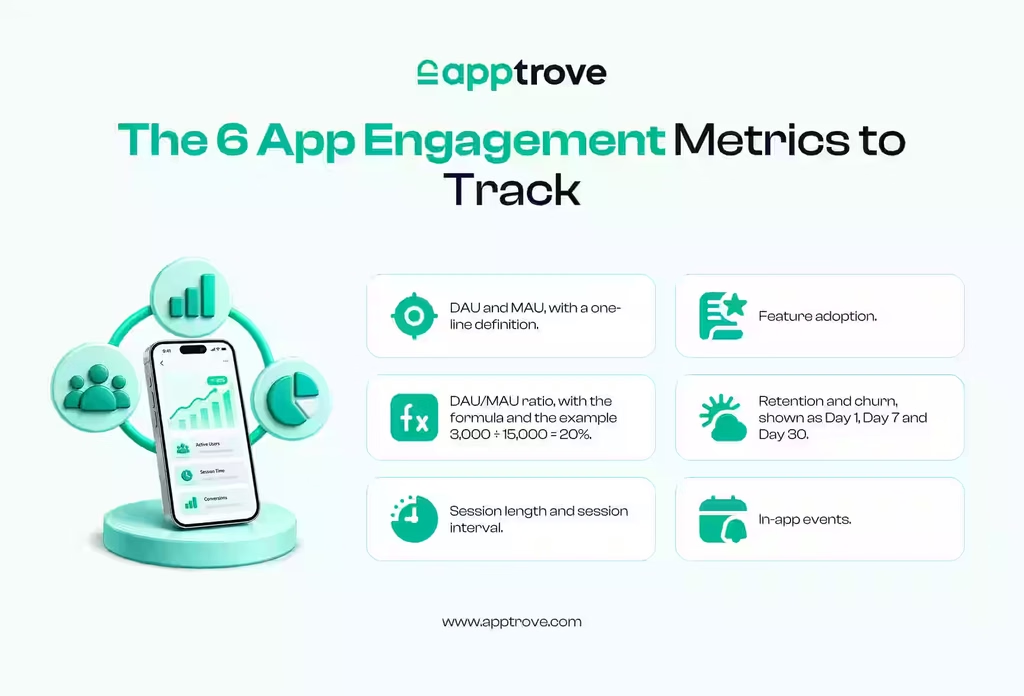
App Engagement Metrics to Track
The right app engagement metrics depend on what your app does, but most teams begin with the ones below.
Daily and Monthly Active Users
Daily active users (DAU) represent the number of users who are active in a 24-hour period, and monthly active users (MAU) refer to the number of users active over 30 days. Together, they indicate the direction of the movement of your base and how large it is.
DAU/MAU Ratio (Stickiness)
To find out what percentage of your monthly users are on an average day, divide DAU by MAU. For an app with 3,000 DAU and 15,000 MAU, the ratio is 20% (meaning that the average monthly user is active, on average, six days out of thirty). The generally accepted healthy figure is close to 20% for general apps. The aim of messaging and social apps is generally much higher, as are apps that are launched occasionally by users of utilities, so benchmark yourself against apps in your own category.
Session Length and Session Interval
The length of a visit is called session length and the length between visits is called session interval. Neither on their own is of any great significance. If someone spends a long time in a shopping app, it may be a sign of a happy customer, or perhaps it may mean they simply aren’t able to locate the checkout button. Read both at the conversion events and drop-off points.
Screen Views and Feature Adoption
These help you understand how your app is being used and how it isn’t. You don’t want to find out that a feature that was worked on for many months is rarely used before the next sprint.
Retention Rate and Churn Rate
Retention Rate is the percentage of the installer cohort that is still active on Day 1, Day 7, Day 30 and beyond. The other side of the coin is churn, or the share that has quit using the app. Review both by cohort, rather than overall, to determine if improvements are positive due to the onboarding change last month.
In-App Events and Conversions
Custom in-app events like added to cart, finished tutorial or invited a friend make it possible to convert abstract activity into action you can measure. In Apptrove, every custom event that you create will have an Event ID, and attribution events will be tracked automatically when the SDK is implemented, allowing each action to be traced back to the campaign and channel that drove the user to your site.
Why App Engagement Matters
User engagement leads to a higher retention rate. They also spend more over time, lowering acquisition cost and increasing lifetime value, as well as the fact that they share the benefit of their appreciation of the app with others. Their activity also provides learnings for product and marketing teams.
The exact opposite is also true. Money is also spent on installs that are never converted to active users, and these also count towards your CPI – the actual cost of each engaged user is therefore greater than the dashboard shows. Mobile attribution is all about connecting spend with post-install behaviour, and it allows you to measure channels by engaged users rather than raw installs.
How to Increase App Engagement: 7 Strategies That Work
These seven steps follow the user journey from the first open to the point where a lapsed user comes back. Each one works better when you can measure its effect, so the loop shown below is worth keeping in mind as you read.
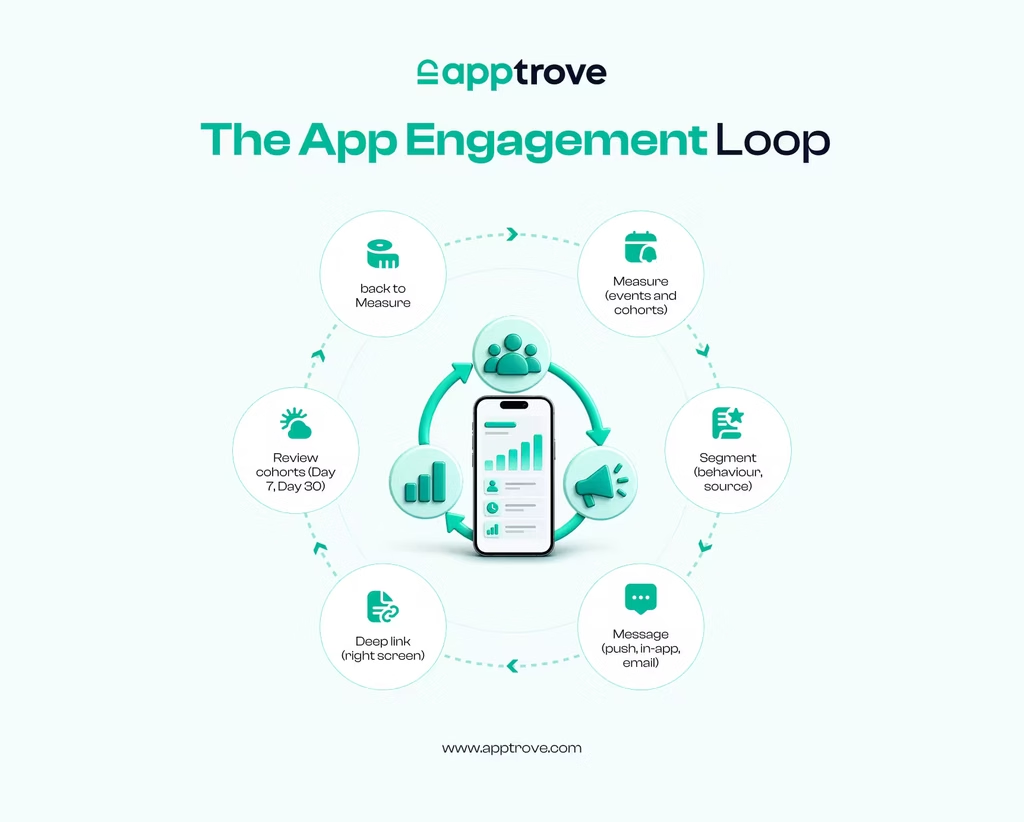
1. Get Users to Their First Win Quickly
The first impression counts for all that comes after. Don’t ask for too much up front. Don’t ask for an explanation before people are able to take a look, ask for permissions when they are needed, and explain what the app can do for them in the first screens. After that, check the funnel and find the place where the majority of people drop off. Using the in-app events above, you can track the time from install to first key action – an excellent metric to display on a dashboard.
2. Segment Users and Personalize
As a general rule, generic messages are unread. Segment users according to behaviour, geography, device, or acquisition source and write for each segment. These are the needs of a first-week user, a lapsed user, and a paying subscriber. Apptrove can be used to create audiences based on attribution and event data, and the integration with Google Ads allows you to send events to Google Ads and create remarketing audience lists in Google Ads.
3. Use Push Notifications With Restraint
Push notifications can bring someone back within minutes, and they can also trigger an uninstall when they feel like noise. Before sending one, ask if it provides the person with something useful now, like an order update, a drop in price on an item they viewed, a streak about to expire, and so on. Reduce the amount of communication, time it for when each segment is more likely to be reading, and monitor the actions taken after the tap – not just open. If you want a bigger picture of how push works in the context of the other channels, follow our guide to the mobile marketing mix.
4. Add In-App Messages for Context
In-app messages are ones sent to people who are already in your app, making them ideal for introducing a new feature, explaining a new update or providing assistance when users are stuck in a particular part of your app. These messages are more specific than a push notification and less intrusive since the person is already there.
5. Send Every Message to the Right Screen With Deep Linking
If the message isn’t well-written and ends up on the home screen, then the effort behind it is wasted. Deep link – directly redirects the user to the appropriate product, level, or offer. For users who have the app, Apptrove offers direct deep linking; for users who have not yet installed the app, it offers deferred deep linking, which means that the context doesn’t get lost on the journey through the app store. It is possible to dynamically link each campaign/partner and track which links result in real in-app activity.
6. Bring Lapsed Users Back With Re-Engagement Campaigns
Determine what constitutes “lapsed” for your app. 7 days without an open may be considered a red flag for a news app, but it may be a normal number of days for a travel app. Connect with those users on channels that are right for them, like email, push or retargeting ads; provide them with something that is relevant to what they were previously doing in the app and connect them to the appropriate screen. Reattribution provides visibility into which re-engagement campaigns drove users back to the app in Apptrove.
7. Test, Read the Cohorts and Repeat
Make a single change at a time. Take a note on the cohort that had your new onboarding and compare it with the other cohort – the one that has not had your new onboarding – and make a judgment based on the behaviours on Day 7 and Day 30. This is a routine rather than a quarterly project with cohort analysis, custom reports and real-time dashboards.
Common App Engagement Mistakes
- Treating time in app as always good. Long sessions can signal confusion. Check them against conversions.
- Sending too many notifications. Frequency without relevance is a common reason for opt-outs and uninstalls.
- Trusting averages. A blended retention number hides which channels and cohorts are doing well.
- Counting low-quality installs. Fraudulent or incentivized traffic inflates installs and drags engagement figures down. Apptrove’s layered fraud settings can be set per campaign, network partner and channel so your reports reflect real users.
How Apptrove Helps You Improve App Engagement
Apptrove is a mobile measurement partner, which allows measurement of what it brings in and what it brings out. Once the SDK is integrated, installs and campaign events are associated with the campaign, the partner, and the channel that the campaign came from. Then, you can compare channels based on engagement, create segments, and push events to ad platforms for retargeting and deep linking to the appropriate screen. Cohort views, custom reports, and real-time dashboards then present the impact of a change as either Day 7 or Day 30 behaviour. The data from the engagement appears alongside the data from your campaign rather than in a different tool, as Apptrove integrates with 500+ advertising platforms.
Conclusion
You can enhance app engagement by setting the definition of an engaged user for your app, track it in cohorts, and send the appropriate message to the right user on the right screen. Begin with one or two metrics, like DAU/MAU, Day 7 retention, and so on, and focus on solving the largest drop-off in your onboarding process before introducing more channels. For a one-stop solution, try out Apptrove and find out which campaigns retain users: for attribution, events, deep linking.
FAQs
What is app engagement?
App engagement is how often and how deeply users interact with your app after installing it. It includes opens, session length, screens viewed, features used, and in-app actions such as purchases. Higher engagement usually leads to better retention and higher lifetime value.
How do you measure app engagement?
Track DAU, MAU, the DAU/MAU ratio, session length, session interval, feature adoption, retention, and churn. Add custom in-app events for the actions that matter to your business, and analyse them by cohort and by acquisition source instead of as one blended number.
What is a good DAU/MAU ratio for app engagement?
A ratio near 20% is commonly quoted as healthy for general apps, though messaging and social apps usually aim higher and occasional-use apps can sit lower. The most useful comparison is your own cohorts over time and apps in your category.
What is the difference between app engagement and app retention?
Retention measures how many users are still active after a set period. App engagement measures what those users do while they are active. An app can retain users who barely use it, so reviewing both gives a clearer picture.
How can you increase app engagement?
Start with a short onboarding flow, segment users by behaviour, send relevant push notifications and in-app messages, use deep links so messages open the right screen, and run re-engagement campaigns for lapsed users. Test each change against a cohort.
Do push notifications improve app engagement?
They can, when each message is relevant and timed well. Notifications that offer something useful, such as an order update or a reminder tied to user behaviour, tend to bring users back. Over-sending raises the risk of opt-outs and uninstalls.
Which tools help track app engagement?
Most teams combine a mobile measurement partner for attribution, events, deep linking and cohorts with a product analytics tool and a messaging platform. Apptrove covers the measurement layer, so you can see which channels and campaigns produce engaged users.