Attribution configuration is very important for understanding the Blackout Window settings of in-app activity to acquisition partners along with re-engagement activities. Advertisers must manage how long original installations keep their allocation for activity attribution and whether or not further activities related to re-engagement will change that attribution process.
Apptrove’s blackout period works in combination with the installation and activity period for allocation management during a customer’s journey. Advertising agents can understand whether the original acquiring partner continues receiving credit for in-app events or a reengagement campaign receives credit instead.
Apptrove gives advertisers the possibility to set up their configurations on two levels:
1. Per acquisition partner by configuring different attribution windows accordingly in Partner Integration, and
2. Per agency by setting common attribution rules for all partners managed by a selected agency through Agency Integration.
This combination of using blackout period and Install-to-Event attribution settings is effective for unifying attribution strategy while still following different acquisition and re-engagement campaigns.
How to Configure Partner Attribution Windows in Apptrove
Advertisers also have the ability to set up attribution windows for each partner in the Partner Integration area of Apptrove.
To use this feature, it is essential to go to the following link:
- Partner Integration > Select Partner > Attribution Windows
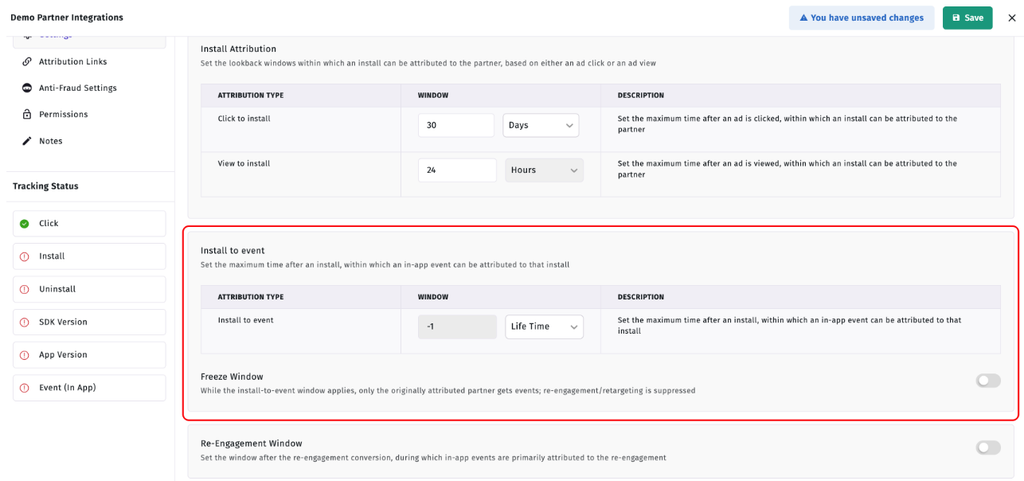
This section encompasses two significant settings such as Install to Event and Attribution Freeze.
1. Set up Install-to-Event Window
The Install-to-Event option indicates how long the actions made by the user will still be considered as being linked to the partner who carried out the initial installation.
Apptrove offers three types of time frame options:
- Hours
- Days
- Lifetime
By default, the value of Install-to-Event Window is Lifetime (-1).
Lifetime Attribution
Lifetime applies to the Install-to-Event format when in this case, all forthcoming actions carried out by the user will still be linked to the first partner.
Thus, the original partner preserves attribution of the actions indefinitely.
Limited Attribution Window (Hours or Days)
Advertisers may also pick a specific window of hours or days duration instead of the Lifetime. In case of a limited window configuration, the events that occur only during the selected window will be associated with the original Install Partner.
Once the Install-to-event window closes, future in-app events will either become organic or become eligible for re-attribution through a subsequent re-engagement campaign, depending on what the re-engagement settings allow for. The blackout window configuration works simultaneously with this duration to determine whether re-engagement attribution may override original acquisition attribution before the Install-to-event window expires.
2. Configure the Attribution Freeze Window
The Attribution Freeze Window decides whether re-engagement campaigns may override original acquisition attributions while the Install-to-event window remains open.
This setting is off by default. Advertisers are free to enable or disable it per their attribution models.
The behavior of blackout windows in both configurations needs to be contextualized for the easier management of acquisition and retargeting attribution.
Freeze Disabled
Attribution Freeze Not Activated
When the Attribution Freeze is not in effect, the initial acquisition partner will still obtain event attribution while the Install-to-Event Window is in effect. In the event of a valid re-engagement event, the following in-app events can be attributed to the re-engagement campaign as per the configuration of the re-engagement rules.
In this case, the qualifying re-engagement campaign may replace the original attribution before the Install-to-Event Window ends.
Freeze Activated
In the event of Attribution Freeze being activated:
- The acquisition partner obtains exclusive access to all events during the Install-to-Event Window.
- Other events occurring during this period cannot be utilized for event attribution.
- Once the Install-to-Event Window comes to its end, the subsequent events can be classified as Organic and used in terms of re-engagement attribution once again.
The blackout window made possible thanks to the Freeze setting, prohibits any re-engagement campaigns from overriding acquisition attribution during the respective time frame. This will make it easier for advertisers to preserve acquisition attribution credits for the original acquisition partners for certain periods of time.
Recommended Blackout Window Configuration
Most advertisers are advised by Apptrove to use the following setup:
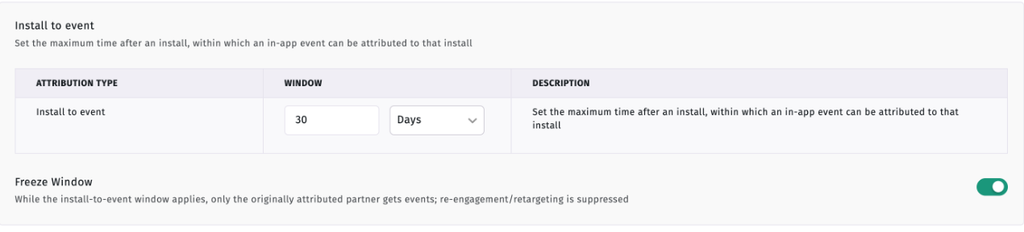
- Install-to-Event Window = 30 Days
- Attribution Freeze = On
This combination creates a period during which the first acquisition partner has dedicated attribution on users’ in-app activities.
With this setup:
- The first acquisition partner receives attribution for all in-app activities that happen in the first 30 days.
- No re-engagement campaigns may override the original attribution during this period.
After 30 days, new activities will be considered Organic, and they may receive attribution from a valid re-engagement campaign. This setup for blackout windows can help achieve a balanced approach to protecting acquisition campaigns, while still enabling long-term retargeting campaigns to receive attribution after this period ends.
How to Set Up Agency Attribution Windows?
Aside from the ability to set specific settings for every partner, Apptrove lets agencies set uniform attribution settings too.
To do this, visit:
- Agency Integration > Select Agency > Permissions
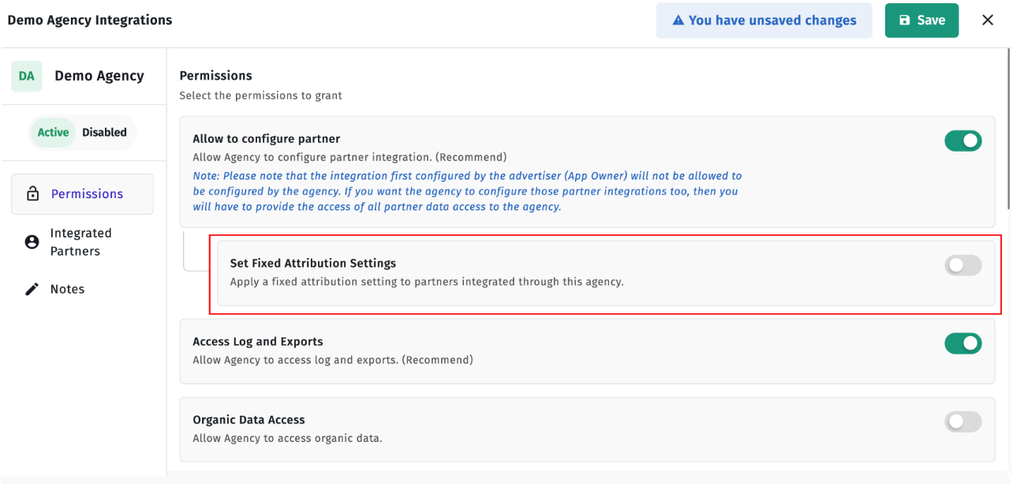
- Find the option called Set Fixed Attribution Settings and switch it on.
- This action will enable a new Attribution Windows tab for the agency.
Setting Up Fixed Attribution Settings
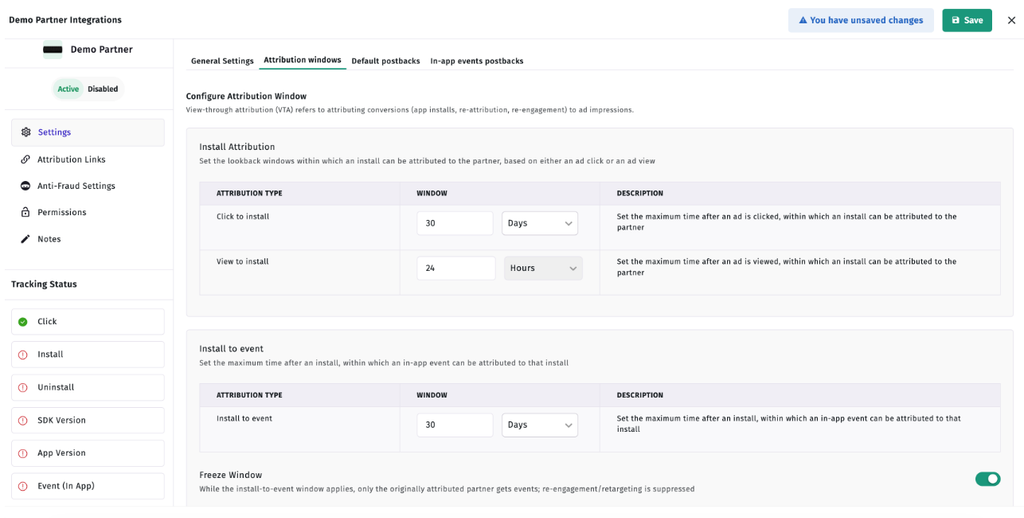
Go to the Attribution Windows tab you have just enabled. This tab allows advertisers to set up multi-dimensional fixed configuration of attribution windows such as its Install-to-Event Window and Attribution Freeze.
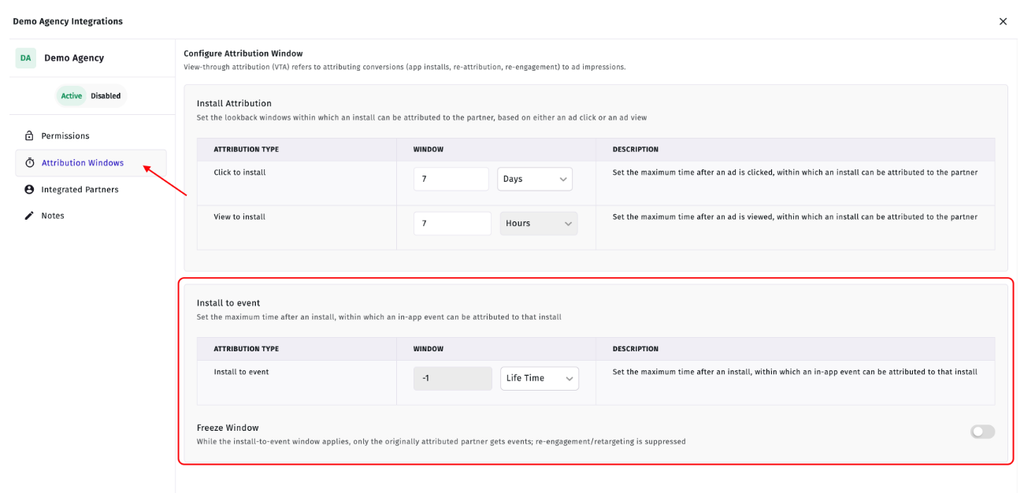
When the settings are activated, Apptrove automatically applies them to all partners of the agency.
Thus, an advertiser can control the blackout window centrally as opposed to setting up the same attribution settings separately for every partner of the agency.
Understanding Blackout Window Through an Example
To understand the meaning of the blackout window, we should take an example from an advertising company.
Suppose that the agency’s advertising company is run under the following settings:
- Install-to-event window: 30 days
Attribution freeze: active
It means that the following series of events can follow.
Day 0: first installation
Some user has downloaded the application by means of partner A. Thus, the installation will be attributed to partner A for 30 days.
Day 10: re-engagement campaign
The same user has clicked the advertisement. Since the attribution freeze is on, the re-engagement won’t be able to substitute the acquisition attribution.
Day 25: in-app purchases
The user buys something within the app. All of these activities were carried out under the install-to-event window.
Day 40: New Re-engagement Activity
A user has begun participation in yet another re-engagement campaign. All in-app events that occur thereafter will qualify for attribution under the relevant re-engagement campaign because their original attribution window has expired. In such cases, the agency will take accountability for the given events.
This example illustrates the way the blackout window preserves the attribution of the original acquisition for 30 days while still allowing new re-engagement campaigns to obtain the required attribution once the blackout window period has finished.
Conclusion
Setting up the blackout window and the install-to-event attribution settings within Apptrove will enable advertisers to exercise control over how credit for in-app events is given to their acquisition and re-engagement campaigns.
Whereas the Install-to-Event Window determines how long a particular original acquisition partner can retain event attribution, the Attribution Freeze setting governs whether re-engagement campaigns can take over that attribution during the active period.
Advertisers can set these configurations individually for partners or set universal attribution rules for all under an agency.
Retaining the 30-day Install-to-Event Window along with the Attribution Freeze setting, as recommended, allows advertisers to provide protection against the initial recruitment attribution while letting re-engagement campaigns get credit afterward for the initiative.