
What is a Device Id?
A Device ID is a distinctive identifier attached to your device, such as a cell phone, tablet, or smart television. Just like a name tag, it allows your applications to identify, measure and control a variety of interactions with that particular device.
The unique IDs included in every device allow devices to be distinguished from other similar devices and help drive analytic capabilities, performance measurements and provide required functionality for your application without using any of your personal information, such as your name or email address directly.
Today’s mobile ecosystem makes use of this to assist with tracking users across multiple devices through the development of platform patterns that show how users are using their devices (phones, tablets, etc.) and to protect user privacy.
Examples of device types to support ID tracking on different devices are:
- IMEI – Utilized for devices with SIM cards
2. Android Device ID – Created by the Android OS
3. Google Services Framework ID
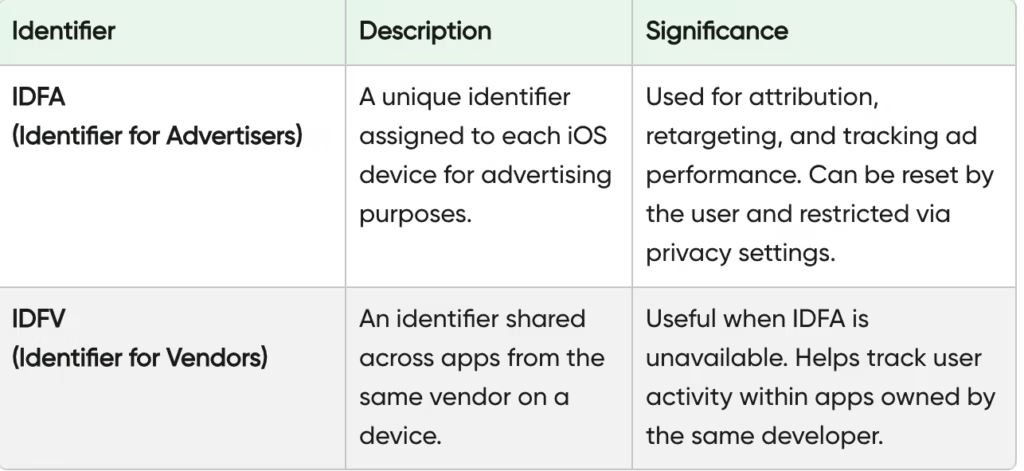
4. Advertising ID is referred to as Mobile Advertising ID – Used for advertisement personalization and targeted advertising.
While some permanent IDs cannot be reset or deleted, several IDs can be reset, thereby giving users greater control through privacy settings and opt-out capabilities that are becoming common in the digital space today, amid growing privacy concerns.
Why is the Device ID Important?
Below are some of the ways this ID is helpful:
- App Personalization: Apps remember preferences and experiences using device-based signals, supporting behavioral analytics without directly revealing identities.
- Security: Device-level signals help detect suspicious activity and improve data security, especially when paired with data encryption and data minimization practices.
- Licensing: Paid apps and subscriptions rely on device verification to prevent misuse and unauthorized data sharing.
- App Support & Debugging: Support teams often request an ID to diagnose issues within mobile analytics systems.
- Gaming & Progress Tracking: Games without accounts use Device IDs for progress tracking and user profiling—a common pattern in mobile gaming ecosystems.
How to Check Device ID?
Dealing with this question is common, so how do we check the device ID?
There are a few different ways to check the ID, especially when using an Android phone. Here are the most common and easiest ways:
Method 1: Through Phone Settings
- Open Settings
- Go to About Phone / About Device
- Look for IMEI, Serial Number, or Android Device ID
This approach aligns with transparency expectations found in most modern privacy policies.
Method 2: By Using a Device ID APK
A Device ID APK is a special application to help you locate the ID in seconds.
- Go to the Google Play Store.
- Search for Device ID APK.
- Install one that looks trustworthy, such as “Device ID by Evozi.”
You’ll see Android ID, IMEI, Advertising ID, and more—commonly used in app analytics and tracking technologies.
This is pretty simple and fast! A great option for window shoppers.
Method 3: Through a Special Dial Code
For some phones, you can use a dial code that will show you the ID:
- Open your phone’s Phone app
- Type either designated number to find the ID for instance.
- Your IMEI or some other IDs should show up immediately.
So the next time you’re Googling around, “how to check mobile device ID” consider using one of the three ways above!
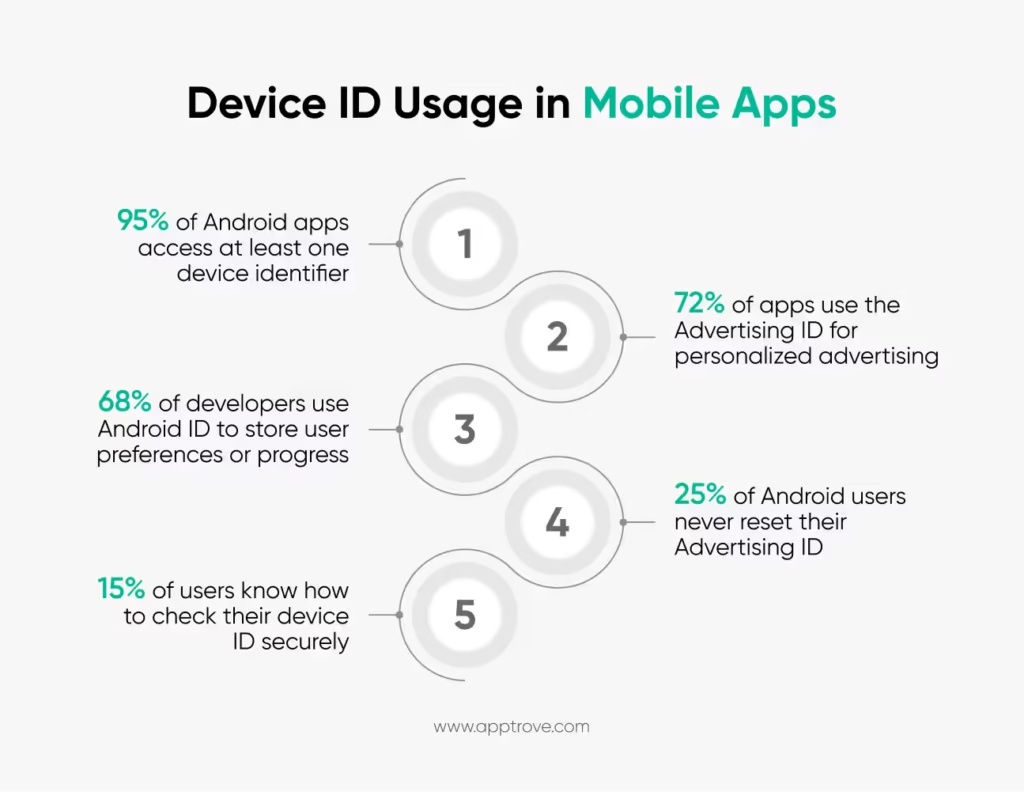
What is an Android Device ID?
It is generated when you first set up your phone and generally remains consistent unless you perform a factory reset.
It’s widely used by apps for device recognition, testing, and behavioral targeting—but with fewer risks than hardware-based identifiers. Developers often rely on it during debugging, testing, and performance analysis alongside third-party SDKs.
You commonly see quotes such as:
- “The app didn’t recognize my Android Device ID.” or,
- “Use an app to locate your Android Device ID while debugging.”
This ID is especially helpful to you if you are a gamer or an app user, and you install and test lots of apps.
What is Device ID APK?
A Device ID APK is simply an Android application that shows you the IDs of your device. These apps are great if you don’t understand how to go into the settings of your phone, or you simply don’t want to look.
These apps provide multiple IDs at one time:
- Android Device ID
- Google Advertising ID
- IMEI
- Serial Number
These apps are particularly useful for developers, testers, and users managing app permissions or reviewing how identifiers are used in mobile analytics workflows.
When Should You Use a Device ID APK?
You may wish to check your ID if:
- You are contacting support for an app or game.
- You are switching app data from one device to another.
- You are a developer and you want to test features.
- You’re working with device-based licenses or data collection audits.
Your faster option is to use a Device ID APK instead of guessing or trying to find it on your own.
Security and Privacy: Is Sharing Device ID Safe?
Your ID isn’t as sensitive as your password, but it is private. It’s OK to share with trusted app developers or when you need to contact support, but don’t post it on the internet or send it to random websites.
Here’s why you wouldn’t want to do that:
- Some apps may use this ID to track you across other apps
- If someone gains access to your IMEI, they could clone your phone’s identity (although rare).
To keep you safe:
- Only use trusted apps to look up your device ID
- Never root your phone unless you know what you are doing
- Don’t download any APKs for the ID from unknown sources.
Modern apps increasingly rely on consent management and consent management platforms to ensure tracking transparency and compliance with evolving laws.
Regulatory & Compliance Considerations
The usage of this ID is governed by strict regulations globally:
- GDPR compliance requires clear consent and purpose limitation
- CCPA and CCPA compliance mandate disclosure and user rights
- Businesses must ensure regulatory compliance, especially when handling identifiers tied to third-party cookies or persistent tracking
Many platforms now emphasize tracking transparency, limit user profiling, and offer clear opt-out paths for advertising ID usage.
Pros and Cons of the ID
Here is a summary:
Pros
- Enables app recognition and continuity
- Supports personalization and analytics
- Enhances fraud prevention
- Simplifies technical support
Cons
- Can contribute to invasive tracking if misused
- Some identifiers are hard to reset
- Raises legitimate privacy concerns if improperly managed
Final Thoughts
Understanding Device IDs puts you ahead in today’s privacy-first mobile world. While an ID may look like a random string, it powers everything from app analytics to security and ad personalization.
Quick recap:
- This ID is a digital fingerprint of your device
- It helps apps function better without direct personal data
- You can find it via settings, a Device ID APK, or dial codes
- Responsible use depends on consent, transparency, and data security
Next time someone asks, “How do I check my device ID?”—you’ll not only know the answer, but also understand the privacy implications behind it.
Stay informed, stay protected. Subscribe to our newsletter to keep up with mobile privacy, analytics, and compliance trends.
FAQs
1. What does device ID mean?
Device ID refers to an individual identifier given to your phone that enables applications to recognize, track, and measure user behavior without depending on personal information such as your name or email address.
2. Is the IMEI number the same as the ID?
No. An IMEI number is a hardware identifier for mobile phones with SIM cards, while “Device ID” is a more general term for a variety of software-based identifiers like Android Device ID and Advertising ID.
3. Can my mobile device ID be reset or changed?
Certain identifiers such as Advertising ID can be reset through privacy settings, while other identifiers like IMEI are fixed and cannot be reset.
4. Why do I have to provide my device ID?
Apps utilize the ID for activity tracking and analytics, personalization of experiences through recommendations based on the user’s preferences, verification of user’s identity through security checks, and resolving problems that arise from support calls or debugging error messages.
5. Is it OK for me to give the ID to anybody?
Generally, providing your Device ID to trusted application developers or technical support is reasonable as long as you do not disclose it publicly or to unknown/nontrusted websites.