Choosing the right app name is one of the most important decisions you’ll make before launching your mobile app. Your app name is often the first thing users notice in the App Store or Google Play, and it plays a significant role in App Store Optimization (ASO).
A well-optimized app title not only strengthens your brand identity but also improves discoverability by including relevant keywords in the app name. When users search for apps, Google’s and Apple’s algorithms use your app title as one of the strongest ranking signals.
In this guide, you’ll learn how to name an app, choose the right keywords, avoid common mistakes, and optimize your app title for better visibility and more downloads.
What Is an App Name?
An app name is the official title users see in app stores, search results, advertisements, and on their devices after installation. Beyond branding, the app name helps app store algorithms understand what your application offers.
An effective app name should be memorable, descriptive, easy to pronounce, and include relevant keywords whenever appropriate.
How Does an App Name Affect App Store Rankings?
App stores use metadata to determine where your app appears in search results. Since the app title carries significant ranking weight, including relevant app name keywords can improve discoverability without compromising readability.
A clear and descriptive app name also improves click-through rates because users immediately understand the app’s purpose.
Google Play Store Optimization and Ranking Factors
To determine what your app is about, Google Play’s algorithm searches your app’s metadata for certain terms. To help Google determine where your app should appear in search results, these terms—also known as keywords, must highlight the major elements of your app. The most significant factor affecting Google Play app store optimization, or Google Play ASO, will be the keywords you include in your app’s title.
You can ensure that your app will show up in pertinent Google Play searches by doing this. This implies that your chances are higher when your potential users are browsing for apps and mobile games similar to yours.
- What area does the algorithm search for keywords in?
- App Name
- Full Description
- Short Description
- Examining apps
How Does the Title of Your App Affect App Rankings in ASO?
You must be aware that, unlike iOS, Google Play does not provide developers access to a Keyword Field when discussing Android apps. The most significant keywords are therefore filtered out of the title by the algorithm, and the lower in the title the keywords are placed, the less relevant they are. Short version: Your app title should contain your most crucial keywords.
The aim is to highlight your brand identity and the most salient features in your app title. However, pay close attention because your potential clients will find you through the app title, which still needs to make sense.
Potential consumers will form an opinion of your app based on the title and icon of your app and, hopefully, determine whether to visit the app page.
Keep in mind that the more people who visit your app page, the more relevant Google Play will find you to be. In addition, your app ranks improve the more relevant you are. But if a lot of people visit your app page but don’t download it, it suggests your app metadata has to be updated.
Therefore, always keep in mind that your App Title must coincide with the details shared in the remainder of your app store listing.
Best Practices for How to Name an App in 2026
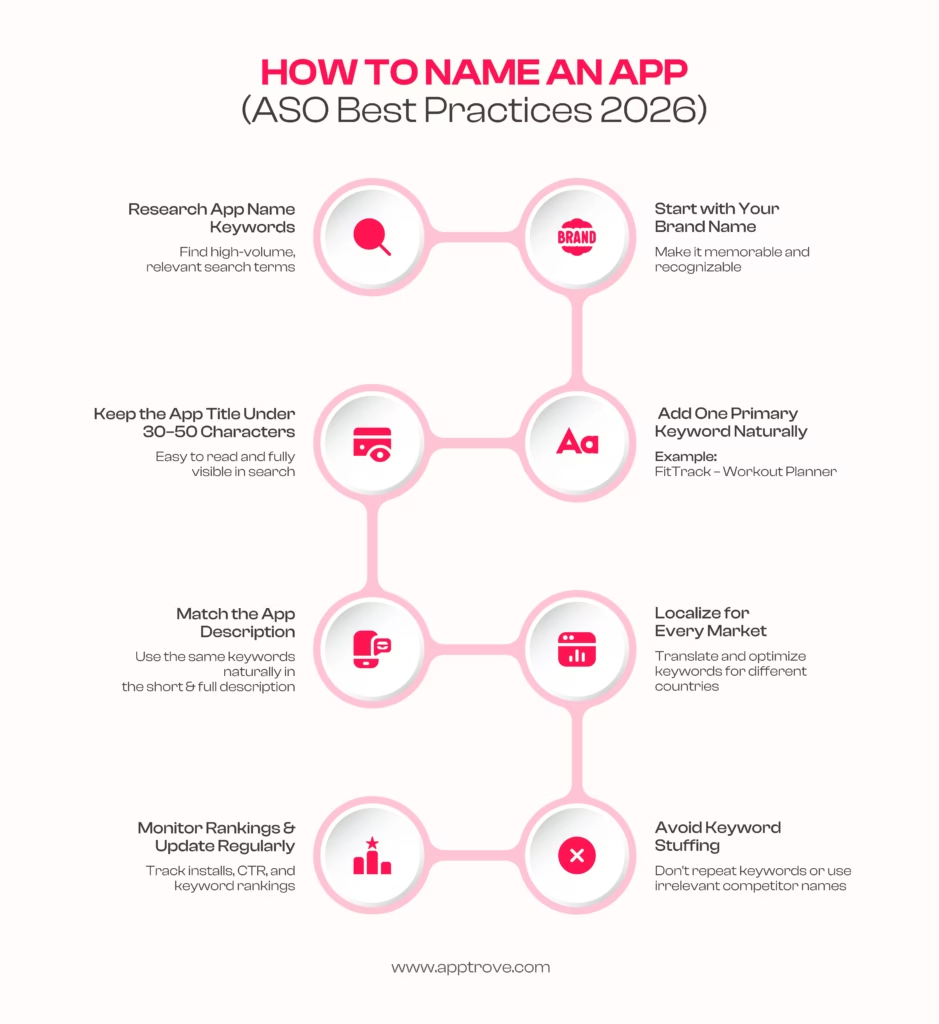
1. Select and include your primary keywords in the app title.
To make a strong first impression and stand out in the search results, you have 50 characters.
You should explain the purpose of your app there. You still need the app title to make sense, so avoid stuffing this box with meaningless keywords. Use your 50 characters to good effect.
Why it matters:
Primary keywords help search algorithms understand your app while making it easier for users to discover your product through relevant searches.
2. App description and app title keywords
In contrast to iOS, you should use your primary keywords repeatedly in the app description. Avoid cramming your content with keywords at all costs because it could harm your search engine rankings. Make sure to repeat keywords in the metadata between three and eight times. Keep in mind that the keywords you use in the title and brief description will be more relevant than those you use in the app description.
Best Practice:
Write naturally. Keywords should support readability rather than overwhelm it. Keyword stuffing can negatively affect user experience and ASO performance.
3. Localize the App’s Name
Always take the effort to translate your app’s title and metadata if you are selling it through several marketplaces. They will be more likely to visit the app page if they find an app title in their native language among the search results. Keep in mind that localization is different from translation. You can use App Radar to uncover relevant keywords for various markets in your category field.
Consider cultural preferences, local search behaviour, and regional spelling differences when localising your app name. Translation alone is rarely enough to maximise visibility.
4. Brand names
Avoid using trademarks that are not yours in the title of your app. This may disrupt Google’s algorithm, which will hurt your rankings.
A strong brand name builds recognition over time, but combining it with descriptive keywords often improves discoverability for newer apps.
5. Synonyms
Avoid using synonyms in the app’s name. Find out which long- and short-tail keywords are most popular and easiest to rank for. Use them on the title after that. In the brief description, which is the second location the Google algorithm will check for keywords, you can utilize the synonyms directly.
Instead of using multiple similar words, focus on the highest-volume keywords supported by keyword research tools and naturally integrate them into your metadata.
Common Mistakes When Naming an App
Avoid these common mistakes:
- Choosing a name that’s too generic
- Keyword stuffing
- Using trademarked brand names
- Ignoring localisation
- Making the app name difficult to pronounce
- Using unnecessary symbols or special characters
- Frequently changing the app name
How to Choose App Name Keywords
Selecting the right app name keywords requires balancing search volume, relevance, and competition.
When researching keywords, consider:
- Search intent
- Competitor app titles
- Long-tail keywords
- Regional search trends
- Brand relevance
The best keywords describe your app while matching how users actually search.
Conclusion
Your app name influences far more than branding. It affects discoverability, click-through rates, and App Store Optimization performance. Choosing an app name that balances branding with relevant app name keywords can significantly improve visibility in search results while helping users immediately understand your product.
Rather than chasing keywords alone, focus on creating a memorable, descriptive title supported by strong metadata, localisation, and continuous ASO optimisation.
FAQs
How do I name an app?
Choose a name that is memorable, descriptive, relevant to your product, and includes important keywords where appropriate.
Do app name keywords improve ASO?
Yes. App titles remain one of the strongest ranking factors in both Google Play and Apple’s App Store.
Should my app name include keywords?
Including relevant keywords naturally can improve discoverability without sacrificing readability.
How long should an app name be?
Keep your app name concise while leaving room for important keywords. Follow each app store’s character limits.
Can I change my app name later?
Yes, but frequent changes may affect brand recognition and App Store Optimization performance.
What should I avoid when naming an app?
Avoid keyword stuffing, trademark violations, confusing names, and unnecessary symbols.