
Deep Links: The Complete Guide to What They Are, How They Work, and Why They Matter for Mobile Growth
Mobile apps have become a mainstream, trusted medium for delivering content and services. Grand View Research states that the global app market will cross $567 billion by 2030.
Despite this growth, 25% of users engage with an app only once before abandoning it. This can lead to significant revenue loss, impacting overall profitability.
One of the leading causes of churn rate is poor user experience, often stemming from ineffective linking strategies.
Traditional linking methods can frustrate users by directing them to generic landing pages, complicating their user journey. Besides, it becomes challenging for marketers to track and attribute conversions accurately.
Deep linking addresses these issues by directing users to specific app content directly from marketing campaigns.
In this post, we’ll look at what is a deep link means, it’s types, how it contrasts with traditional methods, explore Apptrove’s Unilink, and review the best practices to optimize mobile tracking.
What Is a Deep Link?
A deep link is a URL that sends a user directly to a specific screen, piece of content, or action inside a mobile app, rather than to the app’s home screen or a generic webpage.
The “deep” part refers to going deeper than the surface. Not just opening the app. Opening it to exactly the right place.
Think about how a normal web link works. If someone sends you a link to a specific article, you land on that article. Not the website’s homepage. The specific article. That’s standard web behaviour.
Mobile apps didn’t work that way for a long time. Tapping a link would either open the app’s home screen or, if the app wasn’t installed, do nothing useful at all.
Deep links fixed that.
Now, a user who taps an ad for a specific product lands on that product’s page inside the app. A user who receives a push notification about an abandoned cart lands on the cart. A user who clicks a referral link from a friend lands on the same screen that friend was looking at.
The user journey becomes continuous and contextual instead of fragmented and frustrating.
Why Deep Linking Actually Matters (This Isn’t Just a Technical Detail)
Before getting into types and mechanics, it’s worth being direct about the commercial stakes.
Deep linking isn’t a feature. It’s a conversion lever.
Think of it this way: The ad makes a promise. The click sets an expectation. The landing decides everything.
A user who tapped “50% off running shoes” expected shoes. They expected the specific product they were shown. They tapped with intent. And then the landing page either honored that intent or destroyed it.
One extra step between click and checkout can end the journey. Not because the user is impatient. Because they’re on a phone with a hundred other things pulling their attention, and you just made them work for something they’d already decided to pursue.
The best ad in the world can’t survive a broken landing.
This is why growth teams that invest in creative and targeting but neglect deep linking consistently underperform on conversion. The measurement might not show it clearly because the attribution still fires at the install. But the user never completed the action the ad was designed to produce.
Deep links are where campaign performance and user experience intersect. Getting them right isn’t optional if you’re serious about mobile growth.
The Three Types of Deep Links
Not all deep links work the same way. The type you need depends on who the user is and where they’re coming from.
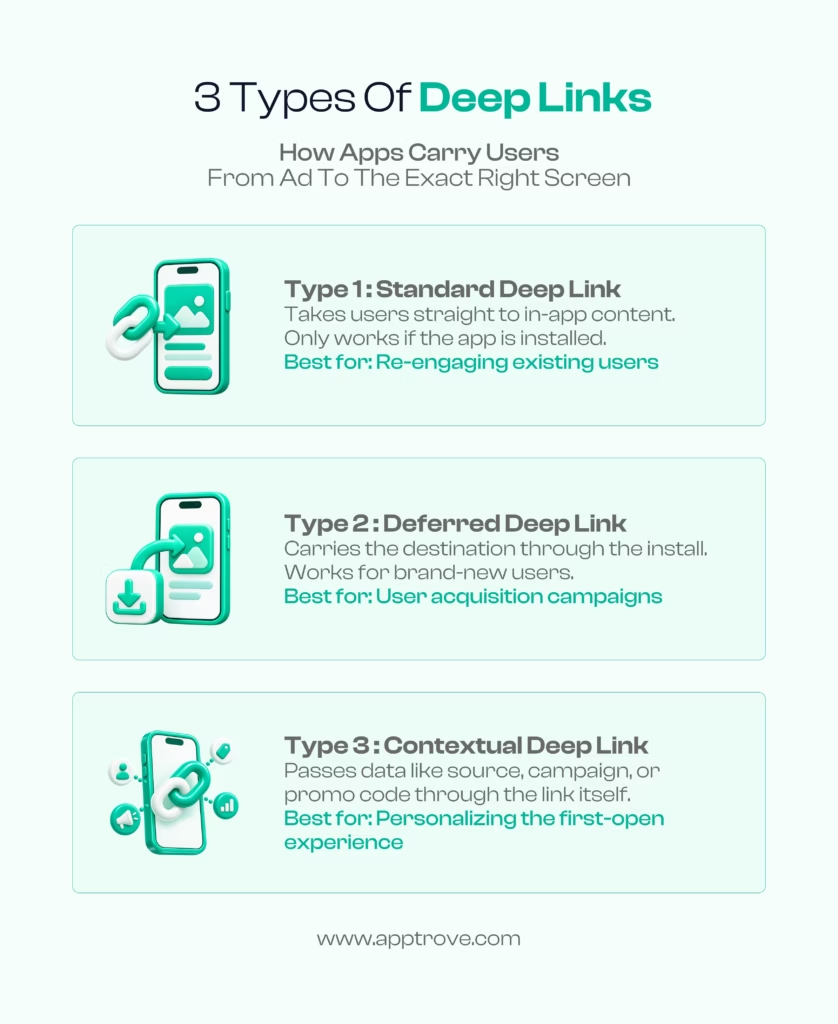
Type 1: Standard Deep Links
A standard deep link, sometimes called a basic deep link or URI scheme link, takes a user with the app already installed directly to a specific screen inside the app.
How it works: The link contains a URI scheme that the operating system recognises as belonging to your app. When the user taps it, the OS opens the app and routes them to the specified screen.
The limitation: It only works if the app is installed. If the app isn’t on the user’s device, a standard deep link typically throws an error or does nothing. The user sees a broken experience and the journey ends.
Best for: Re-engaging existing users. Push notification campaigns, email campaigns to your user base, SMS messages, in-app sharing between users. Any context where you know the recipient already has your app.
Real example: A push notification saying “Your order just shipped” with a deep link that opens directly to the order tracking screen. Clean, direct, useful.
Type 2: Deferred Deep Links
Deferred deep links solve the problem standard deep links can’t. What happens when the user doesn’t have the app installed?
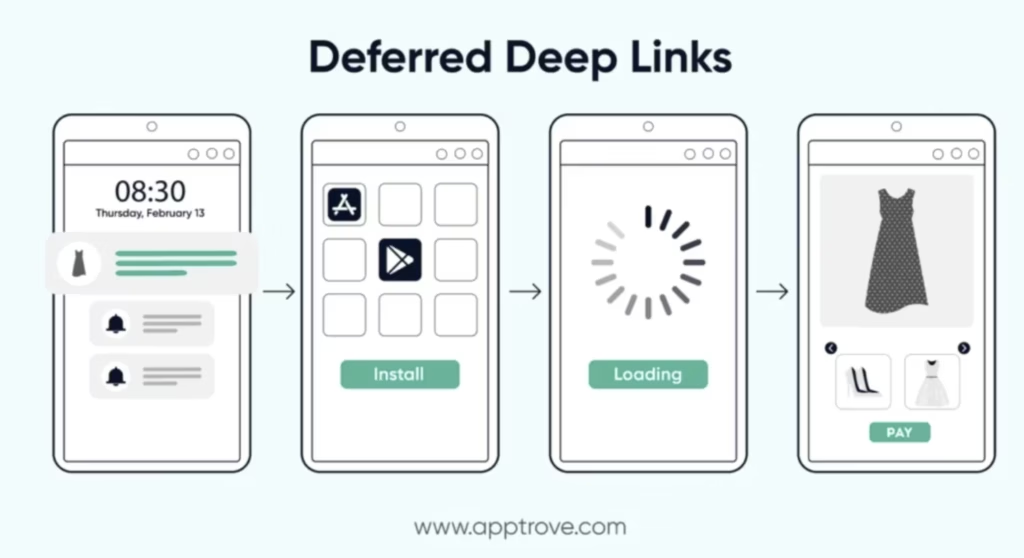
How it works: A user clicks a link, say from an ad or a social post. They don’t have the app. Normally, the journey would end there. With a deferred deep link, the destination information is stored. The user is sent to the App Store or Play Store to install the app. Once they open the app for the first time, the deferred link fires, and the user lands on the exact screen the original link was pointing to.
Installation happens. Loading happens. And then: product page. The specific dress they saw in the ad. The exact offer that prompted the click.
The commercial significance: Acquisition campaigns don’t just need to drive installs. They need to deliver users to relevant experiences. A user who installs an app and lands on a generic home screen is a much harder conversion than a user who installs and immediately sees the product or offer that made them tap in the first place.
Deferred deep linking preserves intent across the installation gap. That intent is the most valuable thing you have. Don’t let the install process destroy it.
Best for: User acquisition campaigns. Influencer campaigns where new users are the audience. Any campaign where a significant portion of the audience might not have the app yet.
Type 3: Contextual Deep Links
Contextual deep links carry additional information beyond just the destination. They pass data like campaign source, user segment, promo code, or referral attribution through the link itself.
How it works: The link is built with parameters encoding the relevant context. When the user opens the app, that context is available to personalise the experience. The app knows where the user came from, what campaign they responded to, which friend referred them, or what offer was shown.
Why this is powerful: Personalisation at the first open dramatically changes the new user experience. Instead of a generic onboarding flow, a user from a referral campaign can see “Welcome, your friend gave you 20% off.” A user from a specific influencer campaign can see content relevant to that influencer’s audience. A user from a loyalty campaign can have their points automatically credited.
Best for: Referral programs, where showing the referring friend’s name or the specific reward improves conversion dramatically. Influencer campaigns, where landing users in contextually relevant experiences performs better than generic onboarding. Any campaign where personalisation at first open is commercially meaningful.
Standard Deep Links vs. Deferred Deep Links vs. Traditional Links
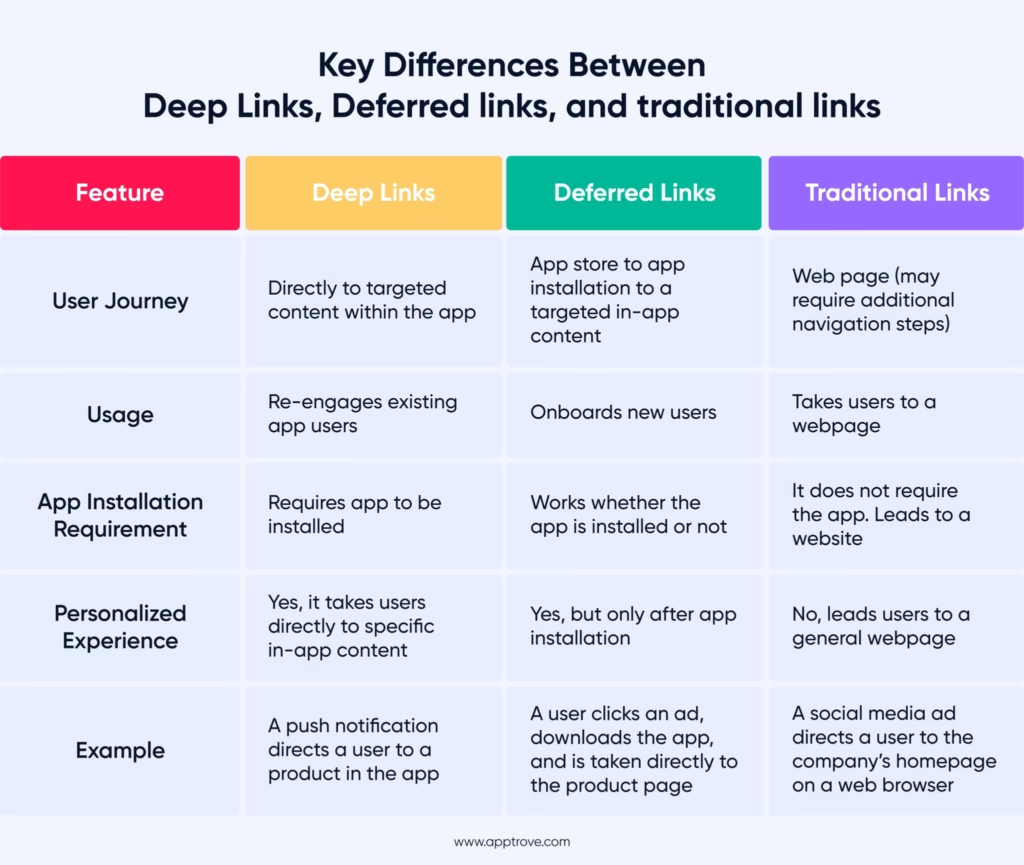
It’s worth making the comparison explicit because these three things are frequently confused.
Traditional links take users to a webpage. No app required. No personalisation possible. The user experience ends at a browser. Useful for general awareness and web traffic, but entirely disconnected from the app experience you’ve invested in building.
Standard deep links take existing app users directly to specific in-app content. Require the app to be installed. No fallback for new users. Best for existing user re-engagement.
Deferred deep links work regardless of whether the app is installed. Carry the destination through the installation process. Land new users in the right place on first open. Best for acquisition campaigns.
The fundamental difference: traditional links ignore your app. Standard deep links require your app. Deferred deep links bridge the gap between discovery and installation without losing the user’s original intent.
For a mobile-first business, the relevant question isn’t whether to use deep links. It’s which type to use for which use case.
What Deep Linking Does to the User Journey
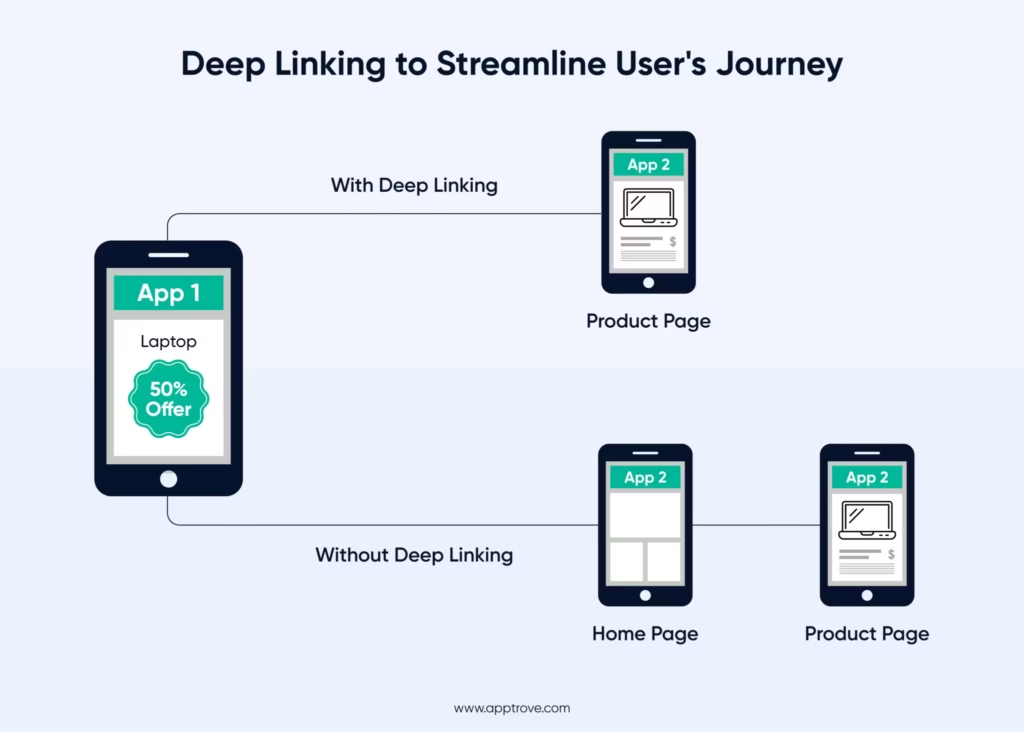
The visual makes it clear.
Without deep linking: user sees an ad for a laptop at 50% off, taps, opens App 2’s home screen, has to navigate to find the laptop, probably gives up.
With deep linking: user sees the same ad, taps, lands directly on the laptop’s product page in App 2. One step. Zero navigation required.
This isn’t a subtle improvement. The friction difference between these two experiences is the difference between a conversion and an abandoned session.
And friction compounds. Every extra tap, every extra navigation step, every moment where the user has to work to find what they were promised, increases the probability that they leave. Mobile users aren’t patient, not because they’re lazy, but because they have options. Competing apps. Browser searches. Other things to do.
Deep linking removes the moments where those other options start looking more appealing.
The Installation Gap: Why Deferred Deep Linking Changes Acquisition Economics
Here’s a problem that gets underestimated constantly.
A user sees your ad. They’re interested. They tap. They get sent to the App Store to install. The installation process takes thirty seconds to two minutes. Maybe they get distracted. Maybe it takes longer. Maybe they install and then aren’t sure why they did, because they’ve lost the context of what made them tap in the first place.
This is the installation gap. It’s the period between when a user expresses intent and when they can act on it inside your app.
Without deferred deep linking, every new user who comes through a campaign lands in the same place: your generic home screen or onboarding flow. It doesn’t matter what the ad showed them. It doesn’t matter what they clicked on. The context is gone.
With deferred deep linking, the intent survives. The destination the user was heading for is stored, carried through the App Store or Play Store installation, and surfaced when the user first opens the app.
The commercial impact is measurable. Users who land in relevant, contextualised experiences after installing convert to their first in-app action at higher rates than users who land in generic onboarding. The specific product or offer that motivated the install is still there when the app opens. The journey that started with the ad completes inside the app without requiring the user to re-find what they were looking for.
This is particularly significant for high-intent campaigns. If your acquisition campaign is targeting users who searched for a specific product category, landing them on that category rather than a home screen on first open captures the intent your targeting identified. Wasting that intent by delivering users to a generic experience is one of the most common conversion leaks in mobile marketing.
Why an Install Isn’t a Conversion
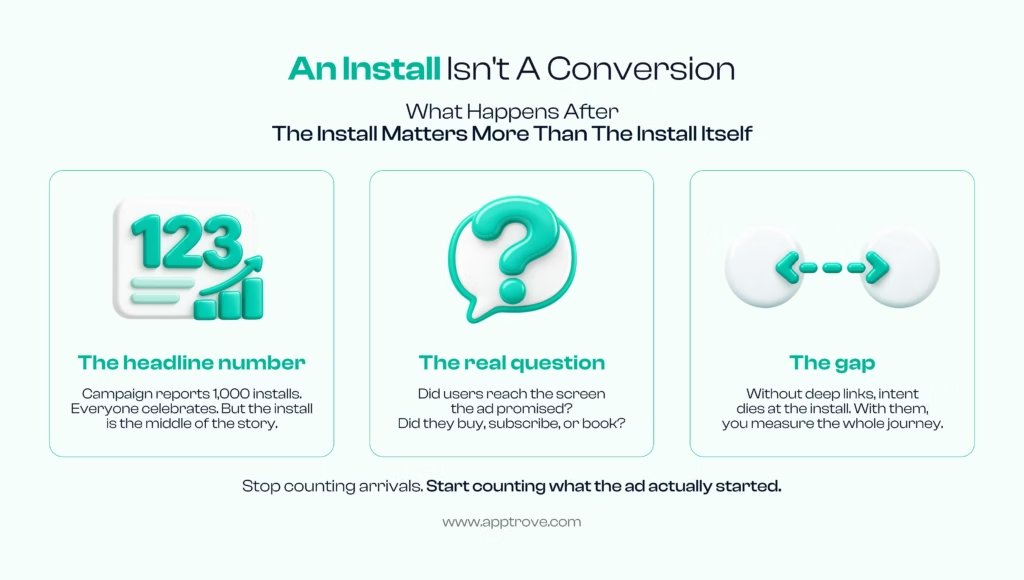
Campaign reports celebrate installs. Dashboard numbers go up. The team celebrates.
But the install is the middle of the story, not the end.
The real question is what happened after. Did the user reach the screen the ad promised? Did they buy, subscribe, or book? Did the experience they found inside the app match what they’d been shown outside it?
Without deep links, intent dies at the install. The user arrived somewhere unfamiliar, disconnected from what brought them there.
With deep links, you measure the whole journey. Not just arrivals. What the arrival actually started.
Stop counting arrivals. Start counting what the ad actually started.
This reframing matters for how growth teams report success. Install volume is a leading indicator. What users do immediately after installing, specifically whether they complete the action the campaign was designed to drive, is the commercial outcome.
Deep links make that measurement possible because they connect the pre-install journey to the post-install experience. The campaign that drove the install, the specific creative, the source, the offer, is connected to what the user does inside the app. That connection is where optimisation happens.
Deep Links and Re-Engagement: The Easiest User to Convert Already Has Your App
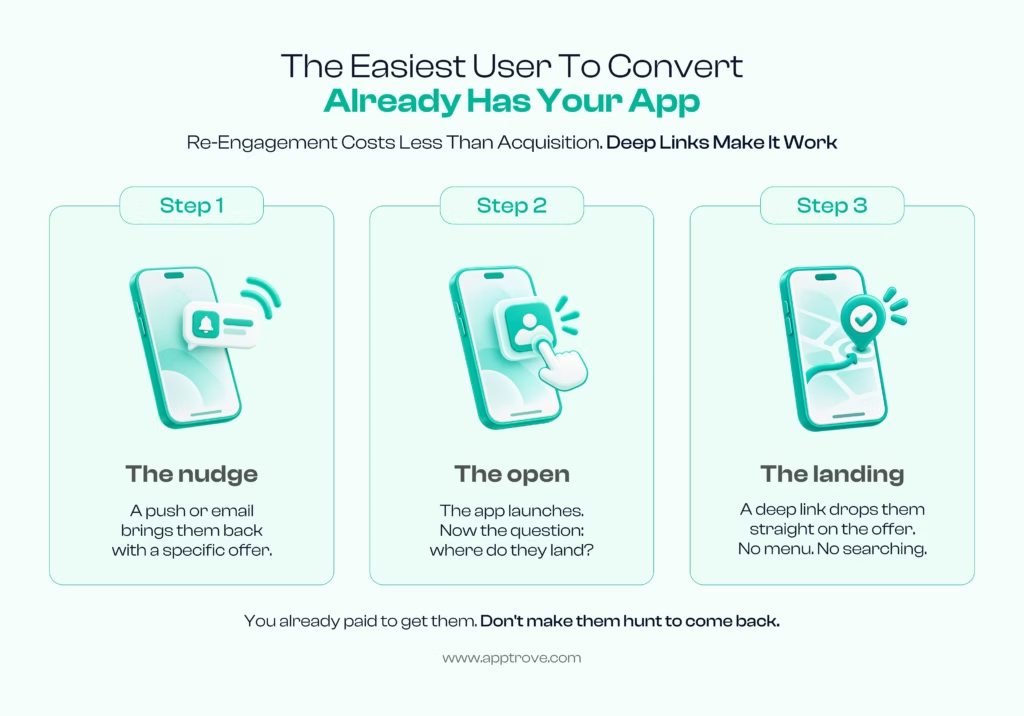
There’s a version of deep linking that gets less attention than acquisition but is often more commercially significant: re-engagement.
Acquiring a new user is expensive. Reactivating a user who already installed your app, who already went through onboarding, who already showed enough interest to download, is considerably cheaper.
The problem is that re-engagement campaigns without deep links are broken by design.
Step 1: A push notification or email brings the user back with a specific offer.
Step 2: The app launches.
Step 3: The user lands on… the home screen. Menu. Search. Now they have to find the offer themselves.
Most don’t. Not because they didn’t want the offer. Because you made them hunt for it after you’d already brought them to the door.
Deep links fix this. The nudge, push or email with a specific offer, lands the user directly on that offer when they open the app. No menu. No searching. The promise made in the notification is honored by the landing.
You already paid to bring them back. Don’t make them work to complete the journey you started.
Re-engagement deep links are particularly high-value for:
- Abandoned cart recovery: user left with items in cart, notification brings them back, deep link lands them on the cart
- Price drop alerts: user wishlisted a product, it went on sale, link opens the product page
- Loyalty and rewards: user has points to redeem, notification and link take them directly to redemption
- Feature announcements: user hasn’t tried a new feature, in-app message deep links directly to the feature
In each case, the deep link is doing one specific job: honoring the promise made by the message that brought the user back.
How Deep Linking Works with Attribution
Deep links and attribution are connected in ways that matter for measurement.
When a user comes through a deep link, the link parameters carry information about the source: which campaign, which creative, which partner, which channel. That information flows into your attribution data, connecting the user’s post-install behavior to the specific campaign that drove the install.
Without deep links carrying this context, attribution is incomplete. You know a user installed. You may know from your MMP which campaign to credit for the install. But you don’t have the link between what they were shown, where they landed, and what they did next.
With deep links integrated into your attribution setup, the complete picture is available: the campaign that drove the install, the experience the user landed in, and the actions they took. That chain is what makes campaign optimisation meaningful rather than guesswork.
Apptrove’s deep linking is built into the attribution layer rather than treated as a separate feature. This means the contextual data carried by deep links, campaign source, creative, user segment, referral source, flows directly into attribution reporting. The deep link parameters and the attribution event are connected from the moment the user first opens the app.
This connection matters because it’s what allows you to answer the questions that actually drive decisions: which campaigns deliver users who complete the action the campaign was designed for, and which campaigns deliver installs that go nowhere?
Deep Linking on iOS vs. Android: Platform Differences That Matter
The technical implementation of deep links differs between iOS and Android in ways that affect how they behave.
iOS: Universal Links
Apple’s preferred deep linking mechanism for iOS 9 and above. Universal Links are standard HTTPS URLs associated with your app through an Apple-CDN-hosted configuration file. When a user with your app installed taps a Universal Link, iOS opens the app directly to the specified content. If the app isn’t installed, the link opens in Safari instead.
The advantage: Universal Links work seamlessly across iOS apps and web, and they don’t expose URI scheme information to other apps. The disadvantage: they require careful configuration and the fallback behavior for non-installed users (defaulting to web) requires additional handling for mobile campaigns.
Android: App Links
Android’s equivalent to Universal Links. App Links use HTTP URLs verified against your app, providing a smooth experience for users with the app installed and falling back to a web destination when it isn’t.
URI Schemes (Both Platforms)
Custom URI schemes, like yourapp://product/123, are the older approach that still works on both platforms. They’re simpler to implement but have limitations: they don’t work gracefully when the app isn’t installed, and they can sometimes create ambiguity if multiple apps register the same scheme.
Deferred Deep Linking Requires an MMP
Standard platform deep links don’t handle the installation gap. Getting a user from a link they tapped before installing to the right screen after installing requires infrastructure that carries that destination information through the App Store and Play Store installation process.
This is what Mobile Measurement Partners like Apptrove handle. Apptrove’s deep linking infrastructure manages the session matching and parameter passing that makes deferred deep links work reliably across both platforms, without requiring your engineering team to build and maintain this infrastructure themselves.
Common Deep Linking Problems (and Why They Kill Conversions)
Understanding what can go wrong is as important as understanding how deep links work.
Broken fallbacks: A deep link that works for installed users but shows an error for non-installed users creates a broken experience for a significant portion of your audience. Every campaign reaching new users needs a defined fallback, ideally to the App Store or Play Store, not a generic error.
Incorrect URL schemes: Custom URI scheme mismatches mean the link doesn’t route correctly inside the app. The user sees an error or lands on the wrong screen.
Missing context on first open: A deferred deep link that routes the user to the right screen but doesn’t carry campaign or referral context loses the personalisation potential that was the point of using a contextual deep link in the first place.
Attribution disconnection: Deep links that aren’t integrated with attribution infrastructure create a gap between the link click data and the in-app event data. You know the link was clicked. You don’t know what the user did after.
Platform-specific routing failures: A link built for iOS Universal Links behaves differently on Android. A link that works in a browser behaves differently when tapped from within a social media app’s in-app browser. Testing across platforms and surfaces is essential.
Not actually testing the user journey end-to-end: Teams frequently test that the link opens the right screen for an installed user and consider the implementation done. Testing should cover: installed user, non-installed user, iOS, Android, in-app browsers within social platforms, and the attribution data that flows through each scenario.
Each of these problems sits between the campaign and the conversion. They’re invisible in install numbers. They show up in post-install engagement rates, first-session conversion, and revenue per install.
How Apptrove Handles Deep Linking
Unilink, Apptrove’s deep linking suite, is designed around one principle: the experience the ad promised should be the experience the user gets, regardless of platform, regardless of whether the app is installed, and regardless of which channel the user came from.
For existing users: Standard deep links that route reliably to specific in-app content, with consistent behavior across iOS Universal Links, Android App Links, and custom URI schemes.
For new users: Deferred deep linking that carries destination context through the installation process, landing first-time users in the relevant experience that motivated the install.
For personalised experiences: Contextual deep linking that passes campaign parameters, referral data, promo codes, and user segment information into the first-open experience, enabling personalisation at the moment of highest intent.
Connected to attribution: Deep link parameters flow into Apptrove’s attribution data automatically. The campaign that drove the install, the link that carried the context, and the in-app actions the user took are all connected in the same measurement layer. No gap between link click and post-install behavior.
Across social and third-party surfaces: Deep links from social media apps, email clients, QR codes, and other surfaces behave consistently. Apptrove handles the routing complexity that comes from links being tapped inside in-app browsers and redirected through multiple surfaces before reaching your app.
With fraud protection applied: Apptrove’s fraud detection runs on the attribution data flowing through deep links, which means click injection and other fraud patterns that exploit deep link traffic are caught before they affect your measurement or billing.
FAQs on Deep Links
What is a deep link?
A deep link is a URL that takes a user directly to a specific screen or piece of content inside a mobile app, bypassing the home screen. It works by using URL schemes or verified HTTPS URLs that the operating system recognises as routing to a specific location within a specific app.
What is the difference between a deep link and a regular link?
A regular link takes a user to a webpage. A deep link takes a user to a specific location inside an app. Regular links require a browser. Deep links require the app to be installed (or, in the case of deferred deep links, route the user through installation first).
What are the three types of deep links?
Standard deep links route existing app users directly to in-app content. Deferred deep links carry the destination through an installation and land new users in the right place on first open. Contextual deep links carry additional parameters for personalisation, such as campaign source, referral data, or promo codes.
What is a deferred deep link?
A deferred deep link is a link that stores the intended destination when a user taps it, routes the user to install the app if it isn’t already installed, and then delivers the user to the stored destination when the app opens for the first time. It bridges the gap between pre-install intent and post-install experience.
Why do deep links matter for mobile marketing?
Because the landing experience determines whether the campaign delivers the conversion it was designed for. A user who taps an ad and lands on a home screen is significantly less likely to complete the target action than a user who lands on exactly the product, offer, or content the ad featured. Deep links are the mechanism that makes that precision landing possible.
How do deep links affect attribution?
Deep links carry campaign parameters that connect the pre-install touchpoint to the post-install experience. When deep links are integrated with an MMP like Apptrove, that connection flows through to attribution reporting, allowing marketers to measure not just which campaign drove the install but which campaigns drove users to complete meaningful actions inside the app.
What happens when a user doesn’t have the app installed and clicks a deep link?
A standard deep link either throws an error or opens a web fallback. A deferred deep link routes the user to the App Store or Play Store for installation, then delivers them to the intended destination on first open. Which behavior your campaigns need depends on whether you’re targeting existing users or acquiring new ones.
Do deep links work differently on iOS and Android?
Yes. iOS uses Universal Links (HTTPS URLs verified through Apple’s CDN) and custom URI schemes. Android uses App Links (HTTP URLs verified against your app) and custom URI schemes. The implementation differs but the user-facing behavior, landing in the right place inside the app, is the same. Apptrove handles cross-platform deep linking consistently across both operating systems.