More than three billion people use WhatsApp every day. In most markets, it isn’t just another messaging app sitting alongside ten others. It’s the default. It is the messaging app people open without thinking, the app they use to ask questions, compare options, and make decisions before they ever call anyone or visit a store.
Your customers are already there. Every day. The question isn’t whether WhatsApp is worth being on. It’s whether you’re making it easy enough for people to actually reach you when they want to.
Surprisingly, most businesses aren’t on WhatsApp. Their phone number is buried somewhere on a contact page, maybe a WhatsApp icon that goes nowhere useful, and a whole lot of friction standing between a interested customer and an actual conversation. By the time someone figures out how to reach them, they’ve moved on.
That’s the problem a WhatsApp deep link solves. One tap and the conversation is already open, sometimes with a message pre-filled and ready to send. No number saving, no searching, no steps that give people a reason to give up.
This blog covers what a WhatsApp deep link is, what it looks like, what it means for marketing, and how to build one properly from scratch.
What are WhatsApp Deep Links?
Most people have been in this situation. You see something you’re interested in, you want to ask a quick question, and suddenly you’re copying a phone number, opening WhatsApp, starting a new chat, and by the time you’ve done all of that, the moment has passed. You just move on.
A WhatsApp deep link fixes exactly that. It’s a URL that does all those steps in a single tap. Click it, WhatsApp opens, and a conversation with the right number is already there. No contact saving, no copy-pasting, no unnecessary back and forth.
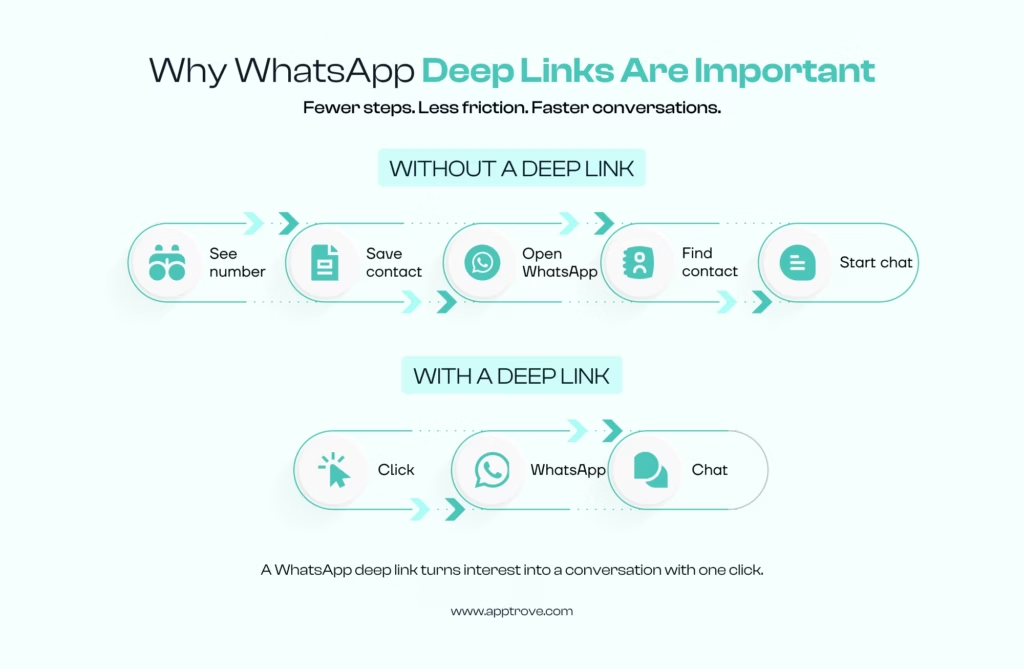
For businesses, that difference between one tap and five steps shows up very clearly in how many people actually follow through:
- Launches WhatsApp directly to a conversation: Not to the app home screen. Not to a search bar. Straight into a chat with the specific number in the link, whether the user is on mobile, desktop, or WhatsApp Web.
- Removes the contact-saving step entirely: This one gets overlooked, but it matters. A surprising number of people drop off right here. The WhatsApp deep link URL handles the connection automatically, so users don’t have to do anything extra.
- Opens the chat with a message already written: This is where it gets genuinely useful. The link can carry a pre-filled message that sits in the text box when WhatsApp opens. Relevant, contextual, ready to send. The user doesn’t need to figure out what to type. They just tap send.
- Works across every channel you’re already using: Same WhatsApp deep link format, completely flexible placement. Paid ads, email campaigns, SMS, QR codes on physical materials, social media bios, website buttons. One link structure, consistent experience everywhere.
How can Businesses Use WhatsApp Deep Links?
The WhatsApp deep link format is flexible enough to work across very different customer journeys. A few real-world applications worth noting:
E-commerce: Deep link buttons beneath product pages let shoppers ask about sizing, availability, or delivery before buying, reducing abandonment caused by unanswered questions.
Real estate: A deep-link WhatsApp button on property listings can pre-fill the property reference number automatically, so agents know exactly which listing generated the enquiry before the conversation even starts.
Travel: Booking confirmation emails with a WhatsApp deep link give customers a direct line for itinerary changes, visa questions, or upgrades, without waiting for email responses.
Healthcare: Clinics use WhatsApp deep link digital marketing for appointment enquiries and follow-ups. Patients connect with the right person in seconds, reducing missed appointments and administrative back-and-forth.
Local services: Salons, consultants, repair companies, fitness studios. Anywhere a contact form creates unnecessary friction, a WhatsApp deep link shortens the path from interest to conversation considerably.
The pattern across all of these is the same. When a customer has a question that could delay a decision, a WhatsApp deep link removes the barrier between that question and an answer. Fewer abandoned opportunities, better conversations, more measurable outcomes.
How to Create a WhatsApp Deep Link?
https://wa.me/[phone-number] – This is the whole foundation.
Two things:
- WhatsApp domain – https://wa.me/
- A phone number – [phone-number]
Let’s break down what each piece actually means before adding anything to it.
https://wa.me/ – This is WhatsApp’s official short link domain. It does the heavy lifting behind the scenes – working out whether someone’s on mobile or desktop, whether WhatsApp is installed, and which version to open. You don’t touch this part. Ever. Just leave it exactly as it is and move on.
[phone-number]
Your number. Sounds simple. Trips people up constantly.
Three things that matter here:
- Full country code included. Always. India is 91, UK is 44, UAE is 971.
- No plus sign at the front
- No spaces. No brackets. No hyphens. Nothing except digits.
That number you’d normally save as +91 98765 43210? Inside the link, it becomes 919876543210. Strip everything except the numbers themselves.
So a real, working WhatsApp deep link URL looks like this:
https://wa.me/919876543210
Click it. WhatsApp opens. A blank chat to that number. That’s it.
Add a pre-filled message in WhatsApp deep links
This is where the WhatsApp deep links just start showing off and make it so that whenever someone clicks them, they automatically populate their chat with a pre-filled message.
Remember this – https://wa.me/919876543210 ?
For a pre-filled message, add ?text= after the phone number, and whatever follows appears pre-written in the chat when someone opens it. They don’t have to type anything. Just hit send.
https://wa.me/919876543210?text=[your-message-here]
Here is what each new bit does:
- ? — Basically says “here come some extra instructions.” Sits between the phone number and everything after it.
- text= — Tells WhatsApp what to put in the message box.
- [your-message-here] — The actual message. But here’s the catch – it can’t just be plain text.
For [your-message-here], URLs can’t handle plain text with spaces and punctuation.
So the message needs to be converted into a format browsers can actually read.
The words remain the same, but the punctuation changes. Here are some common ones:
| Character | What it becomes |
| Space | %20 |
| Comma | %2C |
| Apostrophe | %27 |
| Full stop | %2E |
| Exclamation mark | %21 |
So “Hi, I would like more information” becomes:
Hi%2C%20I%20would%20like%20more%20information
And the full WhatsApp deep link with a pre-filled message ends up looking like:
https://wa.me/919876543210?text=Hi%2C%20I%20would%20like%20more%20information
Putting it all together
| What You’re Doing | What It Looks Like |
| Start with the base domain | https://wa.me/ |
| Add your number properly | 919876543210 |
| Add the text parameter | ?text= |
| Add your URL-encoded message | Hi%2C%20I%20would%20like%20more%20information |
| Full link, ready to use | https://wa.me/919876543210?text=Hi%2C%20I%20would%20like%20more%20information |
Tip: Don’t sit there manually converting characters. Just paste your message into any free URL encoder online, copy what comes out, and drop it after ?text=. Five seconds. Done.
Then test it. On iPhone. On Android. Before it goes anywhere near a live campaign. The WhatsApp deep link format behaves slightly differently across devices sometimes, and finding that out after launch is considerably more painful than finding it out before.
This is all based on WhatsApp’s own Click-to-Chat documentation, which is worth a quick read if you want the full technical details.
How to Test a WhatsApp Deep Link?
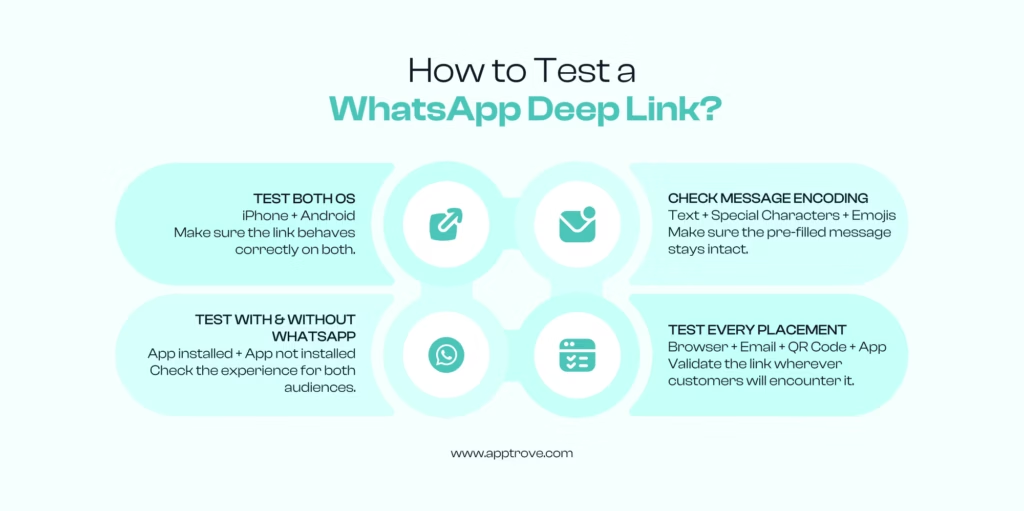
A deep link can look perfectly fine on paper and still break the moment it hits a real phone. A short test run before launch saves a lot of trouble later.
- Check both operating systems. iPhone and Android sometimes handle the WhatsApp deep link format a little differently.
- Test with and without the app. This shows what happens for people who click the link but do not have WhatsApp on their phone.
- Check the message encoding. Special characters or emojis in the pre-filled text can break the link if they are not encoded properly.
- Test from every place the link will be used. A link that works in a browser might act differently inside an email app or after being scanned from a QR code.
Mistakes To Avoid When Creating a WhatsApp Deep Link
Most problems here are small and easy to fix, but they still cause real headaches if nobody catches them early. Some of the usual ones:
- Getting the phone number format wrong (spaces or a plus sign will break the link)
- Forgetting to properly encode the pre-filled message
- Not testing the link on both iPhone and Android before launch
- No backup plan for people who do not have WhatsApp installed
- Running a whole campaign without any attribution tracking attached
- Making the pre-filled message too long, which can feel pushy instead of helpful
- Using the same message everywhere, which makes it hard to tell later which channel actually worked
That last point about tracking is worth a second look. It is not really a mistake on its own. It is more of a missed chance. A campaign without tracking will not necessarily fail. It just will not be clear what worked and what did not, and that problem tends to get worse over time instead of better.
How do WhatsApp Deep Links Help Marketers?
Think about a normal customer journey:
Someone sees an ad, gets curious, and now has to find a phone number, open WhatsApp, start a new chat, and explain who they are.
By that third step, a lot of people just give up. That is not surprising. Extra steps lose people every time.
- Predefine the goal and target audience better
The goal is not just getting someone to click anymore. It is getting them to start talking, for real. A WhatsApp deep link removes most of that. The person lands straight in a chat, with context already there. Because there is less effort involved, the people who do click through tend to be more serious. A pre-filled message already tells you what the customer is after, before the chat even begins
- Skip the small talk
Instead of “Hi, I’m interested,” the conversation can open with an actual, specific request. Conversations start faster since nobody has to explain who they are first. And the message that comes pre-filled already tells the team a bit about what the person wants, even before anyone replies.
- A different kind of win
There is also a longer-term benefit that is easy to miss. Once a chat starts on WhatsApp, it usually stays open. People do not delete WhatsApp threads the way they ignore old emails. So one good WhatsApp deep link, placed in the right spot, can keep generating conversations long after a campaign is over.
Apptrove UniLinks = Better WhatsApp Deep Links
A regular WhatsApp deep link works fine, but it is also a bit of a black box. Once someone clicks it, most marketers lose sight of where that click came from.
That is the gap UniLinks, Apptrove’s deep-linking system, is built to fix. Think of it like putting a return address on a letter. Without the address, there is no way to know who sent it or what happens after it is delivered.
UniLinks does something similar for a WhatsApp deep link. It connects the click back to the exact campaign, ad, and placement that led to it. So instead of one big number of “WhatsApp clicks,” there is a clear picture of where each click actually came from.
That being said, a WhatsApp deep link without tracking still works fine. People still land in a chat and start a conversation. For users, it is all they need.
For someone running a business on WhatsApp, or leading their customer to a sale, it is just not enough.
It is also important to note that WhatsApp is a closed platform, so once someone taps a WhatsApp link and starts chatting, the trail usually goes cold. This means there is no way to know the following:
- Did this user click the WhatsApp link from an Instagram ad?
- Did they scan the QR code from the event last month?
- Did they click on it from a follow-up email?
Without some kind of tracking in front of that link, a normal WhatsApp deep link will always keep you guessing.
With Apptrove UniLinks and proper attribution added on, that guesswork turns into real findings like:
- Which channels bring in the most engagement.
- Which campaigns lead to actual conversations.
- Which ad creatives bring better leads.
- Which audience groups convert the best.
Even which time of day gets the most replies.
This kind of visibility matters a lot for anyone running WhatsApp deep link digital marketing across several campaigns and regions. It also changes how budget gets spent. Without clear data, spend usually gets split evenly across channels just to be safe. With good tracking, spend can move toward whatever is actually working.
Where Can WhatsApp Deep Links Be Used in Marketing Campaigns?
An app deep link can fit almost anywhere the goal is to make it easier for someone to start a conversation. A few common places it shows up:
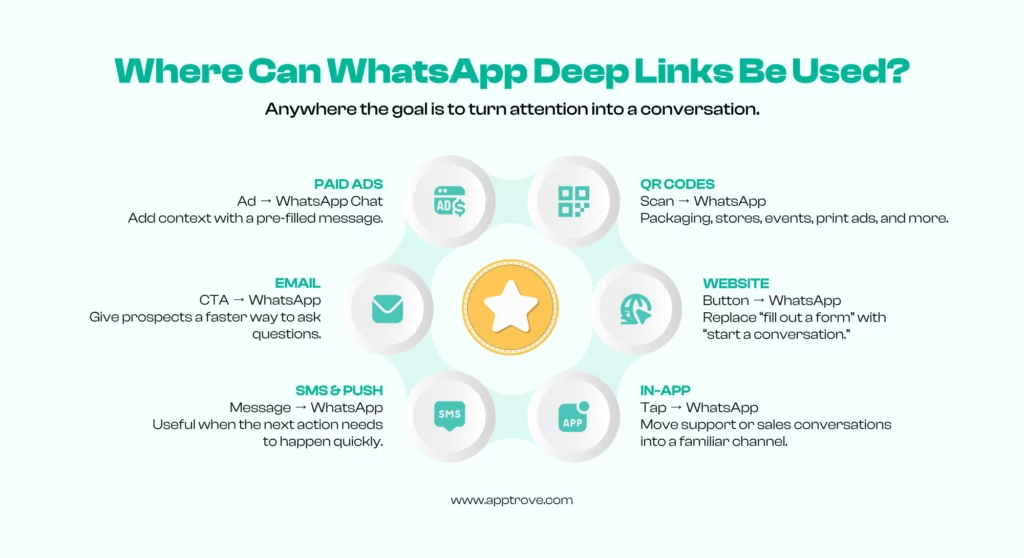
- Paid ads. Click-to-WhatsApp campaigns on Meta, and some Google campaign types, take someone straight from an ad into a WhatsApp chat. A pre-filled message can set the context right away.
- Email. Adding a WhatsApp deep link to an email button gives people who still have questions a direct way to ask them, instead of replying to the email and waiting.
- SMS and push notifications. Fewer steps between getting a message and starting a chat. This matters a lot for anything time-sensitive, like a limited offer.
- QR codes. A deep link WhatsApp QR code works well on product packaging, in stores, at events, or on printed ads. Someone scans it, and they are chatting within seconds.
- Website buttons. A chat button built on a WhatsApp deep link URL usually gets more responses than a contact form that only gets checked once a day.
- Inside an app. A support or sales button that opens WhatsApp keeps things on a platform users already trust and already know how to use.
How Do You Measure the Performance of a WhatsApp Deep Link Campaign?
Clicks aren’t enough. A campaign generating hundreds of clicks but very few conversations isn’t performing well, regardless of what the click report says. The metric that matters is what happens after the click.
Measure the full journey:
- Click-through rate: How many people are actually tapping the WhatsApp deep link URL
- Conversation start rate: Of those clicks, how many opened an actual chat
- Response rate: How many conversations received a reply from the user
- Lead quality: Are these conversations producing qualified prospects or dead ends
- Conversion rate: How many conversations resulted in a sale, booking, or demo
- Customer acquisition cost: What it costs to generate a WhatsApp-driven conversion
- Revenue attribution: What that channel is actually contributing to the bottom line
Where this gets particularly valuable is across multi-channel campaigns. If the same offer is running through Meta ads, email, QR codes, and website banners simultaneously, every WhatsApp conversation looks identical without proper attribution.
With tracked links through Apptrove, you can see exactly which channel is driving the highest-quality conversations, not just the most of them. That’s the insight that changes budget decisions.
FAQs About WhatsApp Deep Links
Is a WhatsApp deep link the same as a normal website link?
No. A normal link opens a webpage. A WhatsApp deep link opens the WhatsApp app directly and starts a chat with a specific number, sometimes with a message already typed in.
Does a WhatsApp deep link work if someone does not have WhatsApp installed?
Not really. On a phone, it usually asks the person to download the app first. This is why it helps to have a backup option ready for people who might not have WhatsApp.
Can a WhatsApp deep link work without a business account?
Yes. The basic wa.me format works with any WhatsApp number, personal or business. A WhatsApp Business account adds extra features like automatic replies and labels, which help with larger campaigns.
How is a WhatsApp deep link different from the WhatsApp Business API?
A regular WhatsApp deep link opens one chat manually. The WhatsApp Business API, often used together with tools like Apptrove, supports automation, message templates, and connections to CRM systems for larger operations.
Can WhatsApp deep link results be tracked without any extra tool?
Only a little. Some basic click numbers might show up depending on where the link is shared, but knowing exactly which campaign or creative led to a conversation usually needs a proper tracking setup like Apptrove’s UniLinks.