The QR code has been forced to move from the restaurant menu to the self-checkout stand. There are more than 102 million people in the US alone who will be scanning a QR code this year, and the global QR Code industry has reached a value of more than $13 billion. It doesn’t have to be a trend; that’s infrastructure.
However, there is also the other half that most people don’t do: scan a code. The magic is in the QR code tracking, which maps the scan, its time, location, device, and subsequent action(s). If you don’t track, you’re printing codes and hoping. With it, each individual QR code turns into a miniature self-reporting checkpoint within your marketing funnel. It explains how it works, why it is imperative for all app and ecommerce marketers and how to do it correctly without the guesswork.
What is QR Code Tracking and Why Does It Matter?
QR code tracking refers to the ongoing process of observing and recording data whenever someone scans a QR code, such as: scan location, scan time, device type, what happens after the redirect, etc. Unlike a “do something” when scanned, a tracked QR code communicates back, and provides a log of who has engaged and how.
Imagine the difference between a flyer and a digital ad. A flyer vanishes in an unfed world. A digital ad tells you conversions, clicks and impressions. This type of scan-level measurement fills that same gap for print, packaging and offline media — the areas of a marketing budget where measurement has been a challenge in the past. Others refer to this as QR code attribution, as it is more about a physical touchpoint and a digital outcome.
Why QR Code Tracking Has Become a Marketing Essential
QR codes were once nice-to-haves a couple of years ago. That’s no longer the case, and the numbers back it up:
- According to data from industry scan-reports, people scan at least one QR code a month in about 50.5% of global internet users.
- A good placement, relevant QR has an average conversion rate between 15% and 20% to action, according to Bitly’s trend research.
- According to Uniqode’s 2026 report, 98 percent of the marketers who were surveyed reported that QR codes helped their marketing efforts in the last year.
But it’s even more important for app marketers. A QR code on a billboard, product box or print ad can take someone directly into an app install flow, but the real question is: which of the above brought that install? Only powerful QR code analytics can tell you. A key part of this handoff is created by Apptrove’s deep linking capabilities, where the link to a scanned code is transferred to an in-app destination without losing the “chain of command.”
How Does QR Code Tracking Actually Work?
The entire system is based on one simple trick: that the code doesn’t directly reference where you end up. Instead, it points to a trackable, dynamic link that logs the scan and then redirects the user. Here are some examples of that journey in practice.
Static vs. Dynamic QR Codes: The Difference That Actually Matters
This is where most QR code tracking questions start, so it’s worth being direct about it:
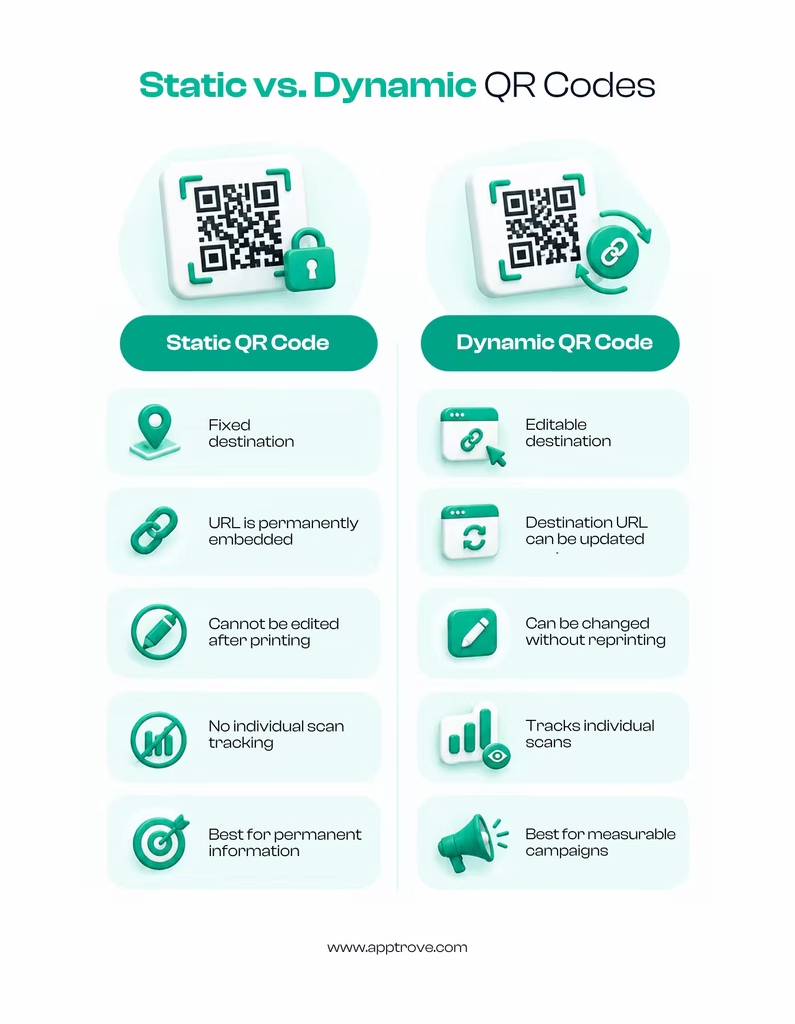
- Static QR codes have the destination URL baked directly into the code’s pattern. Once printed, that destination can never change, and there’s no way to log individual scans. What you see is what you get, forever.
- Dynamic QR codes on the other hand, have a short redirect link that can be edited. The owner of the link can switch the destination at any time and — most importantly — each scan travels through a server that logs the scan before relaying it on to the user.
For meaningful tracking of QR code scans, you need dynamic QR codes. Static codes are good for a wall at a café that has a permanent Wi-Fi password, but not for any campaign you want to measure.
What Data Can You Actually Capture From a QR Code Scan?
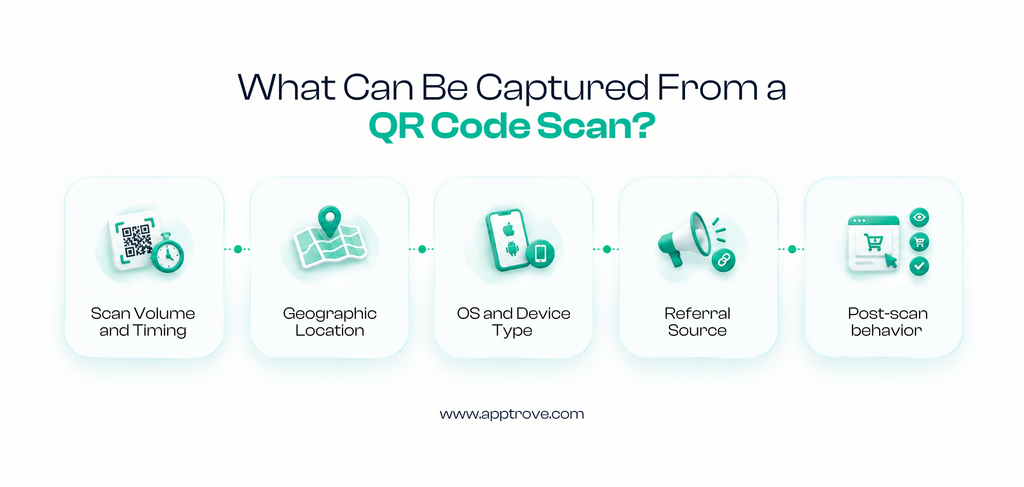
Depending on the platform behind the code, the QR code scan data you can pull typically covers:
1. Scan volume and timing: total scans and when they occurred (by hour, day or week)
2. Geographic Location: city or region-level data from the scanning device.
3. OS and Device Type: iOS vs. Android, which proves to be significant for app-install attribution?
4. Referral Source: If you are running more than one version, you can see that in the “referral source” section, indicating which physical location or campaign version has been responsible for the scan.
5. Post-scan behavior: whether the scan resulted in a page view, a form fill, an app install, or a purchase
The latter part is where things get cool for app marketers. A shallow metric is a scan that only hits a web page. When the scan is stitched to a real app install, and subsequently to in-app events, such as signing up or making a purchase, it will let you know if the QR code was profitable. That’s why a closed-loop measurement platform such as Apptrove is all about tracking through omnichannel tracking, with a QR scan, SMS click, and paid social tap, all getting the credit they deserve, rather than competing for the same conversion.
How to Set Up a QR Code Tracking Campaign?
Setting up QR code tracking isn’t complicated, but skipping a step tends to show up later as a data gap you can’t backfill. Here’s a practical sequence:
- Start with a dynamic QR code generator that includes analytics. There are lots of free tools that produce a code, and few that log scans, locations and devices. Do check for this prior to committing.
- Add UTM or campaign parameters to the destination link even if they all end up on the same page, so that each one can be distinguished in reporting later on.
- Build a landing experience that matches the promise. For the “50% off” code, the page it lands on should say “50% off” also, right away, and with no need of 3 additional taps to find it.
- Connect the code to an attribution or analytics platform so scans link up with installs, sign-ups, or purchases instead of sitting in a spreadsheet on their own. This is where a mobile attribution setup earns its keep.
- Test the code yourself before it goes anywhere public. Try the code out before making it public. Scan it from 2 different phones, wifi and mobile data, and ensure destination, redirect speed, and tracking events all work correctly.
There is no need for a developer sprint for this. Most dynamic QR code platforms, such as Apptrove’s UniLink tool provide all steps from 1 to 4 from a single platform, and once the code is live, all the data from the scan begins to flow.
Best Practices for Reliable QR Code Tracking Data
I. Use a unique code per placement. A single QR code for “all print materials” does not provide any information about which print piece worked. Different codes for flyer, poster and packaging insert.
II. Set attribution windows deliberately. A person can scan a code today, and install the app three days later. Determine in advance what the “credit” will be for an action downstream from the scan.
III. Test before you print. Test before printing! An error on a thousand printed boxes is a costly mistake. Check the final code of many devices prior to production.
IV. Keep the destination mobile-first. Almost all of the scans take place on a phone, and if you redirect to a page that works only on desktop, the conversion rate that you worked for goes down the drain.
V. Review scan data weekly, not just at campaign end. Early data allows you to replace poorly performing placements during the campaign.
Common QR Code Tracking Mistakes Worth Avoiding
- Treating all scans as equal. A scan from a bored person that is not an experiment of somebody who is standing in your store. Use segmentation wherever possible.
- Ignoring device-level detail. If half your scans come from Android and your redirect only deep-links properly on iOS, you’re losing real conversions to a technical gap, not a demand gap.
- Skipping fraud checks. The number of bot traffic and click farms are also on the rise targeting scan-based links. Platforms with built-in fraud prevention catch abnormal scan patterns before they distort your reporting.
- Not updating dynamic codes. The advantage of a dynamic code is that you can direct it elsewhere. If you’ve already paid for the physical print, but you’re running seasonal campaigns with a point to the previous quarter’s landing page, then you’re wasting that real estate.If you’re running campaigns this season with a point to the previous season’s landing page, you are wasting the real estate space that you paid for.
The Bottom Line
This is not an after-thought anymore – this is what can make the difference between a poster that looks great and a poster that tells you what you got for your work. When paired with solid mobile marketing attribution, a printable QR code isn’t a shot in the dark, it’s a channel you can work with. QR codes continue to rise upward above 100 million scanners for use in the United States, and the winners aren’t the ones who have printed the most codes. It is they who can do the proof, scan by scan, of which ones really worked.
When you’re using QR codes as part of an app growth strategy, it’s important to make sure you pair them up with a measurement setup that has understanding of the mobile world, otherwise you’ll lose your physical QR code the minute it becomes a digital action. Discover the ways Apptrove’s mobile marketing analytics brings that whole journey together—from that initial scan to long-term user value.