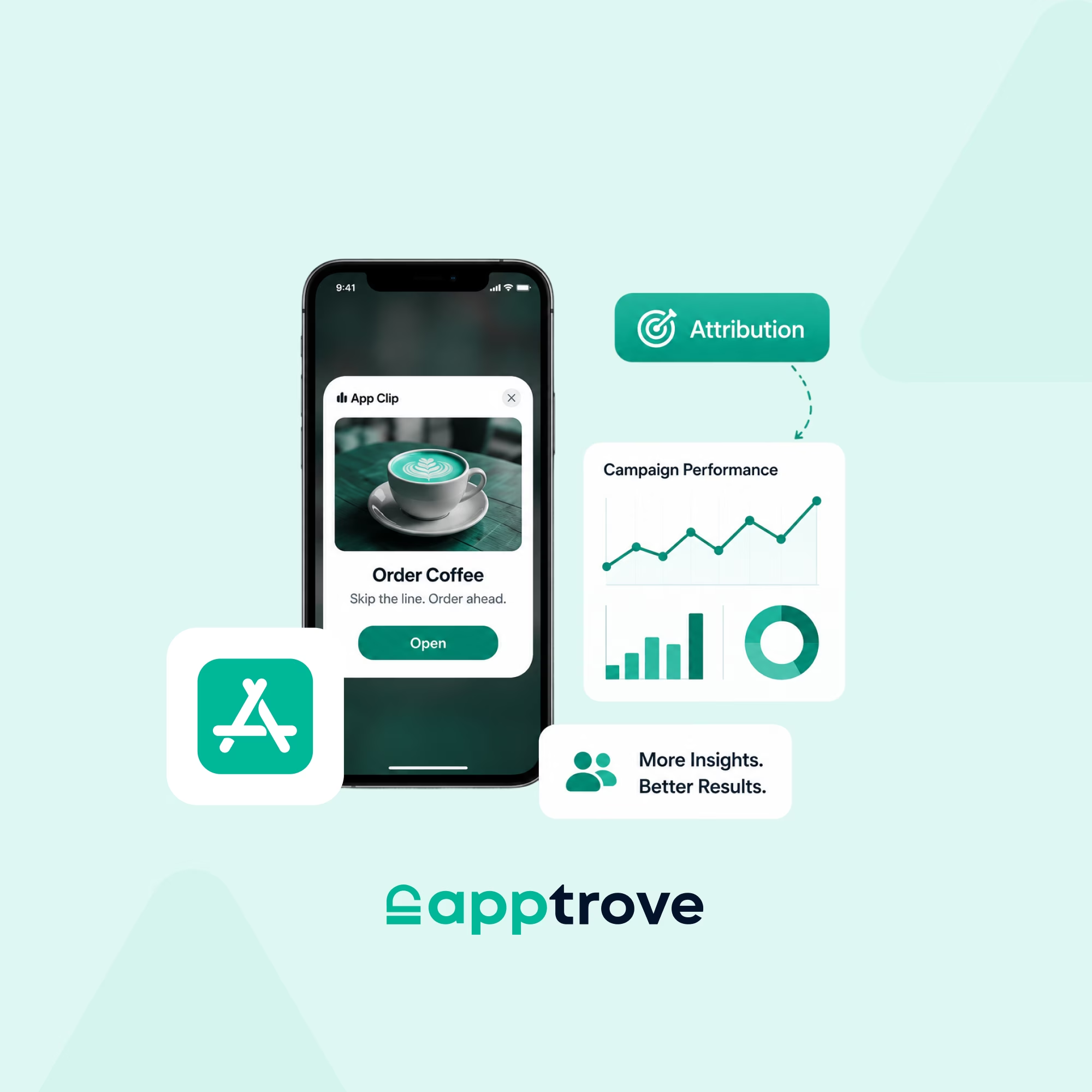
Users hate friction. Every extra tap between discovery and value is a conversion you will never see again. That is the core problem Apple’s clipping apps, officially called App Clips, were built to solve. Launched with iOS 14, App Clips are lightweight, on-demand slices of your full app that load in seconds without requiring a download. A customer scans a QR code at your retail location, taps a Smart App Banner mid-browse, or clicks a link in a message, and your app experience opens instantly, right where they are, before they have had a chance to lose interest.
For mobile marketers, clipping apps are not just a UX feature. They are a performance channel. They reduce drop-off at the install gate, drive micro-conversions in high-intent moments, and unlock entirely new acquisition paths. But measuring them accurately is another challenge, one that a Mobile Measurement Partner (MMP) like Apptrove is purpose-built to handle. This guide covers everything you need to know: how App Clips work, why they belong in your growth stack, and exactly how to attribute, track, and optimise them for real business outcomes.
What Are Clipping Apps? Apple App Clips Explained
Apple’s clipping apps, known in developer documentation simply as App Clips, are small, focused versions of an iOS app designed to accomplish a single task. Think: pay for parking, order a coffee, book a scooter ride, or redeem a promo code. The entire interaction is self-contained, fast, and frictionless.
Unlike a full app install, an App Clip loads on demand. It lives in the cloud rather than on the user’s device permanently. Apple imposes a strict 50 MB size limit (enforced since iOS 16), which forces developers to strip the experience down to its most essential function. That constraint is actually a feature: it compels you to design the best possible first impression, with no room for bloat.
The term “clipping apps” draws naturally from the old newspaper metaphor, clipping the single coupon or article you need from the whole publication. You do not take the entire paper. You take the part that matters right now. That is exactly the philosophy behind App Clips: give users the precise slice of your product they need, at precisely the moment they need it.
How App Clips Differ from Full Apps
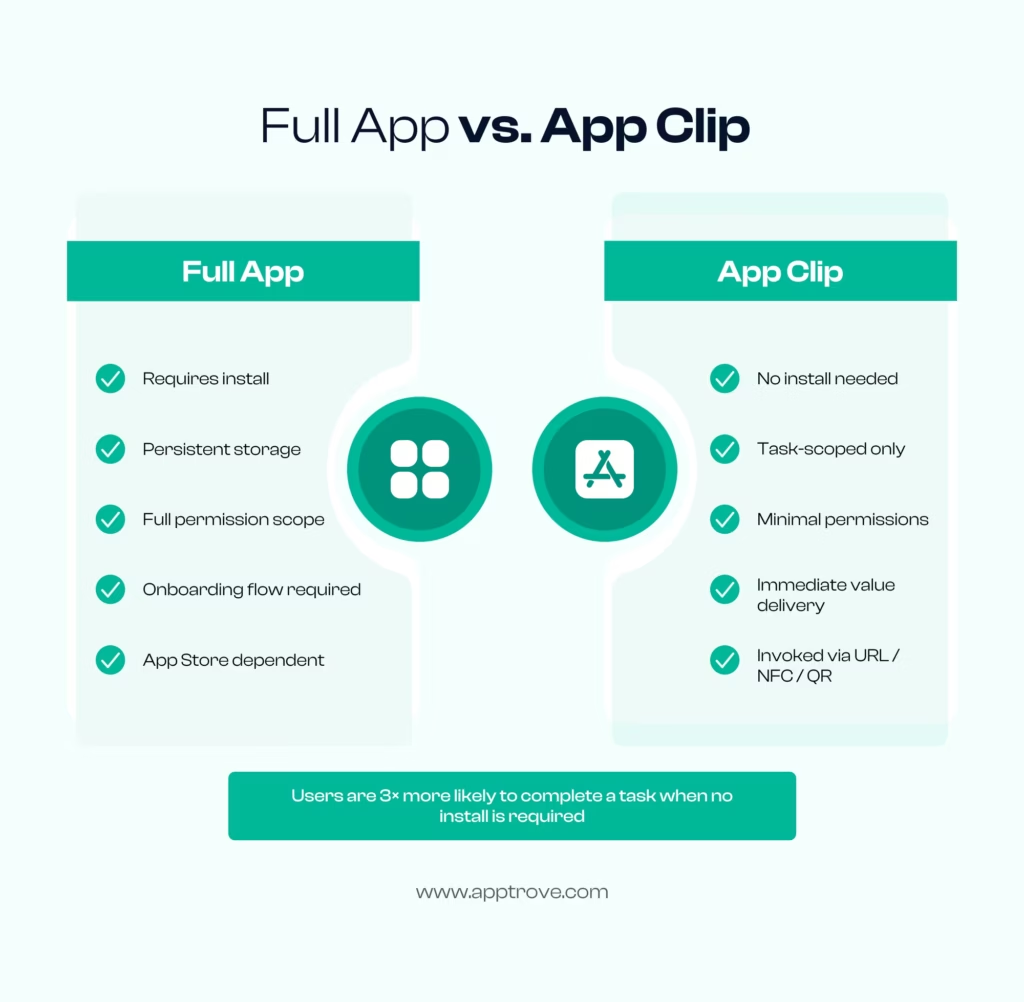
The difference between App Clips and full apps is not just size; it is intent. A full app is a relationship. It asks the user to invest time downloading, onboarding, and trusting you with space on their device. An App Clip is a transaction. It shows up exactly when needed, does its job, and steps aside. That low-commitment entry point turns high-intent moments, such as someone standing at your physical location, tapping your ad, or following a referral link, into immediate value exchanges.
Key distinctions mobile marketers should internalise:
• No download required, App Clips stream directly to the device on demand, bypassing the App Store install step entirely
• Size capped at 50 MB, enforces focused, high-quality design with no feature sprawl
• Temporary by default, iOS removes clipping apps automatically after a period of inactivity, keeping device storage clean
• Privacy-scoped, App Clips can only request a limited set of device permissions, which builds user trust
• Conversion bridge, Apple prompts users to download the full app after completing a task, at the moment of peak motivation
How Apple App Clips Work: The Full Technical Flow
Understanding the technical mechanics behind clipping apps helps mobile marketers think clearly about attribution, deep link architecture, and measurement. Here is the complete flow, from invocation trigger to downstream full-app install.
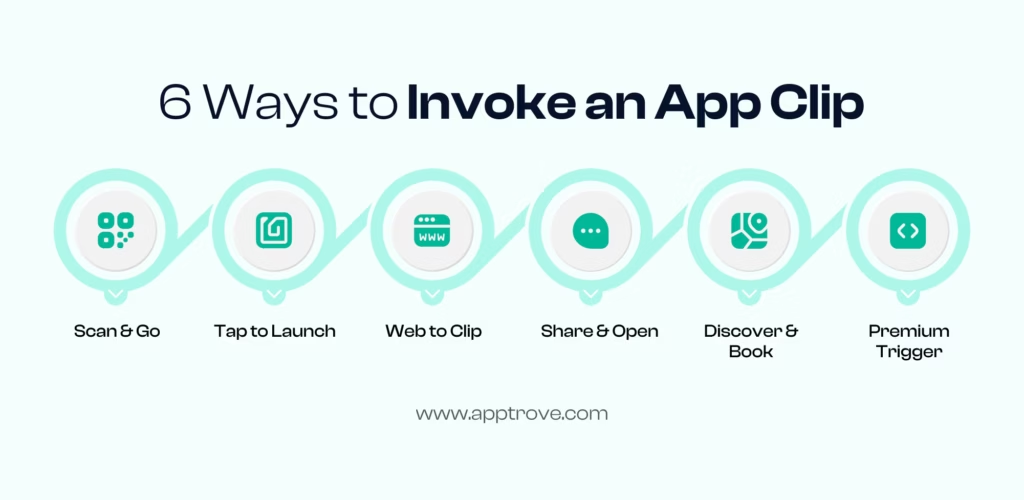
Invocation Methods: Six Ways to Launch a Clipping App
App Clips can be triggered, or ‘invoked’, through multiple entry points, each suited to different marketing contexts:
1. QR Codes and NFC Tags, Physical locations embed QR codes or NFC chips that, when scanned, trigger a clipping app instantly. A retail store can offer contactless payment. A transit hub can surface a ticketing experience. No app needed, no App Store search.
2. Smart App Banners, an <meta> tag in your website’s HTML, surfaces a banner at the top of Safari. Tapping it opens the App Clip directly, not the App Store listing. This is the highest-converting web-to-App-Clip path for mobile marketers with strong organic web traffic.
3. Messages and Mail, When an App Clip link is shared via iMessage or Mail, iOS renders a rich preview card. One tap launches the clipping app. This makes referral programmes particularly powerful: a shared experience is one tap away from working.
4. Apple Maps, Businesses registered on Apple Maps can surface clipping apps directly inside the Maps interface. A user searching for a restaurant can launch an ordering App Clip without leaving Maps.
5. Siri Suggestions and Spotlight, Apple’s intelligence layer can proactively surface App Clips based on location history, time of day, and behaviour patterns. Your clipping app can appear at the right place and moment without additional marketing spend.
6. App Clip Codes, Apple’s proprietary circular codes combine NFC and a visual scan target. They are designed to be fast, reliable, and visually distinct from standard QR codes, and they signal premium brand quality.
The User Journey Inside a Clipping App
Once invoked, the clipping app loads a streamlined card at the bottom of the screen, Apple calls this the App Clip Card. It displays the app name, the developer, a header image, and a clear action button. Users launch the experience directly from this card with no installation prompt and no App Store redirect.
Inside the clip, users can complete payments via Apple Pay, authenticate with Sign In with Apple, access permitted device capabilities (location, camera, microphone), and complete the core task the clipping app was designed for.
When the task is complete, Apple displays a prompt to download the full app. This is the conversion moment mobile marketers care about most. A user who has already experienced value is dramatically more likely to install than one encountering your App Store page cold. This post-task window is where smart teams focus their install-rate optimisation.
Why Clipping Apps Matter for Mobile Marketers
The install wall is one of the most significant friction points in mobile user acquisition. A user who sees your ad, feels interest, but has to navigate to the App Store, download your app, wait for it to load, and then complete an onboarding flow, that user is very likely to drop off before reaching any value. App Clips remove that wall entirely, and the impact on conversion metrics is measurable.
Reducing Friction at the Moment of Intent
The highest-intent moments in mobile are often physical or immediate. Someone at your store, someone who just tapped your paid social ad, someone referred by a friend, all of them have intent right now. App Clips meet that intent immediately, without asking for a commitment first.
App Clips are specifically architected for these high-intent, transactional moments. The platform rewards brevity and immediacy. For mobile marketers, this translates directly into fewer drop-offs between intent and conversion, and lower effective cost per acquisition across every channel that supports clipping app invocation.
Expanding the Mobile Acquisition Funnel
App Clips do not just improve conversion for existing awareness, they open new acquisition paths entirely. A user who would never organically discover your app might encounter your clipping app through a physical QR code, a friend’s share, or a Maps listing. They complete a task. They experience your product. They become a high-quality candidate for full install and long-term retention. For a deeper look at how Apptrove approaches mobile app traffic and acquisition, the Apptrove blog is an excellent resource.
This expansion of the funnel is why forward-thinking growth teams treat App Clips as a distinct acquisition channel, not just a UX enhancement that engineering manages independently.
Driving Micro-Conversions That Count
Not every mobile moment needs to end in a full install. Sometimes the win is a purchase, a booking, a sign-up, or a redemption, right now, without friction. App Clips are built for these micro-conversions.
A hospitality brand can let guests check in via a clipping app without ever downloading the hotel’s full application. A retailer can process a loyalty redemption. A food and beverage brand can take an order. Each of these is a revenue event, a data point, and a potential touchpoint in a longer user relationship, even without an install. When tracked correctly through an MMP like Apptrove, these micro-conversions become as attributable and optimisable as any standard paid install.
App Clips vs. Android Instant Apps: Two Approaches, One Problem
Apple did not invent the concept of frictionless app delivery. Google launched Android Instant Apps in 2016, four years before Apple’s App Clips arrived with iOS 14. Both technologies solve the same problem: let users experience app functionality without the install gate. For cross-platform mobile marketers, understanding the differences is essential for campaign architecture and measurement strategy.
| Factor | Apple App Clips | Android Instant Apps |
| Launch Year | 2020 (iOS 14) | 2016 |
| Size Limit | 50 MB (compressed) | 15 MB |
| Entry Points | QR, NFC, Safari, Maps, iMessage, App Clip Code | URLs, Google Play Store |
| Authentication | Sign in with Apple | Google Account |
| Privacy Controls | Strict OS-level restrictions | App-level controls |
| Full App Prompt | Automatic post-task (Apple UI) | Manual developer implementation |
| Attribution Support | SKAdNetwork + MMP (e.g. Apptrove) | Play Install Referrer + MMP |
For cross-platform campaigns, the key takeaway is straightforward: both ecosystems now support frictionless-entry experiences. Campaigns that leverage clipping apps on iOS alongside Instant Apps on Android can dramatically reduce install-gate drop-off across the full user base, and a unified MMP measurement layer becomes even more valuable when normalising data across both platforms.
Measuring Clipping Apps: The Attribution Challenge
Here is where many mobile marketing campaigns stumble. App Clips introduce a measurement problem that standard mobile attribution frameworks were not originally designed to handle. Understanding the challenge is the first step to solving it.
Why Standard Attribution Breaks Down
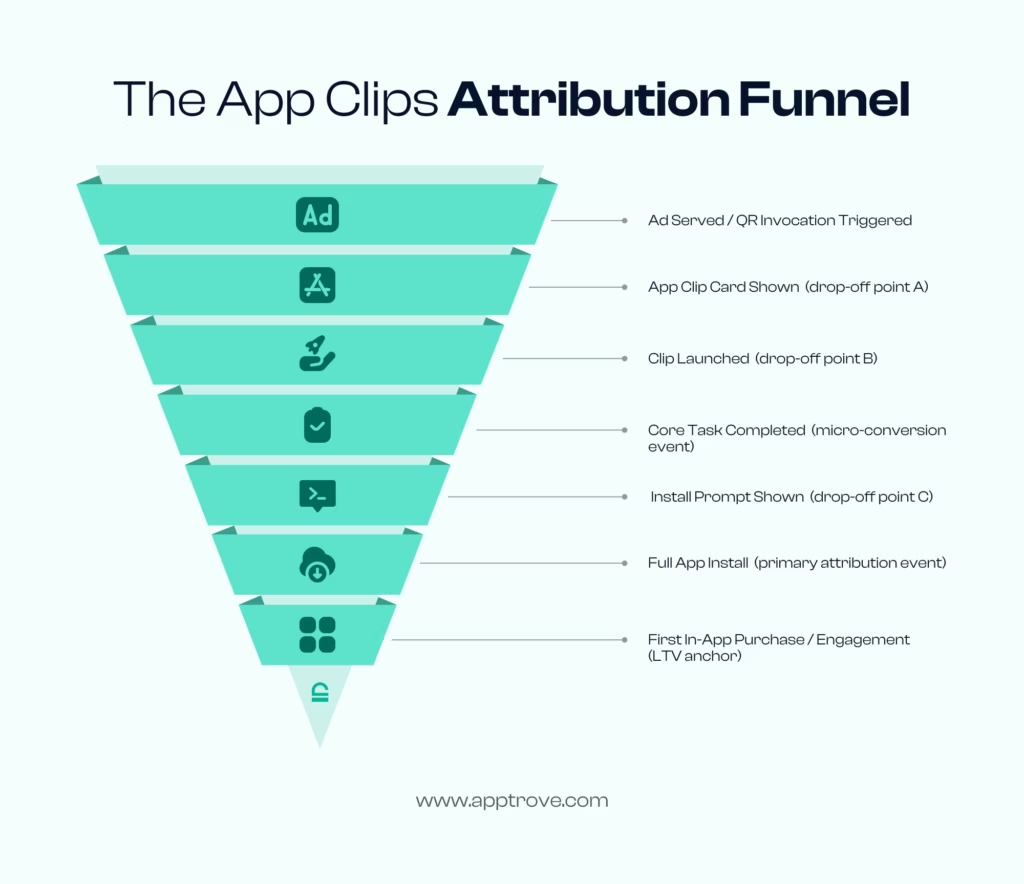
Conventional mobile attribution works through a familiar chain: an ad is served, a user clicks, they download the app, the MMP matches the click to the install via a device identifier, and attribution is recorded.
App Clips disrupt this chain in three specific ways:
• No install event, The defining moment in standard mobile attribution, the download, does not exist for a clipping app. You are attributing a clip invocation, a task completion, and potentially a downstream install as a connected sequence, not a single event.
• Restricted tracking inside clips, Apple severely limits device identifiers inside App Clips. IDFA is not accessible within a clip. SKAdNetwork behaviour in the App Clip context differs from standard in-app behaviour.
• Non-linear user journeys, A user may invoke a clipping app, complete a purchase, leave, encounter a retargeting ad three days later, and then install the full app. Attributing that install to the original App Clip invocation requires a measurement layer sophisticated enough to stitch these moments together across time.
How Apptrove Solves the App Clips Measurement Problem
Apptrove’s mobile attribution platform is purpose-built for the modern iOS measurement landscape, which means it handles the nuances of App Clips attribution that simpler tools miss.
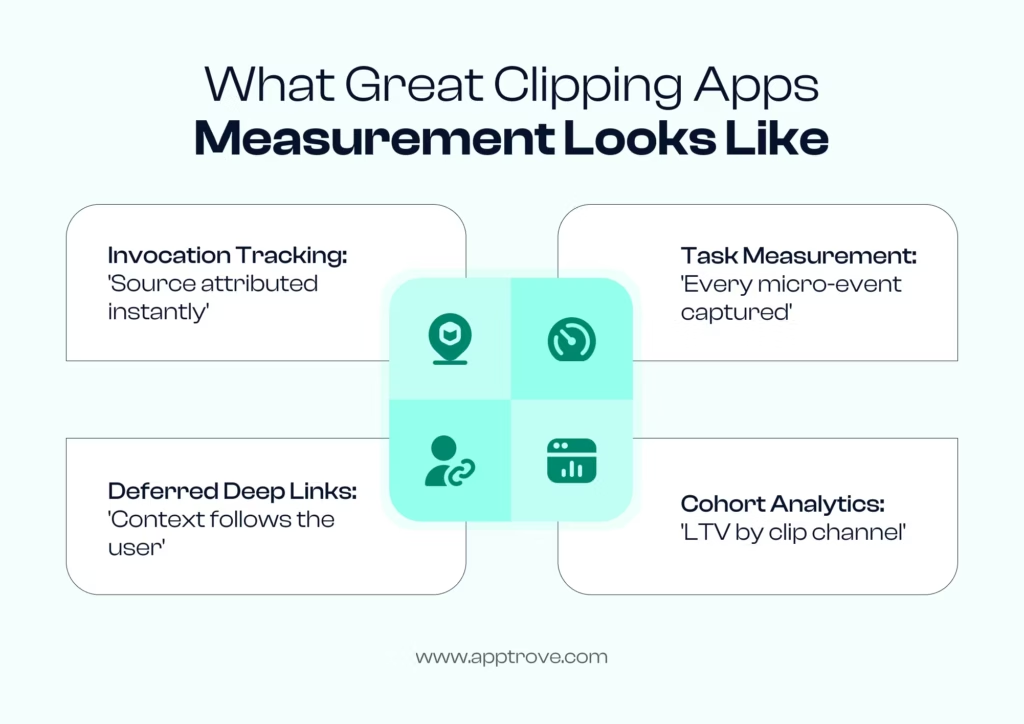
| How Apptrove Measures App Clips 1. Privacy-compliant attribution, Probabilistic modelling + SKAdNetwork data, no IDFA dependency inside clips 2. Clip-to-install funnel tracking, Invocation source → task completion → full app install, mapped end-to-end 3. Event-level measurement, Purchases, bookings, form submissions inside the clip, tied to campaign sources 4. Deferred deep linking, Original clip invocation context carried forward into the full app install 5. Cohort analytics, LTV, and retention comparison for clip-acquired users vs. other channels |
Privacy-compliant attribution is the foundation. Apptrove’s engine does not rely on IDFA-based tracking inside clipping apps. It uses probabilistic modelling, SKAdNetwork postback data, and first-party signals to reconstruct user journeys within Apple’s privacy framework, giving marketers clean data without consent-rate anxiety.
Clip-to-install funnel tracking is where the real insight lives. Apptrove maps the complete sequence, from the specific invocation method (was it the QR code at your physical location, the Smart App Banner on your product page, or the iMessage referral link?) through task completion and downstream install. Channel-level visibility at this granularity is essential for budget optimisation.
Cohort analytics close the loop. Users who discover a brand through a clipping app behave differently from users acquired through standard paid installs. Apptrove’s cohort reporting lets you compare LTV, retention, and engagement for App Clip-acquired users versus every other acquisition channel, which is ultimately how you justify (and increase) investment in the channel.
Deep Linking and Clipping Apps: Making Every Entry Point Trackable
Deep linking is the connective tissue of App Clips marketing. Without it, each clipping app invocation is an isolated event. With robust deep linking, every scan, tap, and referral share becomes a traceable, attributable journey.
What Deep Linking Means for App Clips
A deep link directs a user to a specific piece of content or a specific state inside an app, rather than to the app’s home screen. In the clipping apps context, deep linking is even more critical because every App Clip is invoked through a URL or code tied to a specific experience. When a user scans a QR code at your physical store, the URL embedded in that code tells the App Clip which specific task to load, the payment flow for location #47, for example, not just the generic clip. That specificity is deep linking at work.
Without deep link infrastructure, all of your clipping apps invocations look the same in your analytics dashboard: an undifferentiated spike in clip openings with no channel breakdown, no location attribution, no campaign source, and no path to optimisation. Deep linking is what transforms raw invocation volume into actionable data.
Apptrove’s Deep Linking Tools for App Clips
Apptrove provides deep linking infrastructure that integrates directly with the App Clips architecture. Key capabilities include:
• Universal Links Support, Apptrove’s deep links use Apple’s Universal Links standard, which iOS requires for App Clip invocations. This ensures seamless handling across device states.
• Custom Tracking Parameters, Each deep link generated via Apptrove can carry campaign parameters: source, medium, creative, physical location, and custom dimensions. When a clipping app is invoked, those parameters flow into Apptrove’s attribution engine.
• Location-Level Granularity, A QR code at a London store and one at a New York store carry different parameters. You can compare App Clip performance at location granularity without any additional tagging work.
• Deferred Deep Linking, When a user who invoked a clipping app later installs the full app, Apptrove’s deferred deep linking carries the original context forward. The user picks up exactly where they left off, and your attribution data reflects the complete journey from clip discovery to app install and beyond.
Privacy Compliance: App Clips, SKAdNetwork, and ATT
Apple’s App Tracking Transparency (ATT) framework and SKAdNetwork have reshaped mobile measurement across the board. App Clips add additional complexity to an already evolving landscape. Mobile Marketing Magazine’s mCommerce coverage has tracked the evolution of iOS tracking extensively and is a useful ongoing reference.
What Apple Restricts Inside Clipping Apps
App Clips operate under stricter privacy rules than full apps. Mobile marketers need to internalise these constraints before designing measurement architecture:
• No IDFA access, The Identifier for Advertisers is simply not available inside a clipping app
• Limited persistent storage, App Clips cannot write to shared containers or persist data across separate invocation sessions
• Narrow permission scope, Location, camera, and microphone access require explicit confirmation tied to the specific clip invocation; contacts, photos, and health data are entirely off-limits
• No cross-app data sharing, A clipping app cannot access data from the full app or other apps on the device
For marketers, these restrictions mean the signal-rich environment of a full app install does not exist inside a clipping app. Measurement has to work with less, and it has to do so without any workarounds that would violate Apple’s privacy guidelines.
SKAdNetwork in the App Clips Context
SKAdNetwork is Apple’s privacy-preserving conversion measurement framework. When a user installs an app after clicking an ad from a participating ad network, SKAdNetwork sends a postback to the advertiser, without exposing any device-level data. It is the primary signal available to mobile marketers running paid user acquisition on iOS.
Inside clipping apps, SKAdNetwork’s behaviour has important nuances. The clip itself is not an ‘install’ event, so standard SKAdNetwork postbacks do not fire on clip invocation. They fire on the downstream full app install. This creates a measurement gap between clip engagement and attributed install, which is exactly the gap Apptrove is built to close.
Apptrove’s SKAdNetwork integration handles these edge cases: correctly interpreting postbacks that originate from App Clip-driven install paths, normalising that data alongside probabilistic attribution signals, and surfacing the unified result in a single dashboard. The outcome is clean, actionable attribution data, compliant with Apple’s framework, readable by performance marketers.
Best Practices for Clipping Apps Campaigns
Getting clipping apps right requires thinking differently about design, measurement architecture, and campaign structure. These are the practices that consistently move the needle for mobile marketing teams.
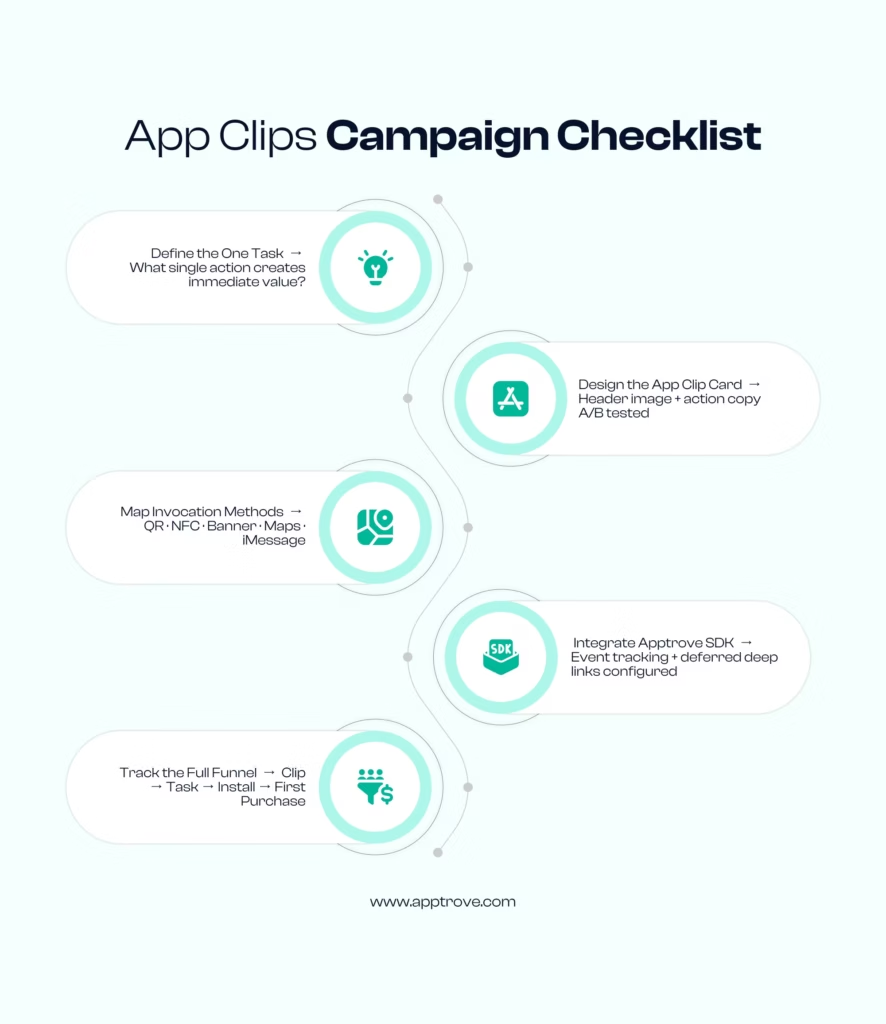
Design for One Task Only
The 50 MB size limit is a gift, not a constraint. It forces the focus that most app development teams resist. Your clipping app should do one thing extremely well, pay, book, redeem, register. Not three things adequately. One thing brilliantly. Define the core job and build the clip around that job exclusively. Every additional screen or flow you add is friction, and in the App Clips context, friction is the enemy.
Optimise the App Clip Card
The App Clip Card is the first thing users see before launching the clip. It has limited real estate: a header image, title, subtitle, and action button label. Treat each element like a landing page above the fold. A/B test your App Clip card imagery and copy, using Apptrove’s campaign tracking to measure clip invocation rates from different card variants, and you will quickly find high-leverage optimisations that most teams overlook entirely.
Map Invocation Methods to Your Traffic Sources
Do not default to QR codes simply because they are familiar. Map your invocation strategy to where your highest-intent users actually encounter your brand:
• Physical retail: QR codes and NFC App Clip Codes at checkout and point-of-display
• Web traffic: Smart App Banners on high-intent landing pages and product detail pages
• Social and referral: iMessage-optimised links for referral programmes and influencer campaigns
• Local discovery: Apple Maps listing with a direct booking or reservation App Clip
Each invocation method carries different traffic quality, conversion rates, and downstream LTV. Apptrove’s multi-touch attribution shows you which matters most, so you can invest accordingly.
Track the Full Clip-to-Install-to-Purchase Funnel
Many teams track clipping apps and full app installs as separate funnels. That is a costly mistake. The clip is step one. The install is step two. The first in-app event is step three. Together, they are a single acquisition funnel with several measurable drop-off points. Set up Apptrove to track the entire sequence end-to-end and you gain visibility into exactly which step is underperforming and where a targeted optimisation will have the greatest impact.
Optimise the Post-Task Install Prompt
Apple surfaces an install prompt at the end of the App Clip experience. Its placement and design are partly within your control. The user has just received value from your clipping app; they are at peak motivation to commit. A clear benefit statement, social proof, and a single tap are all it takes. Teams that invest in optimising the install prompt moment consistently see a significant lift in clip-to-install conversion rates.
App Clips Use Cases: Industries Where Clipping Apps Are Winning
Apple’s App Clips architecture is flexible enough to serve almost any mobile-first vertical. The industries below have moved fastest, and their results are instructive for teams considering clipping apps for the first time.
Food and Beverage
Quick-service restaurants were among the earliest adopters, and the reason is obvious: the use case is perfect. A customer scans a QR code at the table. The ordering clipping app launches. They order and pay via Apple Pay. The experience is over in under a minute, no download, no account creation required. The downstream install rate for F&B App Clips tends to be high because a user who has already ordered via the clip is a warm, motivated prospect for the loyalty programme.
Retail and E-Commerce
Retailers deploy clipping apps for a range of micro-conversions: loyalty check-in at the till, coupon redemption in-store, product lookup, and contactless payment. Online retailers use Smart App Banner clips to intercept high-intent web visitors mid-session. A user browsing a product page sees a banner: ‘Order faster with the app.’ One tap, and the clipping app opens the exact product they were already viewing, with Apple Pay ready to complete the transaction. The conversion uplift on product pages running this flow is often material.
Hospitality and Travel
Hotels, airlines, and car rental companies use App Clips for check-in, digital key access, upgrades, and concierge services. A guest who receives a booking confirmation email can tap the link in it and launch a check-in clipping app without ever visiting the App Store. Frictionless, on-brand, and perfectly timed, for a guest who may only need the experience once, the full install ask can come after they have already experienced the value.
Parking and Mobility
One of Apple’s original showcase use cases. A parking lot deploys an NFC chip at the entry point. Drivers tap their phone, the payment clipping app launches, they pay and receive a confirmation code. The entire interaction takes under 30 seconds. No app download, no account creation, no friction. Mobility platforms running App Clips for scooter and bike rentals report significant improvement in new-user conversion rates versus standard App Store acquisition flows.
Financial Services
Balance check, fund transfer initiation, loan application start, and KYC verification are all strong clipping app use cases in financial services. The install barrier is particularly costly in fintech, users are hesitant to download apps they are not certain they will use. App Clips let them experience the core value proposition first, making the install conversation much easier.
Healthcare
Appointment check-in, pre-visit intake forms, telehealth waiting room access, and prescription refill requests are all tasks that patients would complete if the friction were low enough, but would avoid if they had to download a full app first. Healthcare providers using clipping apps for these micro-interactions report higher completion rates on digital check-in flows and more positive patient experience scores.
Setting Up App Clips: What Your Team Needs to Know
Building and deploying clipping apps requires coordination across development, design, product, and marketing. Here is the high-level map every team should align on before launch.
Development Requirements
App Clips are built as a separate target in Xcode, linked to your main app. They share the same codebase but have a distinct build target with the .appclip suffix in the bundle identifier. The clip must be registered in App Store Connect before it can be invoked by any entry point.
Key technical requirements at a glance:
• App Clip bundle identifier format: com.yourdomain.app.Clip
• Associated Domains entitlement: required for universal link-based invocation, the most common deployment path
• App Clip experiences defined in App Store Connect: each unique URL pattern maps to a specific clip experience
• Size limit: 50 MB compressed, enforced by Apple’s build validation
Your development team should consult Apple’s official App Clips documentation for the complete technical specification, including the most recent changes to experience registration and invocation handling.
Integrating Apptrove into Your App Clips Build
Adding Apptrove measurement to your clipping app requires integrating the Apptrove SDK within the App Clip target, separately from your main app SDK integration, given the isolated execution environment of a clip.
The Apptrove SDK for App Clips is lightweight enough to stay comfortably within the 50 MB constraint. It captures invocation-source parameters, task completion events, and downstream install signals. Key integration touchpoints:
• Initialise the SDK on App Clip launch, passing the full invocation URL
• Forward invocation URL parameters to Apptrove’s attribution engine on launch
• Fire custom events at task-completion milestones, purchase confirmed, booking created, form submitted
• Configure deferred deep link parameters to carry attribution context into the full app install session
Quality Assurance Before You Launch
Test each invocation method systematically before your campaign goes live. Use Xcode’s App Clip experience testing tool for local validation, then move to physical NFC and QR code testing in your actual deployment environment. Test the App Clip Card rendering across multiple device sizes. And run the complete clip-to-install funnel end-to-end on a real device, not a simulator, to confirm that Apptrove attribution firing is correct at every stage.
The Future of Clipping Apps: What Is Coming Next
The App Clips technology has evolved steadily since its iOS 14 debut. Looking at Apple’s platform trajectory and the broader mobile marketing landscape, several directions are coming into focus for mobile marketers planning their roadmap.
Larger Size Limits
The 50 MB cap enforces healthy design discipline today, but it limits the types of experiences that are technically feasible, particularly AR, video-heavy interactions, and complex multi-step flows. As network infrastructure matures and on-device processing improves, Apple may revisit the size constraint, particularly for experiences that benefit from richer content delivery.
Spatial Computing Integration
Apple Vision Pro introduces entirely new surfaces for app delivery. The core concept behind clipping apps, on-demand, contextual, task-focused experiences, maps naturally to spatial computing, where users will not want to install dozens of visionOS applications any more than they want to fill their iPhone home screen with rarely-used downloads. The clipping app model is arguably even more relevant in spatial contexts.
Cross-Platform Measurement Maturation
As both Apple’s App Clips and Google’s Play Instant continue to mature, MMPs like Apptrove are building unified measurement frameworks that normalise cross-platform data into a single view. The goal is a single dashboard showing frictionless-entry performance across iOS and Android, with consistent definitions, comparable metrics, and actionable cohort breakdowns. For the latest on where mobile marketing technology is heading, BusinessofApps’ research hub tracks industry trends with the depth performance marketers need.
AI-Driven Clip Personalisation
The combination of on-device machine learning and App Clips opens the door to hyper-personalised clipping app experiences. Imagine a clip that surfaces the most relevant product based on consented first-party data signals, pre-fills payment information, and delivers a fully personalised experience before the user has tapped a single button, all within Apple’s privacy framework. That level of personalisation is the direction leading product teams are already prototyping, and it will require tightly integrated attribution measurement to optimise correctly.
Conclusion: Start Measuring Your App Clips Today
Clipping apps are one of the most underutilised channels in mobile marketing. The technology is mature, user adoption is growing with every iOS release, and the conversion logic is sound: remove the install barrier, deliver immediate value, and earn the full relationship from a position of demonstrated trust rather than a cold App Store pitch.
The missing piece for most growth teams is measurement. Without clean attribution across the clip invocation, task completion, and downstream install funnel, you are running one of your highest-intent acquisition surfaces entirely on intuition. That is an expensive way to operate.
Apptrove brings the full measurement stack to clipping apps: privacy-compliant attribution, deep linking infrastructure, event-level analytics, and cohort reporting across the complete clip-to-app journey. If you are running App Clips without MMP-grade measurement, you are optimising on guesswork and leaving compounding performance gains on the table.
| Your Next Steps: 1. Audit your current app for the single highest-value task your clipping app should deliver 2. Map the invocation methods most relevant to your acquisition channels (QR · NFC · Banner · Maps) 3. Integrate Apptrove’s SDK into your App Clip target and configure full-funnel event tracking 4. Set a 90-day benchmark: compare clip-acquired user LTV against your other paid acquisition channels Ready to go deeper? Explore Apptrove’s mobile attribution platform. |
FAQs
What are clipping apps in iOS?
“Clipping apps” is a widely used colloquial term for Apple’s App Clips feature, introduced with iOS 14. App Clips are small, on-demand versions of an iOS app that users can access without installing the full app. They are invoked through QR codes, NFC tags, Safari Smart App Banners, iMessage links, Apple Maps listings, and proprietary App Clip Codes, and they are designed to deliver a specific, immediate task in seconds.
How do clipping apps relate to mobile attribution?
App Clips create a unique attribution challenge because the traditional install-based tracking event does not apply. A Mobile Measurement Partner like Apptrove tracks the full funnel: from clip invocation through task completion to downstream full app install. This gives marketers accurate data on which campaigns, channels, and invocation methods are driving App Clip engagement and eventual installs, without any IDFA dependency.
Can App Clips access user data for tracking?
No. Apple restricts tracking capabilities significantly inside clipping apps. IDFA is not available, and persistent data storage is limited to the clip session. Attribution relies on privacy-compliant approaches, including SKAdNetwork, probabilistic modelling, and first-party signals, rather than traditional device identifier-based tracking. Any measurement solution running inside an App Clip must operate within these constraints.
What is the size limit for Apple App Clips?
Apple enforces a 50 MB compressed size limit for App Clips. This constraint is intentional: it forces developers to focus each clipping app on a single, well-defined task and prevents feature bloat. The result is a faster, more focused user experience that loads quickly on any network connection, which is precisely what high-intent micro-moments require.
How does Apptrove measure App Clips performance?
Apptrove provides a lightweight SDK integration for the App Clip target that tracks invocation parameters, task completion events, and deferred deep link data. When a clip user later installs the full app, Apptrove stitches the attribution path together, giving marketers a complete view from first clip invocation through the entire downstream user journey, including first purchase and long-term LTV. The integration is fully privacy-compliant with Apple’s ATT framework.
Are clipping apps available on Android?
App Clips are Apple’s iOS-specific technology. The Android equivalent is Google Play Instant (formerly Android Instant Apps). Both let users experience app functionality without a full install, but they operate on different platforms, use different invocation methods, and have distinct size constraints and permission models. For cross-platform campaigns, Apptrove provides unified measurement across both iOS clipping apps and Android Instant App interactions.