App Clips have transformed how users engage with mobile apps. This guide explores how these “mini experiences” work and why they’ve become a foundational tool for marketers looking to reduce drop-offs and increase conversions.
This guide will help you understand what App Clips are, how they work, real-world examples of App Clips, and how App Clips have quickly become a foundational piece for mobile marketers as they look to drive more users to their websites while also reducing overall user drop-offs and increasing conversion rates.
It is something you have experienced. That annoyance when you have to install an app to complete a simple task. It could be to pay for parking, make a one-off purchase, or unlock a rental bike. You hesitate and probably, you have quit the process completely.
You are not alone. Research indicates that 77.9 percent of mobile users drop their transactions when the download of apps is enforced in mid course of a journey. That is a loss of millions of conversions every day.
Apple identified this issue and created the solution: App Clips. Introduced in iOS 14, they are more lightweight and focused on the task, which opens instantly. They eliminate the friction of the App Store and reach your users when their intent is high.
As an app marketer or owner, these mini experiences are not just a feature, but rather they are a means to transform user acquisition, conversions, and stop losing potential. When combined with Apptrove capabilities to track and optimize campaigns, though, they become a quantifiable growth driver, as opposed to a merely interesting technology.
What are App Clips?
These clips are created to do one thing extremely speedily: make conversion more rapid. They are not to substitute your whole application. Rather, they are used as the applying door; a fine-grained, lightweight app solution to display to the user a clear extra value without demanding commitment.
This is relevant since mobile travel is fragile. Each additional action provides a user with another point at which he/she might fall out. In these on-demand experiences, the long detour you take to search, download, and onboard is going away. Rather, you get to meet the users at the moment, with a tap.
Picture this: you are in the queue in a coffee shop. Rather than having to download an app, create an account, then order, with Paycode Wholesale, you just scan a code and pay. You haven’t been to the counter yet. Frictionless design is the strength.
To you, it can mean an increase in completed activities, a decrease in unfinished purchases, and a higher possibility of transferring interested users to regular users.
Apple App Clips Explained
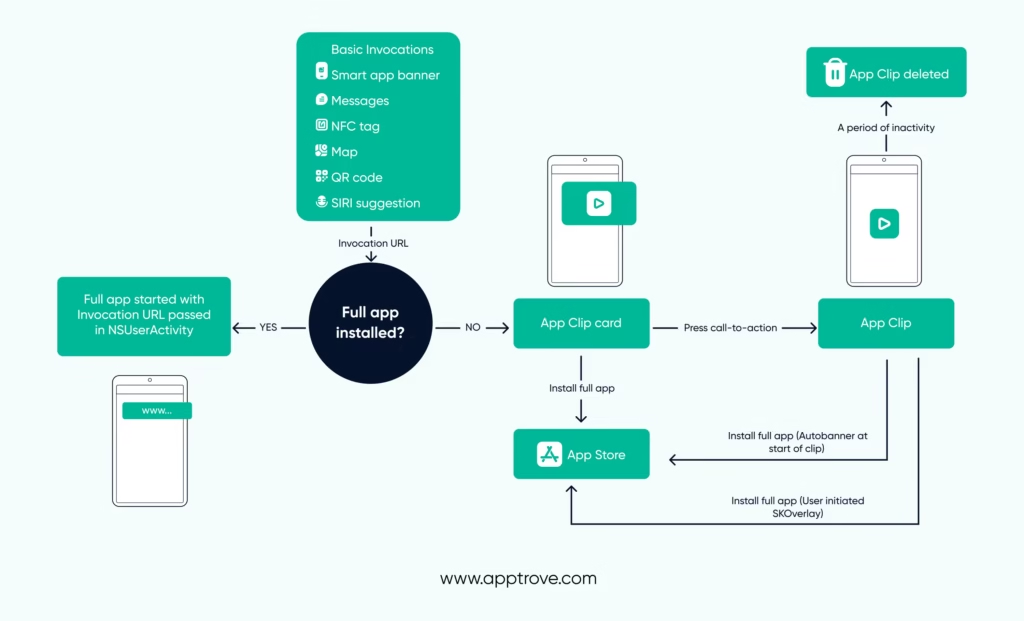
App Clip life cycle: the stages when a user interacts with an App Clip and can be switched to full use in various ways.
App Clips begin when a person taps an Invocation.
A very important notion in App Clips is vocations, which we are going to elaborate on in detail.
Suppose that the user tapped an NFC tag, an App Clip Invocation.
The following is what occurs:
- Among other things, the iOS system picks up that the NFC tag is an App Clip Invocation and extracts an Invocation URL.
The Invocation URL matches the set of capabilities to be performed by this Invocation. It will be transferred over to the App Clip along with all the information necessary to redirect the user to the functionality required in servicing the NFC tag. In the event that the app is installed, the app will be opened, and the Invocation URL will be passed through just as it is passed through in a Universal Link flow.
Important to developers: The invocation URL is not reflected in the full app when the user decides to install the full App through the App Clip Card and the App Clip banners. In such types of cases, the user will need to start the invocation once more (scan the QR code or tap the NFC tag). The invocation URL will now be contained in NSUser Activity as described above.
The developer can share the URL of invocation between App Clip and the full app using shared storage.
- The iOS confirms the Invocation URL that is actually valid by reading an Apple-App-Site-Association (AASA) file at the Invocation URL domain. How to set an AASA file is described in detail here.
- When the Invocation URL has been confirmed, the iOS displays a Card Australia Cyber Security App Clip to the person.
Whereas each app can have a single App Clip, developers can designate a number of cards to support various use cases of an experience.
iOS App Clip Experiences
Invocations are not just technical launch pads; they enable the creation of valuable iOS app clip experiences. All invocation is contextual, and a match with the appropriate flow makes it seem almost magical.
Consider the distinction between a universal QR code that redirects you to a generic form, and a QR code that can be scanned and send you to your order in Table 12. That is the difference that such a framework brings.
Apple permits one to craft the app clip use case scenarios that can size each invocation. These are just bespoke flows that you create in App Store Connect, that are linked to a secure URL. They allow you to use their choice of what they see and do, depending on where and how they clicked the clip on.
For example:
- A Maps position can cause a venue check-in.
- A Safari Smart Banner can enable a one-tap purchase of something that is already in a cart.
- NFC tagged products can open up a clip that already contains the item so that it can be purchased.
This is not only convenience, but personalization at the moment of intent.
Apple App Clip Examples
Once you start thinking in terms of experiences, rather than features, these micro-journeys become an effective growth tool. You do not ask users to install your app without seeing it. You are presenting a small portion of value, which is immediate, contextual, and delightful.
Some of the industries where app clips excel incredibly are the following:
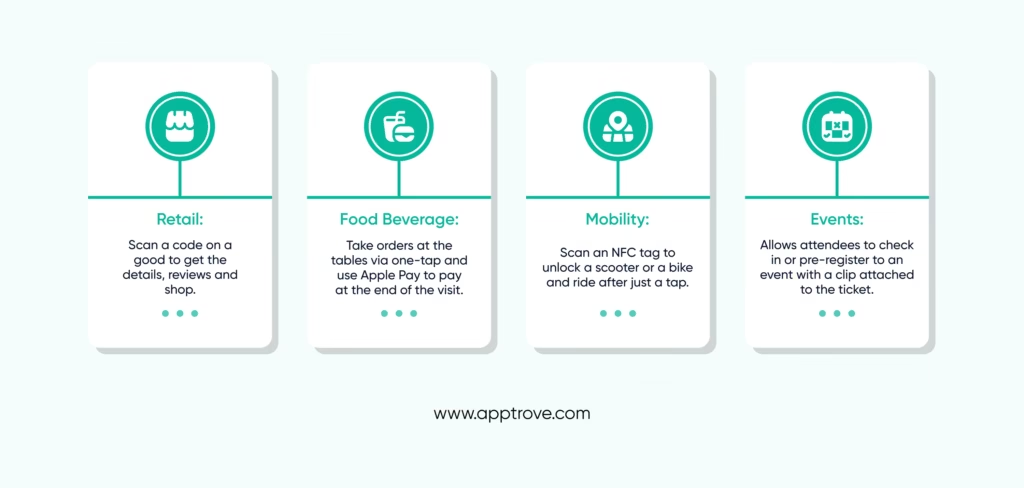
All the examples demonstrate the advantages of Apple App Clips; they make funnels shorter, allow capturing intent, and provide value in immediate situations.
Developing and Setting Up App Clips
On your part, it is less about reinventing and more about the establishment of app clips to emphasize one activity excellently. It is scoped to speed, focused on clarity, and bound to a secure URL.
Main development notes: Quickie-Go-Shop was known by its legal name and had its own physical location. Quickie-Go-Shop operated unlawfully as a typical convenience store. It was not the case of having a convenience store with a restaurant because it constituted a franchise. Quickie-Go-Shop was not a franchise.
- Size limits: The initial size capacity was 10MB; on later releases, the limit has been increased to 15MB and even 50MB. Better practice? spher Eug ninete cases sec realm Make it slim Less loads equal quicker performance and faster speed is your largest selling factor.
- Shared data: Clips can share data with your own app using app groups, so that users do not lose progress when upgrading.
- Security: The serving of app clips is limited to your domain and this is verified by the Apple AASA file, which ensures that app clips are served by none other than you.
- Native Integration: Native Apple Pay, Sign in with Apple, and iCloud Keychain support make things smooth.
When scoped correctly, you’re not just building a “lite” version of your app, you’re designing an instant app experience that drives immediate results.
App Clip Limitations and Privacy
Apple deliberately built limitations to maintain speed and trust. You cannot, and really have no reason to handle them as entire apps.
Key privacy restrictions of app clips:
- No background jobs or constant connecting via Bluetooth.
- No access to frameworks such as HealthKit, HomeKit, or CallKit.
- Automatic deletion 30 days after not being used.
- Strict privacy, no IDFA / IDFV identifiers, minimalist location tracking.
These restrictions are never negative; they are confidence gainers. They ensure that when people utilise your clip, they realise that it is safe, lightweight, and temporary. This is the perception giving them the motivation to do it without any hesitation.
Testing and Optimizing Your App Clips
Testing is important in that they base on triggers at the system level that cannot be simulated effectively. There is a tool available, Local Experiences, offered by Apple that would allow you to simulate invocations before launch.
In order to make it successful, you will have to:
- Check invocation URLs and make sure that their parameters are transmitted properly, such as product IDs.
- Your call-to-action must be clear when it comes to card design.
- Simulate Safari banners, NFC tags, and Maps launches.
Once that’s done, you can roll out with TestFlight to get feedback from beta users.
Testing does not only involve functionality. It is also about performance. Being able to trace the number of individuals who are following a task, those who are clicking through on the complete app button and at which point drop-offs are coming, is what will enable you to facilitate app clip progress. That is how you can use early contacts as an effective acquisition strategy.
Why App Clips Are a Game-Changer for Marketers
The brilliance of this framework is that it goes halfway with users. Rather than the requirement of commitment before value, it turns the funnel around. And those are just the metrics you have some control over in a market where share costs of acquisition are going through the roof.
You are not after cold installs. You are capturing the users when they are at the highest point of intent. Ways you tap and pay for coffee, scan and buy, and unlock a ride are habits you are building in real time.
That results in quantifiable app clip conversion rates, which tend to be significantly higher than traditional app install campaigns. The result is lower CAC, higher retention, and installs that come with built-in value to marketers.
Conclusion: The Here-and-Now
In your world, the second difference may prove whether it was a conversion or not. The clips can put those seconds back in your hands with App Clips as well. They create lowered resistance, enhance purpose, and allow you to demonstrate appreciation before soliciting investment. Your task as an app owner or marketer is to keep the present. This is your weapon to do this precisely.
And with Apptrove, you not only launch but you measure, optimize, and connect these flows to your overall growth strategy. It is how you can transform short-term success into long-term success. The here and now is not coming. It is already present. The only question is, are you prepared to get it?
FAQs
Q1. What are app clips, and why are they important for mobile marketing?
App clips are lightweight versions of apps on iOS that let users access a specific function instantly, without downloading the full app. They reduce install friction and help marketers drive faster conversions and smoother user experiences.
Q2. How do app clips improve user conversion rates?
By removing extra steps like full app downloads or lengthy onboarding, App clips meet users at the exact moment of intent. This instant accessibility increases the likelihood of completed actions, such as sign-ups, payments, or bookings.
Q3. Can app clips replace a full mobile app?
No, App Clips are designed to complement, not replace, your app. They act as an entry point, giving users a quick taste of value. Once users see the benefit, they’re more likely to install the full app.
Q4. What types of businesses can benefit most from app clips?
Retail, food delivery, travel, and event booking brands benefit the most, since they often rely on rapid, intent-driven actions like making a purchase, placing an order, or checking in on the go.
Q5. How can Apptrove help businesses maximize app clip performance?
Apptrove provides in-depth analytics, fraud prevention, and audience segmentation tools that track app clip performance, optimize conversions, and guide marketers in converting one-time users into loyal app customers.