The most common banner ad sizes are 300×250 (medium rectangle), 728×90 (leaderboard), 320×50 (mobile banner), 160×600 (wide skyscraper), and 300×600 (half page). Google Ad Manager lists 728×90, 336×280, 300×250, 300×50 and 160×600 among its top-performing ad sizes. Inside mobile apps, Google’s Mobile Ads SDK supports 320×50, 320×100, and 300×250 on phones. Most networks also cap static banner files at around 150 KB, so banner ad sizes and file weight both need planning before you brief a designer. This guide covers every standard size, where each one fits, and how to find out which size brings in the installs you actually want through user acquisition campaigns.
As of November 23, 2026, the sizes and limits in this guide match the current Google and IAB documentation listed in the sources at the end.
What Are Banner Ad Sizes and Which Ones Are Standard?
Banner ad sizes are the width and height, in pixels, of the image or HTML5 file that fills an ad slot. The publisher or app decides the slot, so your creative has to match it. If the slot is 300×250 and you upload a 300×300 file, the ad either won’t serve or gets scaled and the text goes soft. Inside apps, the rule is stricter. Google’s documentation says the container holding a banner must be at least as large as the ad, and if it can’t fit, the ad isn’t shown at all.
Two groups set the banner ad sizes most advertisers follow. The Interactive Advertising Bureau (IAB) publishes ad unit guidelines, and Google’s platforms (Ad Manager, Google Ads and AdMob) publish the sizes they support. The two lists overlap a lot. The IAB’s newer ad portfolio also describes flexible units defined by aspect ratio instead of fixed pixels, which lets one creative scale across placements. You can read the fixed size rules in the IAB new ad portfolio specification.
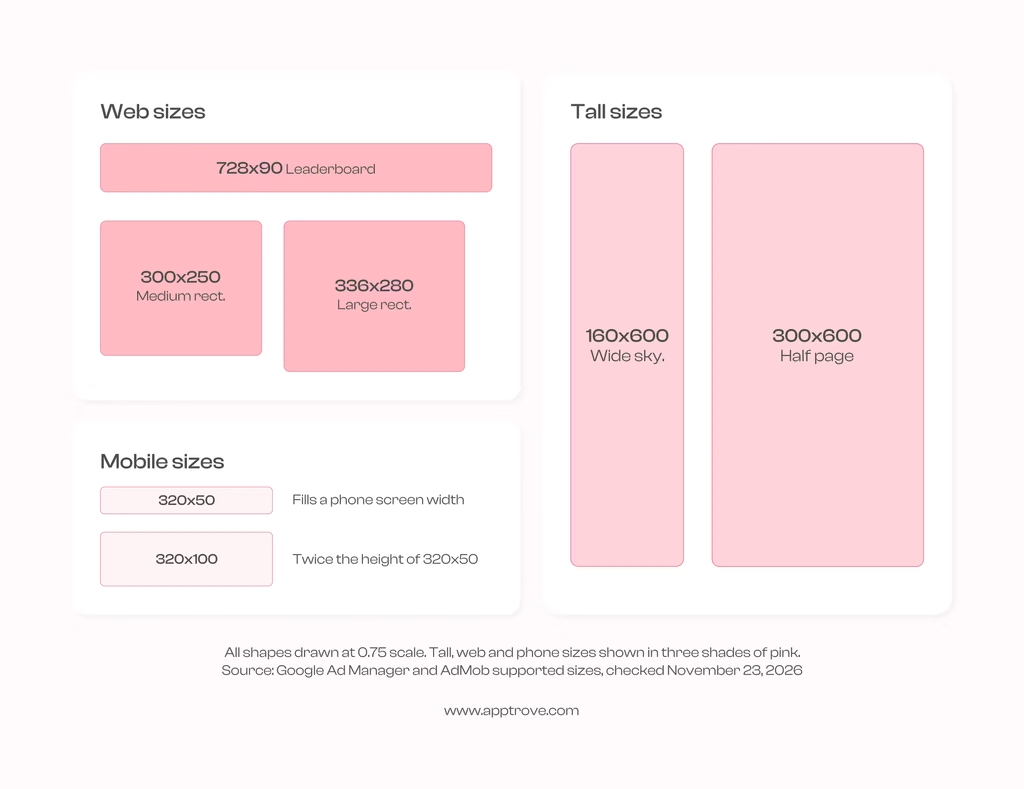
Standard desktop and web banner ad sizes
These are the web banner ad sizes you will run into most often, with the placements Google Ad Manager suggests for each.
| Name | Size (px) | Where it fits best |
| Leaderboard | 728×90 | Above the main content, on forum sites and tablet-optimised pages |
| Medium rectangle | 300×250 | Inside text content or at the end of articles |
| Large rectangle | 336×280 | Inside text content or at the end of articles |
| Wide skyscraper | 160×600 | Along the sidebars of a page |
| Half page | 300×600 | A larger space for brand messages and richer engagement |
| Large leaderboard | 970×90 | Showing video, photos and animation in high definition |
| Billboard | 970×250 | Premium slots, in high demand in preferred deals and private auctions |
| Banner | 468×60 | Smaller spaces where a leaderboard won’t fit |
| Skyscraper | 120×600 | Narrower sidebars than a wide skyscraper allows |
Google describes 300×600 as one of the fastest-growing sizes by impressions, because more publishers now offer visually bigger slots. Sizes such as 234×60, 180×150, 125×125 and 120×240 tend to perform worse according to the same page, mainly because few advertisers buy them. Most teams skip these.
Mobile and in-app banner ad sizes
Phones need narrow, short banners. These mobile banner ad sizes are the fixed ones in Google’s Mobile Ads SDK and Ad Manager, with the devices they cover.
| Name | Size | Devices and notes |
| Banner (mobile leaderboard) | 320×50 | Fills the width of a phone screen, phones and tablets |
| Large banner | 320×100 | Twice the height of a standard mobile banner, phones and tablets |
| Mobile banner | 300×50 | Fits larger phone screens at the top or bottom |
| Medium rectangle | 300×250 | Phones and tablets |
| Full banner | 468×60 | Tablets |
| Leaderboard | 728×90 | Tablets |
The SDK documentation gives these banner ad sizes in dp (density-independent pixels), so export your artwork at 2x to keep it sharp on high-density screens. Google treats adaptive banners as the main option and fixed sizes as the alternative when adaptive banners don’t fit your layout. You can check the full table in the AdMob fixed size banner guide.
Full-screen interstitials are a separate format, but their sizes sit alongside banner ad sizes in the same Ad Manager list: 320×480 for mobile portrait, 480×320 for mobile landscape, 768×1024 for tablet portrait and 1024×768 for tablet landscape.
Checking the footer legend against the rendered output.
Regional banner ad sizes
A few markets favour their own banner ad sizes. Google Ad Manager’s help page lists 980×120 as the most popular size in Sweden and Finland, 950×90 as a top size in China, 930×180 in Denmark, 580×400 in Norway and 240×400 in Russia. It also says 750×200 is used in 53% of ad campaigns in Poland. If you buy media in any of these countries, ask the publisher for its size list before you design.
Image sizes for responsive display ads
With responsive ads you don’t build every one of the banner ad sizes yourself. You upload images and Google assembles the sizes. Google’s best practice guide says you can upload up to 15 images across three aspect ratios (horizontal, square and vertical), and each image can be up to 5120 KB. The recommended landscape image is 1200×628 with a minimum of 600×314, and the recommended square image is 1200×1200 with a minimum of 300×300. Google’s help center also notes that Display campaigns are moving to Demand Gen, so check which campaign type your account uses before you export assets. The responsive display ads best practices page has the latest numbers.
How Do You Choose the Right Banner Ad Size for Your Campaign?
There isn’t one best size. The right pick depends on where the ad will appear, which device sees it, and how much file weight the network allows. Here is how to work through it.
Start with the placement
Ask where the banner will actually sit, because placement narrows the list of banner ad sizes quickly. Sidebars suit 160×600 and 300×600. Inside article text, 300×250 and 336×280 are the usual choices. The top of a page takes 728×90 on desktop and 320×50 on phones. Full-screen moments, such as a pause between game levels, call for an interstitial size.
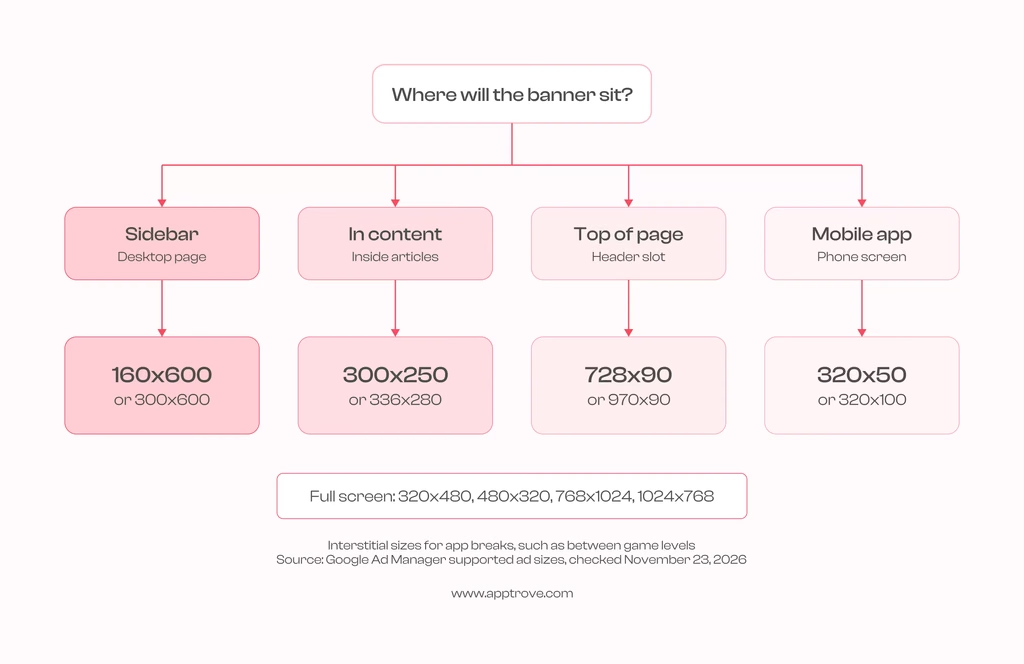
The second infographic follows: a quick flowchart for matching a placement to a banner size.
Match the size to the device
A 728×90 leaderboard is wider than a phone screen, which is why phones get 320×50 or 300×50 instead. A 160×600 skyscraper has the opposite problem, because it works well in a desktop sidebar but has no room on a phone. If your campaign runs on both, plan one set of sizes for desktop and another for mobile instead of stretching a single file.
Keep to the file size limits
File weight is part of banner ad sizes in practice, because every network has a cap. Google Ads accepts uploaded image ads as GIF, JPG or PNG files up to 150 KB. Animated GIFs must run for 30 seconds or less and play slower than 5 frames per second. HTML5 ads go in as a ZIP file of up to 600 KB. These limits are listed in the Google Ads uploaded display ad specifications. Other publishers set their own caps, and some are lower than Google’s, so ask for the spec sheet before you export. A compressed AVIF or optimised PNG usually gets you under the limit without visible loss, though not every network accepts AVIF, so confirm the accepted formats first.
Design for the small space
A 320×50 banner is only 50 pixels tall, so there’s room for one message and one call to action. Put the brand name or logo where it can be read at actual size, use high contrast, and avoid fine print. The simplest check is to view the creative on a real phone at its true size. If you have to squint, cut words.
Build a core set instead of a single size
Networks fill some sizes more easily than others. Ad Manager points out that sizes like 468×60 and 250×250 have limited supply of available ads, which can lead to weaker performance. A sensible starting set for most app campaigns is 300×250, 728×90, 320×50 and 160×600, with 300×600 and 320×100 added when budget allows. That set of banner ad sizes covers the main web and phone placements without a long list of files to maintain.
How Do You Track Which Banner Ad Size Performs Best?
Ad platforms report impressions, clicks and click-through rate for each of your banner ad sizes, and that’s a useful starting point. For an app, though, the question that matters comes after the tap. Small banners pinned to the edge of a screen attract accidental taps, so a size can win on clicks and still lose on installs, retention and purchases. You need post-install data to know which of your banner ad sizes really works.
Here is a simple way to set that up with an attribution platform such as Apptrove, a mobile measurement partner:
- Name the creative with its size. Something like spring-offer-320×50 keeps reports readable later.
- Give each size its own tracking link. Apptrove lets you build link templates and deep linking with Unilinks per campaign and partner, so installs from the 320×50 and the 300×250 show up as separate rows.
- Send the tap to the right screen. A banner that promises a specific offer should open that offer in the app, not the home screen. Dynamic deep links handle this.
- Compare cohorts, not just installs. Use cohort reporting to compare day-1 and day-7 retention and in-app events such as sign-ups or first purchases for each size.
- Filter bad traffic before judging a winner. The fraud prevention settings let you set validation rules for each partner and channel, so suspicious installs don’t make a weak size look strong.
- Move budget to what works. Shift spend toward the sizes with the best retention and event rates, and use audience segmentation to retarget users who tapped but didn’t convert.
If you pay by action instead of by impression, your choice of banner ad sizes also changes your cost. Our guide to CPA vs CPL pricing models explains how each model treats weak clicks, and the comparison of retargeting vs remarketing is useful when your banners are aimed at lapsed users. Teams that run banners inside games can also read about in-game advertising as a channel.
For a look at what unified partner reporting does for an app business, see how SalaryOnTime tracked campaigns across Meta, Google and affiliate networks in the SalaryOnTime case study. If you want to see data for each of your banner ad sizes in one dashboard, you can start a free trial of Apptrove.
FAQs
What is the most common banner ad size?
The 300×250 medium rectangle and the 728×90 leaderboard are the two you will see most often, and both appear on Google Ad Manager’s top-performing list. If you only build one size for the web, 300×250 is a safe start because it fits inside articles and also runs on phones and tablets.
What are the standard mobile banner ad sizes?
The standard mobile banner ad sizes are 320×50, 320×100 and 300×50 for phone screens, plus 300×250 for a larger in-content slot. Tablets can also run 468×60 and 728×90. In-app SDKs these numbers are in dp, so export artwork at 2x.
What is the maximum file size for a banner ad?
It depends on the network. Google Ads allows uploaded image banners up to 150 KB and HTML5 ZIP files up to 600 KB. Other publishers set their own limits, so check the spec sheet for each placement before you finalise files.
Which banner ad sizes does Google Ads support?
Google Ads supports dozens of sizes, including 300×250, 336×280, 728×90, 970×90, 970×250, 160×600, 300×600, 320×50 and 320×100, plus a few regional formats. Responsive display ads adjust to the space available, so you don’t have to upload every size yourself.
Do I need to create every banner ad size?
No. A core set of four to six sizes covers most placements, and responsive ads can fill the gaps. Add more sizes only when a specific publisher or region asks for them.
How do I know which banner ad size is best for app installs?
Run each size with its own tracking link and compare installs, cost per install, retention and in-app events by size. Click-through rate alone can mislead, because accidental taps on small banners inflate clicks without adding real users.