The Meta Threads app has now reached over 500 million monthly active users, establishing itself as one of the most rapidly growing conversation-oriented applications through which companies can communicate with their target audience.
If you’re interested in how to properly use the Meta Threads app for marketing purposes, to put it simply, just create a real profile, post what people want to know more about, participate in the conversations rather than just broadcasting your message, have a proper posting schedule, and measure your work. The app favors companies acting as community members rather than advertisers.
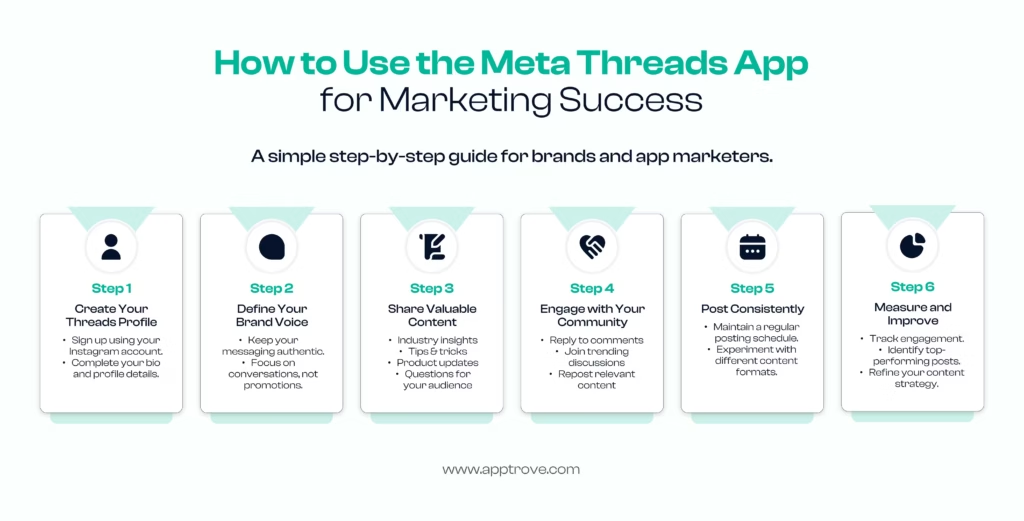
We are going to present 6 actionable steps similar to what’s shown in the infographic below, along with useful pieces of advice, analytics, and answers to the questions commonly asked by marketers before they get started.
Being a mobile attribution company supporting marketers starting from every channel, Apptrove has also acquired knowledge about valuable approaches to Threads that help marketers profit and obtain users, not only likes and shares.
What Is the Meta Threads App and Why Does It Matter for Marketers?
The Meta Threads app is Meta’s text-based communication platform created by Instagram’s team and associated with Instagram. Since it launched, it has developed from being an alternative to Twitter/X into a full marketing platform. As regards Meta Threads app’s performance, it is a phenomenal success that was recorded at 500 million active users as of June 2026.
Marketers know that it is important not only how many people use the app but what kind of format it has. Being built with a focus on replies, quotes, and Communities, Threads is more about participation than interruptions. Besides, Threads is more conversational than Instagram.
How Does Threads Compare to X (Twitter) for Marketers?
Although the two different platforms appear to be alike in that they both feature short text messages that can be seen in a scrollable feed, how users engage with the two is different. According to a study by Business of Apps, Threads is picking up momentum with regards to its active user base in comparison to X. With this rise in numbers, Threads is slowly overtaking X due to a decrease in the number of daily users of X. In the case of businesses, this change means that Threads is not merely a backup tool as audiences are using it more than before.
Why Should Brands Add the Meta Threads App to Their Social Strategy?
Adding the Meta Threads app to your channel mix is a good idea for various solid reasons:
Early-brand takeover: Threads hasn’t developed as many brands compared to people who use both Instagram and Facebook; therefore, good accounts win attention much faster.
High engagement level and low production cost: Since the posts are text-based, Threads doesn’t need such investments in video production like Reels and TikTok.
Improved audience transfer: Thanks to the connection of Threads and Instagram, brands can transfer their existing audience just by a few clicks.
Community-first approach: Threads has already launched the Community feature that will allow brands to enter community-related information easily.
Direct communication with customers: The app enables customers to communicate with the brand in direct reply mode.
When you build your social media marketing strategy, Threads should be considered as an independent social media act that should not be confused with what has been done on Instagram.
How to Use the Meta Threads App for Marketing Success (6-Step Guide)
Follow these six steps in order the first time you use the Meta Threads app for marketing; after that, steps 3 through 6 become your ongoing routine.
Step 1: Create Your Threads Profile
You can join the Meta Threads app easily by using your existing Instagram account; this will allow you to transfer your account name, profile picture, and followers without delay. Once you are on board, fill out all the information about your bio: the main function of your brand, the link to your website (if necessary), and the profile photo that should correspond with your other accounts.
Step 2: Define Your Brand Voice
Before doing anything on this app, it is necessary to determine your brand’s voice on the platform. As their algorithm favors genuineness, try to make your posts sound like a real person rather than a company doing business. Aim at initiating conversations, not advertising.
Step 3: Share Valuable Content
Regular content that adds value is what transforms on-lookers into loyal fans and customers. An effective content strategy that works for Threads involves:
- Insights and current developments from your industry
- Advice and hacks that can be put to use without delay
- News concerning your products and anecdotes from behind the curtain
- Questions that make your audience respond
Switch between these categories now and then so as not to have a feed with a limited set of posts.
Step 4: Engage With Your Community
Threads is created for two-way conversation, and Communities make that easier than ever now that the feature has graduated out of beta. It has become really easy to stick to this principle in action. Reply to the comments promptly, join popular conversations in your area and share information published by users and partners that is suitable for your brand/page.
Step 5: Post Consistently
Establish a reasonable schedule for creating and releasing content that you can maintain over time. Regular content output lets your followers and the Threads algorithm know they can depend on you. Now is your chance to be creative and experiment with a combination of different message styles including long and short text posts, images, polls, and quotations. Try to determine what type of content your particular audience prefers, and then keep using it.
Step 6: Analyze and Improve
Track engagement levels including replies, reposts, saves, and visits to your profile, and find out which of your posts give the best results. Use this information to ensure that you keep on producing successful content rather than create posts that are completely random. Make sure you capture the data on Threads traffic and installations as well as tie it back to mobile attribution reports using an MMP such as Apptrove if you are also running a paid campaign along with organic “Threads for business.”
What Are the Best Practices for Threads Marketing in 2026?
Beyond the six core steps, a few tactics can sharpen any Threads marketing strategy:
1. Utilize Communities: The Community Hub is a feature allowing users to find interest-based communities and join those pertinent to their business interests instead of just posting on feeds.
2. Adhere to “Your Algo” and “Dear Algo”: By utilizing Meta’s personalization mechanisms, users can indicate what they want to be presented with more or less on the platform. For instance, valuable posts will stand out against boring and promotional posts that fail to pass through the filters.
3. Apply Live Chats: With the use of Live Chats spreading to many communities, they can be helpful in various occasions including new product launches and events.
4. Promotion without duplication: Feel free to apply your Instagram ideas again, but ensure that your materials are reformatted in a way suitable for the text-first and comments-driven audience.
5. Monitor migration from Instagram: As your audience migration happens through Instagram, ensure to review how much of your growth can be attributed to new users on Threads and how much was taken from the Instagram audience.
These practices work best as part of a larger strategy; see our breakdown of what the top apps do differently for how leading brands sequence channels like Threads alongside paid and lifecycle marketing.
How Apptrove Helps You Track Threads-Driven App Growth
Posting regularly on the Meta Threads app is just part of the process; the other part consists of confirming whether the app actually encourages installing and making a profit with the app. Here is where mobile measurement partners (MMP), such as Apptrove, come to help.
1. Enhanced Attribution. Apptrove enables connecting the clicks that come from Thread bio links, quote-posts or promotions to the real app installs and in-app events; therefore, the marketing strategy in Threads will coexist with your paid and organic sources in the same dashboard rather than occupying a different spreadsheet.
2. Social traffic deep linking. Apptrove’s Unilinks technology ensures that a customer who clicks on a link in the Meta Threads app is successfully directed to a particular in-app destination: a promo or a product page, rather than being dropped on a random app store entry.
3. Data reporting in real-time. Thanks to Apptrove’s data reporting, marketers stop waiting for monthly reports; they can see how effective the Threads post, Live chat, or Community mention is on the same day.
4. Protection from fraud. As soon as the traffic on Threads grows, the multi-layer fraud detection from Apptrove will help filter all of the bot clicks and irrelevant installs.
How Can You Measure Threads Marketing Success?
With Threads, proceed as you would with any other platform or channel and set KPIs before uploading any content. At a minimum, make sure you keep tabs on:
- Engagement: replies, reshares, and quotes per follower
- Follower growth percent change: from the previous week or weeks.
- CTR: clicks on any links in the bio or post.
- Conversions: app installations, public sign-ups, or purchases directly coming from Threads traffic.
If your goal is app installs specifically, connect your Threads clicks to the rest of your mobile app marketing funnel, so you understand where Threads visitors disappear in comparison with your other channels, and combine it with a defined app marketing plan so Threads is not working in isolation from the rest of your growth engine.
Final Thoughts
Meta Threads has grown from its initial perception as just another “Twitter alternative”; boasting more than 500 million users on a monthly basis and also having the best Communities and unique personalization methods, it requires a separate strategy for maximizing its potential. Start by ensuring that you have your profile set up completely, working on establishing a truly human brand voice, and following the six measures described above: creating your profile, establishing your voice, content creation, engagement with your audience, consistency and measurements.
This approach will help turn Threads into one of the lowest-cost and high-engagement marketing channels available to you. Since the app has significant potential but will require a lot of work, you can use new practices in mobile marketing.
FAQs
Is the Meta Threads app good for business marketing?
Yes. With 500 million monthly active users and a conversation-first format, the Meta Threads app gives businesses low-cost access to an engaged, fast-growing audience, especially for brands willing to post consistently and reply to their community.
Do I need an Instagram account to use the Meta Threads app?
Yes, currently you need an Instagram account to sign up, since your Threads profile is linked to your Instagram identity and can import your existing followers.
How often should brands post on the Meta Threads app?
Most successful Threads app for business accounts post at least once a day, mixing original insights, questions, and replies. What matters more than frequency is consistency; an irregular schedule performs worse than a modest but reliable one.
What’s the difference between Threads and Instagram for marketing?
Instagram is built around polished visual content; the Instagram Threads app is built around fast, text-first conversation. Brands typically use Instagram for visual storytelling and the Meta Threads app for real-time discussion, community building, and customer interaction.
What are Threads Communities, and should brands join them?
Communities are topic-based groups inside Threads, now out of beta with their own icons and a dedicated Communities Hub. Brands should join or contribute to communities relevant to their niche, since this is where much of Threads’ current engagement growth is concentrated.
Can I run paid ads on the Meta Threads app?
Meta has been expanding advertising options across its platforms; check Meta’s official newsroom for the latest availability in your region, since ad rollouts vary by market and change frequently.
How do I measure ROI from a Threads marketing strategy?
Track engagement metrics inside the app alongside downstream actions- clicks, sign-ups, or installs- using an attribution setup like the one described in our mobile attribution guide, so Threads activity ties back to real business outcomes, not just vanity metrics.