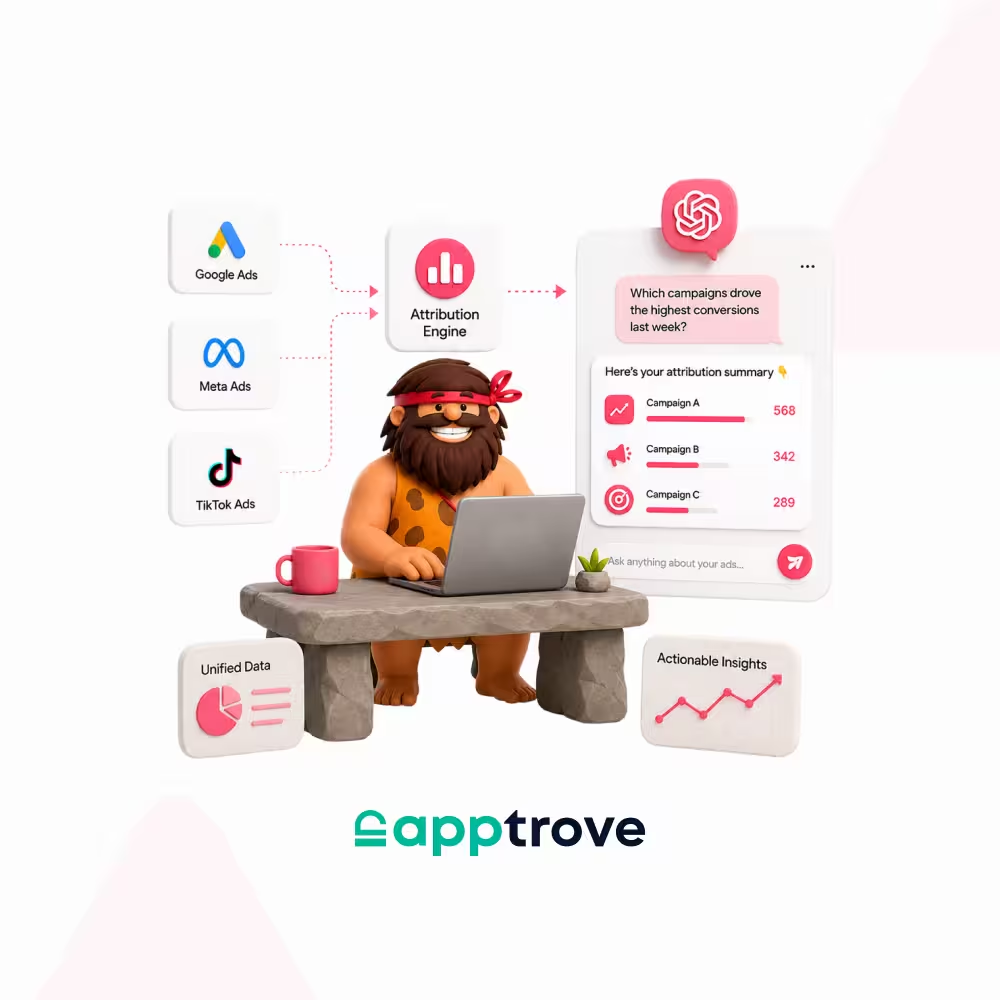
If you are using ChatGPT Ads to run an ad campaign or are considering doing so, then the most important question to ask is not whether you generated clicks with your ads, but whether you can demonstrate that those clicks resulted in revenue and installs. Attribution for ChatGPT ads refers to the ability to connect whatever engagement happened via your ad campaign on the OpenAI ChatGPT Ads interface with tangible results from the user’s point of view, using models from OpenAI and, if you’re running an app-centric business, a mobile measurement partner (MMP). Within this guide, you will understand what ChatGPT Ads is, what attribution means in the current world, the key role of mobile measurement technology, and how Apptrove MCP lets you query it conversationally from Claude, ChatGPT, or Cursor instead of a dashboard. Everything below is sourced directly from OpenAI’s own documentation and Apptrove’s developer docs; linked throughout and listed in full at the end.
What is ChatGPT Ads?
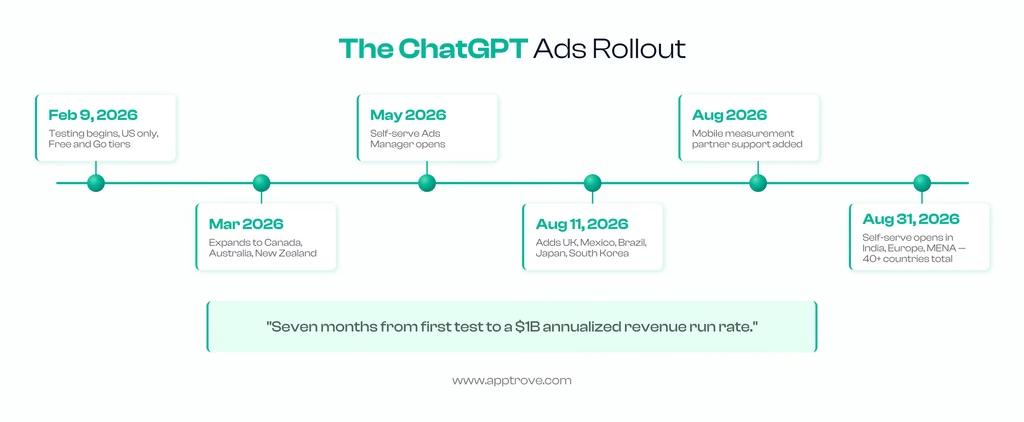
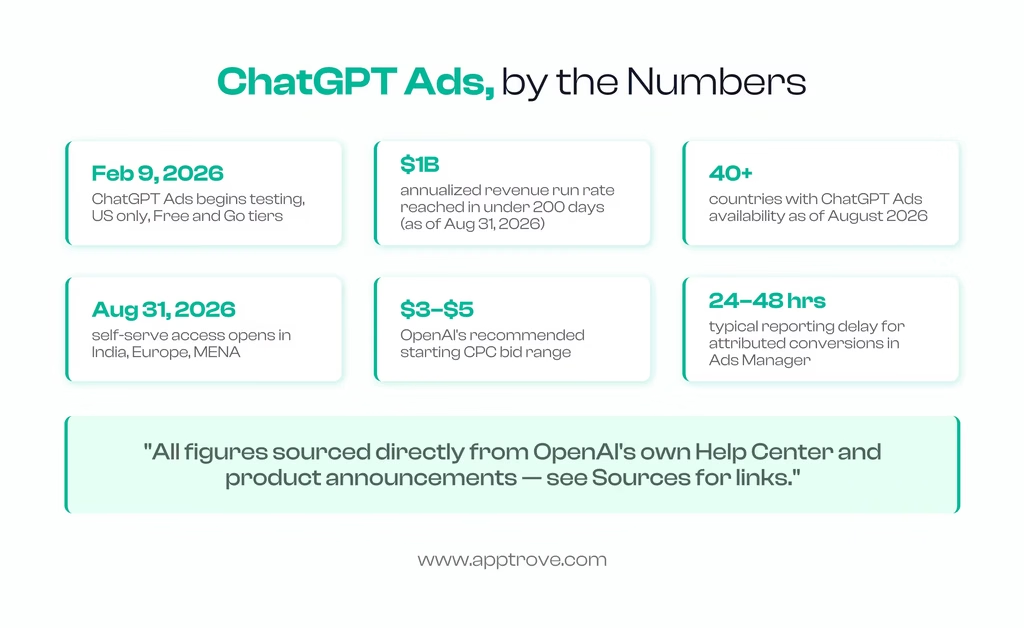
OpenAI’s advertising platform for displaying sponsored cards within ChatGPT conversations is called ChatGPT Ads. Testing started on February 9, 2026 in the US and self-serve was opened up to all in May 2026 (no minimum spend commitment necessary to run a campaign on your own).
How ChatGPT Ads Work?
Ad format: Ads are clearly labeled and visually distinct from a ChatGPT response, always placed below the response, not in it. There should be no doubt, according to OpenAI, that ads don’t change the answer ChatGPT provides.
Who sees them: Only Free and Go tier users see ads. Oh, and there are no ads on Plus, Pro, Business, Enterprise, and Education levels.
Targeting: Unlike traditional cross-web tracking (third-party cookies), is based on the topic of the conversation at the moment and the history of the conversation with ChatGPT. Advertisers are never given raw content of conversations.
Buying model: Advertisers set a CPM (Reach) or CPC (Clicks) objective with ChatGPT Ads Manager, the self-serve advertising platform, and bid in a second-price, relevance-weighted auction. CPC recommends that you start with a bid of $3 to $5 per click.
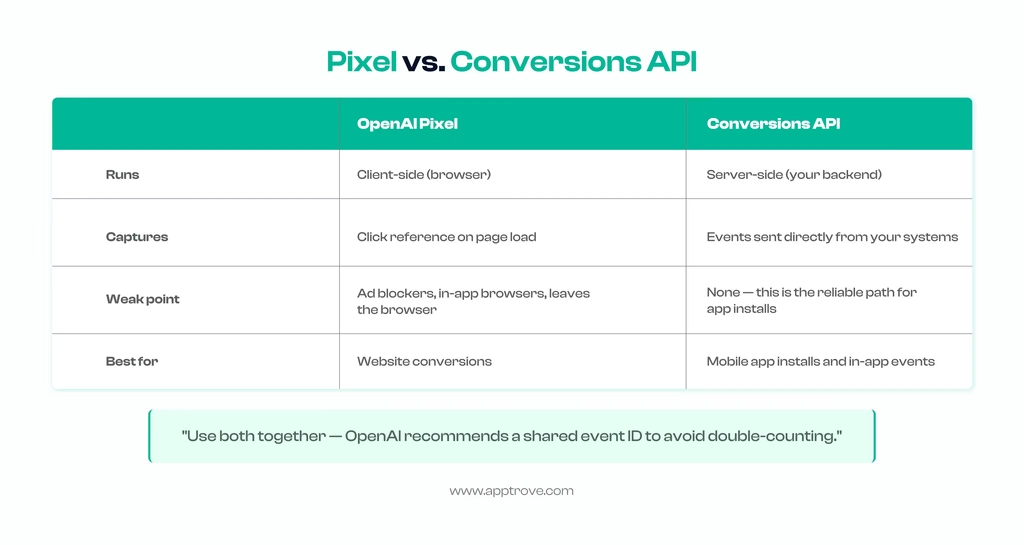
Measurement: Tracked in two ways: OpenAI Pixel (browser-side) and Conversions API (server-side, for sending events from your backend). This is particularly important for mobile app installs, where a browser pixel can’t track what happens after a user leaves the browser.
Rollout: Live in 40+ countries, starting in the US and expanding to Canada/Australia/NZ in March 2026, then to the UK/Mexico/Brazil/Japan/South Korea by August 11, 2026 and to India/ Europe/ MENA on August 31, 2026. OpenAI’s revenue run rate is $1B a year, as per the company, and it achieved that milestone in just 200 days after launch.
(See OpenAI’s own announcement for the primary source on all of the above.)
Why Mobile Apps Are Becoming Central to ChatGPT Ads
The majority of initial reports about ChatGPT Ads were centered on web conversions; Leads, purchases, registrations. However, a significant portion of the fastest moving advertisers into the self-serve rollout are app-first businesses like food delivery, travel booking, fintech and subscription products. That is what tracks, once you consider the type of discussion somebody has inside ChatGPT prior to seeing a sponsored card. Users asking for restaurant advice, or comparing budgeting apps, or looking up a booking site, are exhibiting the type of high intent, decision-making behavior that mobile UA teams have been working hard for years to be able to segment from more noisy traffic channels like broad social feeds.
That’s also why it seemed like a glaring omission for the first few months of the platform’s existence that it wasn’t supported by mobile measurement partners. A successful campaign with a lot of clicks and engagement within Ads Manager for an app-first advertiser might have no supported way to prove that those clicks resulted in an install, let alone a subscriber. Web-only conversion tracking doesn’t show up when a user clicks out of the browser to check out the app store listing. This closing of the gap wasn’t a choice if OpenAI were to increase app-install budgets on the platform to any meaningful extent, and that’s why measurement-partner support was one of the biggest watched ChatGPT Ads product updates this year.
What Is ChatGPT Ads Attribution?
It enables OpenAI and, as it is used by you, your own analytics to correlate an ad click with the subsequent action, whether that’s a website conversion, a lead, or, in the case of businesses built primarily for mobile apps, an install and the ensuing in-app interactions.
The OpenAI Pixel: A browser-side tag that collects OpenAI’s click reference and returns events to Ads Manager.
The Conversions API: A server-side approach to sending the same or additional conversion events directly from your backend (which is generally the best place to send conversions after a user steps outside of the browser, such as to install a mobile app).
Advertisers can also add common UTM parameters to the URLs of their landing pages, and existing analytics tools will continue to track traffic to ChatGPT Ads. Attributed conversions are conversions that are seen in the Conversions metric found in Ads Manager, usually within 24-48 hours.
What this means in reality: While this is a relatively small set compared to more mature channels, OpenAI’s reporting in Ads Manager Beta does cover impressions, clicks, spend, CTR, average CPC, average CPM and conversions. If you have a mobile app in your product, none of that native reporting will be able to see what happens once a user leaves the browser to download the app. The mobile measurement partners were created to fill that void and it is the thread between the first half of this guide and the second half.
How Attribution for ChatGPT Ads Actually Works
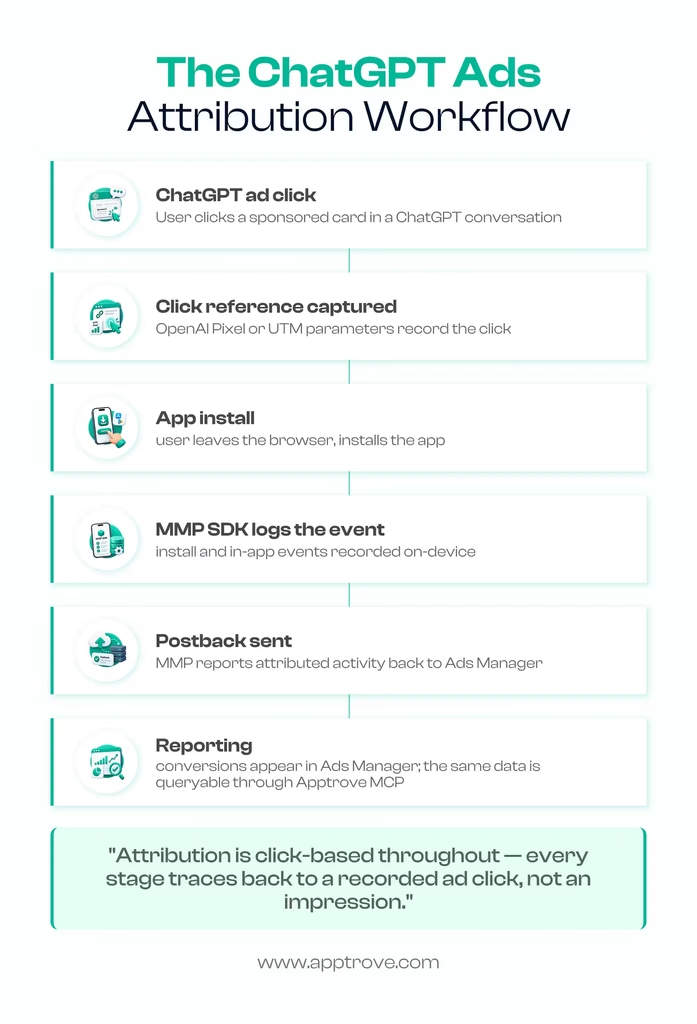
Attribution is click-based. An install or conversion must trace back to a recorded click; OpenAI does not explain a view-through attribution model for this channel today.
Pricing follows a familiar auction model. In ChatGPT Ads Manager, both CPM (Reach objective) and CPC (Clicks objective) buying are supported, chosen via a relevance-weighted, second-price auction. According to OpenAI’s official guidelines on CPC campaigns, the maximum bid is $3–$5 per click. When comparing ChatGPT Ads prices to others, this is a baseline, but actual clearing prices can fluctuate based on the category and competition, so please use OpenAI’s Help Center for the latest numbers, not this estimate.
The most basic is UTM tagging. Prior to setting up a pixel or API-based measurement, tagging landing pages with standard UTM parameters allows your current measurement stack (GA4, your BI tool, or your MMP dashboard) to take credit for ChatGPT Ads as a traffic source.
Server-side measurement is the true measure that remains after app install. A browser pixel can’t see when a user exits the browser and downloads an app from the App Store or Play Store and then launches it. That chain is measured through an app-side SDK that will report the install and other events to the system that’s taking the action of reporting back the attribution measurement, which is the job of a mobile measurement partner.
Quick Glossary: Key Terms in This Guide
A few terms come up repeatedly across this guide; here’s a fast reference if you want the short version of any of them before reading the full section:
- ChatGPT Ads; OpenAI’s advertising platform, offered by a self-service ChatGPT Ads Manager, which allows ads to be displayed under ChatGPT responses.
- ChatGPT Ads measurement; the process of linking a visit to a ChatGPT ad to a downstream action, which includes using OpenAI’s Pixel, Conversions API, and (for apps) a mobile measurement partner.
- Mobile measurement partner (MMP); a neutral third party that attributes app installs and events to the channel that drove them. Full definition in our MMP glossary entry.
- Postback; sending a signal from an MMP once it has attributed an install or event to an ad network’s click. Learn about what a postback is.
- Deep linking / attribution link; Link used to direct and attribute a click to an install that is specific to a campaign. See What Is Deep Linking?
- Model Context Protocol (MCP); open standard, developed by Anthropic, model context protocol (MCP) is a protocol that allows AI assistants to interact with various external tools and data sources via a common interface.
- MCP server; the piece of infrastructure (like Apptrove MCP) that exposes a vendor’s tools and data to an MCP-compatible AI client.
- SKAN (SKAdNetwork); Apple’s privacy-preserving attribution system, which is the closest approximation to iOS channel measurement at this point that you’ll find. Read our SKAN explainer.
What Is a Mobile Measurement Partner (MMP) & Why Does It Matter for ChatGPT Ads and Its Attribution?
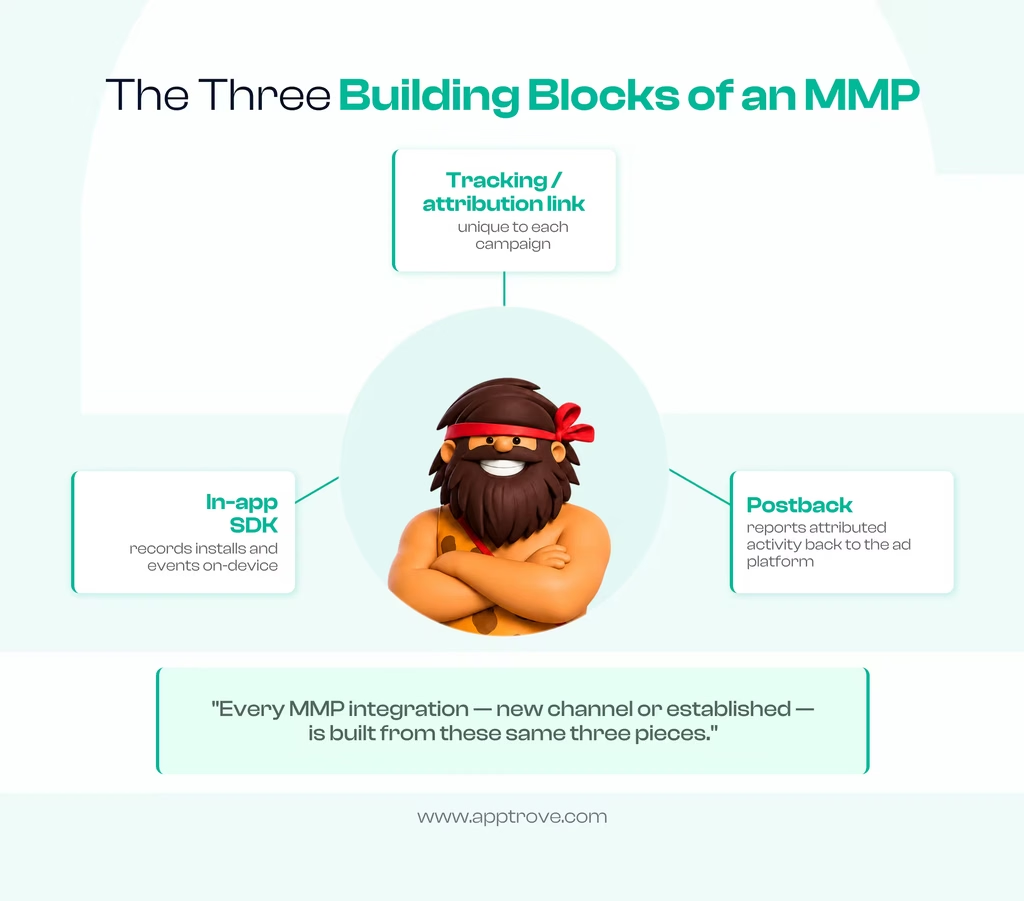
A mobile measurement partner is a third-party company that links app installs and in-app events to the marketing channel that actually brought them, regardless of which ad networks an advertiser uses simultaneously; Google, Meta, or newer channels, like ChatGPT Ads. If there is no one, all ad networks can take their own credit for that install, and there is no single and deduplicated source of truth. The mechanics it uses are the same on every network, and it’s the exact same mechanics we talked about in our mobile marketing glossary: a tracking or attribution link specific to each campaign, an sdk in the app which records installs and events, and a postback which sends attributed activity back to the ad platform for optimization and reporting.
Current MMP support for ChatGPT Ads
OpenAI’s own Help Center documentation currently says that, as of this writing, ChatGPT Ads has integrations with a limited number of mobile measurement partners to attribute app installs and in-app events. This feature was added by OpenAI in early August 2026. For most integrations, the process is the same: enable the partner within Ads Manager, get an Ads Manager Pixel ID and Conversions API key from the Conversions tab, choose the in-app events you want to map to the OpenAI taxonomy, and use the resulting attribution link as your campaign destination. Supported partners and precise steps for setting them up are found in OpenAI’s official measurement partner documentation, which will likely grow over time, and which is the best place to find the most current and up-to-date list than any third-party list (including this one).
A few things worth knowing regardless of which MMP you’re on:
- iOS measurement leans on modeling, not deterministic tracking. Realistic iOS measurement is not deterministic last click but a combination of SKAdNetwork postbacks and modeled incrementality – this is a key signal for iOS-heavy verticals, not a nice-to-have.
- SDK version matters more than usual on a new channel. It is even more important on a new channel to have the right SDK version. The most ubiquitous reason for misattribution on any new ad surface is an outdated SDK build that silently logs the ChatGPT install as an organic install without any error message being found anywhere.
- Preserve the click reference through every redirect. If you’re using the click parameter provided by OpenAI or your MMP’s attribution link, or if you use a redirect chain or a pesky URL shortener that removes query parameters, the relationship between click and install will be broken without your knowledge.
- Reporting windows and event mapping live in your measurement partner, not in Ads Manager. OpenAI’s own docs make it abundantly clear that attribution window times and what events are passed are in the MMP settings, and not in Ads Manager itself; if a conversion is not appearing as you want it to, the answer is almost always the settings of your MMP, not Ads Manager.
Where Apptrove Fits Today
To put it plainly, don’t take it for granted that a specific technical workflow is active for the ChatGPT Ads measurement options – as of this writing, confirm with the Apptrove integrations team. What’s true, and consistent across every MMP: the underlying mechanics — a dedicated attribution link, an in-app SDK, event tracking, and fraud detection — are the same infrastructure Apptrove already runs for every other network, including channels configured manually and not via a pre-built badge, as Google Ads campaigns can be configured in Apptrove.
When running or setting up a mobile app pixel-equivalent tracking, postback configuration, event mapping, the best approach is to consult your Apptrove account team directly, instead of assuming it’s done as you imagine.
Creating a ChatGPT Ads Measurement Practical Checklist: Step-by-Step Guide
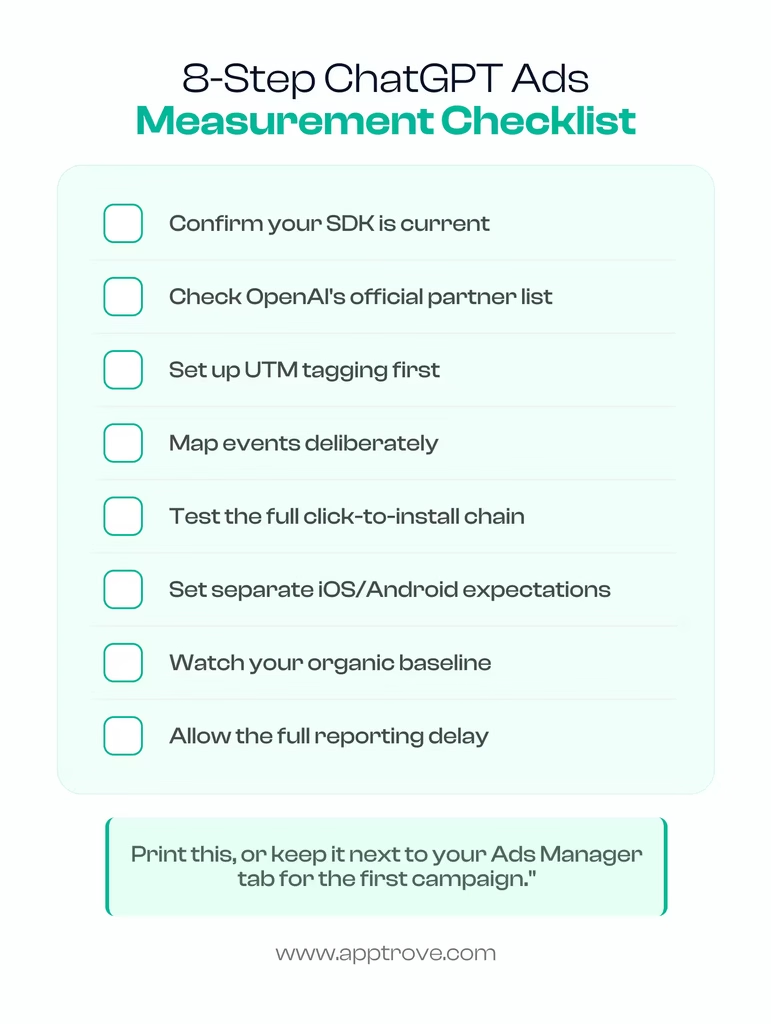
Confirm your SDK is Current
Regardless of which MMP you use. This is the most typical place of hidden failure on any new channel – an old SDK that was last updated a long time ago might not be able to identify a new integration at all, and there are no error messages to indicate it.
Check OpenAI’s Official Documentation
Check the official documentation of OpenAI for the current list of supported measurement partners and exact setup requirements before assuming your existing MMP setup transfers automatically. New-channel documentation changes quickly in the first months after launch.
Set Up UTM Tagging First
Set up UTM tagging even before deeper integration; this is the quickest way to view ChatGPT Ads as a separate source in your current analytics stack, and it doesn’t require you to have a pixel or Conversions API measurement fully set up yet.
Map Events Deliberately
Track registration, trial start, subscription, purchase; not just installs; so you can eventually optimize toward outcomes that matter, not volume. You will always find that an install-only view of a new channel is better looking than it is able to perform.
Test the Full Click-to-Install Chain
Test the full click-to-install chain before you invest real money, meaning test to see if any step is removing the click reference – which is done in the case of redirects or link shortening. This is a 5-minute test that will detect the most frequent setup error.
Set Separate Expectations for Android & iOS
Set separate expectations for iOS and Android, because of the SKAN-based modelling reality on iOS; read our explainer on SKAdNetwork for how it works.
Look Out for Organic Baseline
Watch your organic baseline. If the “organic” installs increase around the same time as a ChatGPT Ads flight, it’s likely it’s an attribution issue rather than a viral moment; cross-check periodically.
Allow Full Reporting Delay Before Final Judgement
Allow the full reporting delay before judging a campaign. Conversions reporting in Ads Manager is reported 24-48 hours after the conversion happens, which means it’s always incomplete data; don’t pause a campaign on incomplete data.
Common Attribution Pitfalls With ChatGPT Ads
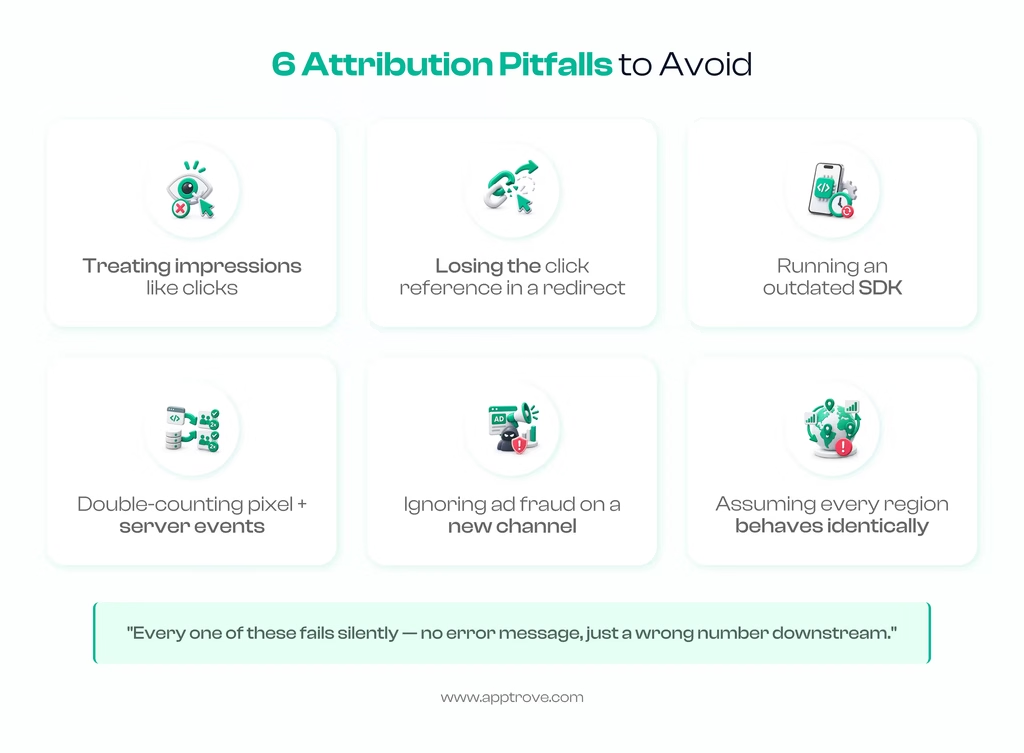
A few mistakes are worth calling out directly, since they show up repeatedly across early implementation guidance:
Treating impressions like clicks. Attribution for ChatGPT ads today is click-based, per OpenAI’s own documentation. If your internal reporting assumes any credit for view-through activity the way some display or CTV channels allow, you’ll overstate the channel’s contribution.
Losing the click reference in a redirect. Whether it’s OpenAI’s own click parameter or your MMP’s attribution link, a shortened link, a redirect chain, or an aggressive tagging tool that strips query parameters will silently break attribution. Test the full chain, end to end, before spending real budget.
Running an outdated SDK. This is the quiet killer of mobile attribution generally, and it’s worse on a brand-new channel: an old SDK build simply won’t recognize a new integration, and installs get bucketed as organic instead of ChatGPT Ads-driven, with no error message anywhere.
Double-counting across pixel and server-side events. If you’re sending the same conversion through both the browser Pixel and the Conversions API without a shared event identifier, you will inflate your own numbers and then make a media-spend decision based on the inflated figure.
Ignoring ad fraud because the channel is new. New ad platforms are not exempt from click injection or click flooding, or install fraud; if anything, less mature fraud tooling on the platform side makes early adoption a more attractive target, not a safer one. Keep your MMP’s fraud detection layer active on this channel exactly as you would anywhere else.
Assuming every region behaves identically. ChatGPT Ads has expanded market by market; the US in February 2026, Canada/Australia/New Zealand in March, the UK/Mexico/Brazil/Japan/South Korea by August 11, and India/Europe/MENA on August 31. If you manage multi-region campaigns, don’t extrapolate one market’s attribution behavior to a market where the platform only just went live.
ChatGPT Ads Measurement vs. Established Channels
| ChatGPT Ads | Search / Display (established players) | |
| Attribution basis | Click-based, as documented today | Click-based, plus modeled conversions |
| Reporting maturity | Early; a compact native metric set as of mid-2026 | Mature, granular |
| Mobile measurement partner support | Select partners, added August 2026 | Broad, long-established MMP ecosystem |
| Targeting signal | Conversation topic + ChatGPT history | Search intent / audience & behavioral signals |
| iOS measurement | SKAN-based postbacks + modeling | SKAN + modeled conversions |
| Regional availability | Expanding market by market since Feb 2026 | Broadly global for years |
The practical takeaway: don’t compare raw engagement metrics from ChatGPT Ads against a mature channel as if they mean the same thing. Use MMP-attributed installs and downstream events as your actual comparison point, and expect the reporting maturity gap to narrow as the platform’s measurement ecosystem grows.
Best Practices for Measuring ChatGPT Ads ROI
Anchor to downstream events, not just installs. An install is the easiest thing to measure and the least useful thing to optimize toward in isolation. Map trial starts, subscriptions, and purchases from day one so your reporting, and eventually a tool like Apptrove MCP, can answer the question that actually matters: is this channel profitable, not just active.
Treat early ChatGPT Ads data as directional. Attribution windows and measurement methodology are still evolving on OpenAI’s side. Build in a margin of error rather than making binary kill/scale decisions off week-one numbers, especially in a newly launched market like India.
Reconcile against your organic baseline regularly. Because this is a new channel with an evolving measurement stack on the platform side, a periodic sanity check against your pre-ChatGPT-Ads organic install trend is one of the cheapest fraud and misattribution checks available.
Keep your event taxonomy consistent across channels. If subscription_created means something different in your ChatGPT Ads event mapping than it does in your Google Ads or Meta event setup, every blended report you build afterward will be wrong in a way that’s hard to spot.
Revisit measurement-partner support periodically. Coverage for this channel is expanding, not fixed; mobile measurement partner support didn’t exist at all before August 2026. Check back with your MMP and with OpenAI’s own documentation rather than assuming today’s setup options are permanent.
ChatGPT Ads in India: What’s Confirmed So Far
So far, here are the confirmed facts about ChatGPT Ads in India. Here are the known facts about ChatGPT Ads in India.
It’s too early not to highlight India’s mobile app market by itself. In fact, the self-serve access to ChatGPT Ads in India, which is part of the same rollout launched in Europe, the Middle East, and North Africa on August 31, 2026, is now also available, as OpenAI states in its own announcement. This means that Indian advertisers are now eligible to sign up using the existing self-serve ChatGPT Ads Manager, instead of having to wait for a managed-sales or agency-led rollout. In addition to the launch date and the inclusion of the product in the market, beyond this point, OpenAI’s public documents do not detail specific performance, adoption, or pricing benchmarks for India, so treat any such figure, regardless of where it comes from, with the same skepticism you would when viewing any other unverified claim, and check its own Help Center for anything specific before planning your budget around it.
If you are a marketer who is based in India and is testing this channel: The mechanics are the same as detailed throughout this guide, and so are the click-based attribution, Pixel, the Conversions API, and mobile measurement partner support. The real new thing is that the door is now open without a need to start a relationship with an agency or managed-sales program. As with any new market, don’t be surprised to see some initial documentation and reporting over the coming months, not all done on day one, as OpenAI did in the US, UK, and other markets before India.
From Attribution Data to Answers: Why MCP Matters Here
All of the above gets you attribution data flowing; installs and events from ChatGPT Ads are attributed to and report with all other channels you run, deduplicated. The obvious next question is what type of data will you be using it for on a daily basis? In the past, this would involve opening the dashboard, filtering for a week’s worth of data, and exporting a report every time someone asked, “How’s the ChatGPT Ads doing this week?”.In the old days, that would mean opening the dashboard, applying a date filter, and exporting a report every time someone asked, “How’s the ChatGPT Ads doing this week?” That’s the workflow gap that is filled by Model Context Protocol (MCP) and Apptrove’s implementation of it.
What Is MCP (Model Context Protocol)?
MCP (Model Context Protocol) is an open standard developed by Anthropic in November 2024 that allows AI tools such as Claude, ChatGPT, or Cursor to seamlessly access external tools and data sources. Prior to MCP, each AI-powered application that sought to communicate with, for instance, your analytics platform required a bespoke, one-off integration. Instead of this broken strategy, MCP offers a unified standard: any vendor creates a single server containing their data and tools in a consistent manner, and any MCP-compatible AI client can access it without any special coding on either side.
Here’s one of the helpful analogies that Anthropic has coined for it: MCP is like a USB-C port for AI apps. Where USB-C allows you to connect very different devices with one standard connection, Model Context Protocol allows very different data sources and tools to be connected with one standard connection.
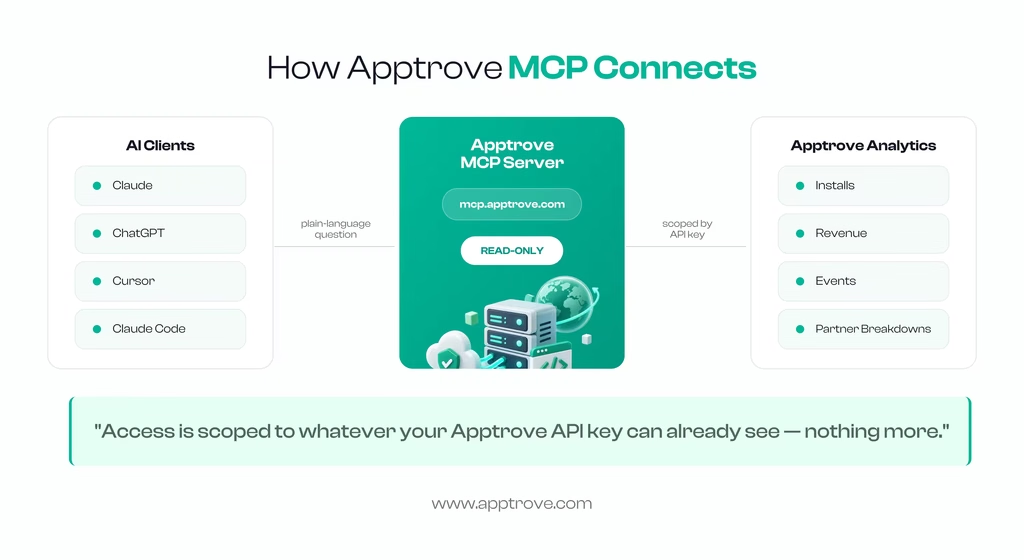
An MCP server is the part of the infrastructure that provides an AI client with a specific set of tools and data. Once you add one, such as Apptrove’s, the AI assistant you are using can summon those tools for you, within the same conversation you are engaged in. You ask a simple question in natural language, and the assistant queries the server directly and provides you with the answer, without having to open a dashboard, filter by date and export a CSV. This is why the category is actually now attracting more and more search demand around it: MCP isn’t a standard just for developers anymore, and “what is MCP” is a question that non-technical marketing teams are asking as well; more analytics platforms are shipping their own MCP servers.
Why MCP in AI Tooling Matters for Marketers Specifically
MCP’s greater movement is larger than any one ad platform. As AI agents become more a part of the daily marketing workflow, from planning campaigns to drafting briefs to monitoring performance, the tools that make data accessible to the agents are as important as the dashboards that used to be the only way to see it. The concept behind Model Context Protocol (MCP): No more having to integrate one-off solutions with every analytics platform; vendors will have one common point to build upon, and the AI agent will have one consistent way to discover and call the tools on offer.
For attribution, it’s a workflow gap that’s been with MMPs since their inception: questions marketers really care about asking: “how did this campaign do?; An MCP server is the one that enables an AI agent to respond directly to those questions from the source data rather than from a stoned out export or a screenshot. It doesn’t matter if you’re interested in a Google Ads campaign or a Meta placement or a newer channel, like ChatGPT Ads; the reporting layer is the same: ask a question, get a number and ask the follow up question.
Introducing Apptrove MCP
Apptrove has added support for MCP, users can connect their Apptrove account through a custom connector and retrieve the reports and log data directly from Claude, ChatGPT, Cursor, or Claude Code, without navigating the Apptrove dashboard; installs, revenue, events and breakdowns per partner. It can respond to questions regarding your existing data, but you cannot alter campaign settings, edit attribution rules, or modify anything in your account. Access is limited to that which is visible to your Apptrove API key, so if someone with fewer permissions in the dashboard can only see part of it, they will only be able to see part of it in the AI client.
The two parts of this guide are now connected: When you have Attribution for ChatGPT ads using an MMP, as described above, Apptrove MCP is how you actually query the data conversationally without having to build a custom dashboard filter each time you want to understand performance. Any reference to a workflow in this guide has its own corresponding How-to-Hub for step-by-step help in setting up that workflow.
What You Need to Connect
- An Apptrove account with an active API key (generated from the MMP API settings).
- One of: Claude.ai, Cursor, Claude Code, or ChatGPT.
Connecting Apptrove MCP in Claude.ai
- In a Claude chat, click +, then Add connector, then Browse connectors.
- Search AppTrove inside the connectors directory and open the AppTrove card.
- Click Connect, or go directly to the Claude AppTrove connector page.
- Paste your Apptrove API key, optionally set a Default App ID, and click Authorize.
- Confirm the connector is toggled on under Connectors.
- Optionally, set tool permissions to Always allow under Settings → Connectors → AppTrove if you’d rather not approve each individual query.
- On your first question, Claude will ask permission to use an AppTrove tool; choose Allow once or Always allow.
Connecting in Cursor or Claude Code
For Claude Code, add the server directly via the CLI:
claude mcp add-json apptrove ‘{
“type”: “http”,
“url”: “https://mcp.apptrove.com/mcp”,
“headers”: { “Authorization”: “Bearer YOUR_API_KEY” }
}’
For Cursor, add the equivalent block to ~/.cursor/mcp.json:
{
“mcpServers”: {
“apptrove”: {
“url”: “https://mcp.apptrove.com/mcp”,
“headers”: { “Authorization”: “Bearer YOUR_API_KEY” }
}
}
}
You can optionally add an x-app-id header to scope every query to a single app by default. As with any API credential, don’t commit your key to a shared repository. Full setup steps are also maintained in Apptrove’s developer documentation.
What Can You Ask Apptrove MCP?
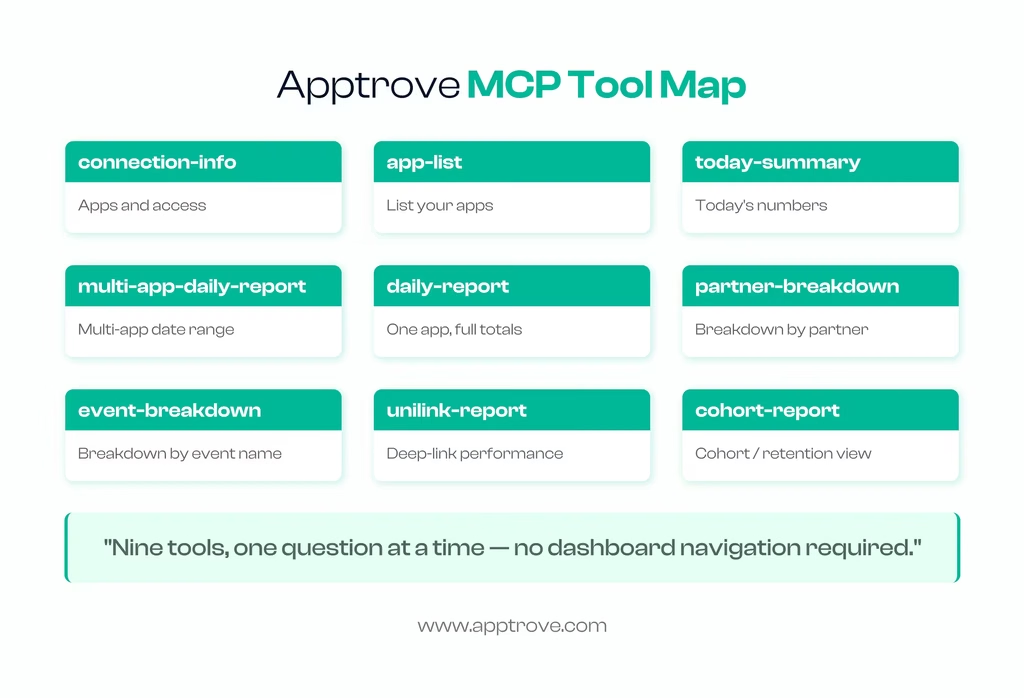
Apptrove MCP exposes a defined set of tools, each mapped to a specific reporting need:
| Need | Tool |
| Apps and access | connection-info, app-list |
| Today’s numbers | today-summary |
| Multi-app date range | multi-app-daily-report |
| One app, full totals | daily-report |
| Breakdown by partner | partner-breakdown |
| Breakdown by event name | event-breakdown |
| UniLink / deep-link performance | unilink-report |
| Dashboard-level metrics | dashboard-stats |
| Cohort / retention view | cohort-report |
Applied to the attribution for ChatGPT ads setup covered earlier in this guide, that turns into questions like:
- “What are my dashboard insights for today?”
- “Give me a partner breakdown for the last 7 days.”
- “Pull the daily report for [app ID] between 2026-08-01 and 2026-08-31.”
- “What are my top in-app events this week?”
- “Show me the UniLink report for [app ID]”; useful for checking whether deferred deep links are routing users correctly post-install.
This is conversational, so you can follow up with the same thread, “now break that down by day instead of by week”, how you would with any of your colleagues who already has the dashboard open. You can also combine questions across channels in one thread; for instance, asking for a partner breakdown and then following up with “how does that compare to last month”; since the assistant retains the context of your conversation, not just the single query.
Privacy and Data Handling
If it’s worth saying, it’s because this is the new concept of a dashboard logon as opposed to a normal one; from that moment on, the data remains the responsibility of the AI client you use, not Apptrove, as soon as you switch to read-only analysis from Apptrove MCP. Apptrove does not control the storage, retention or use of chat content that occurs after a Claude, ChatGPT, or Cursor tool result is delivered. If you’re pulling anything sensitive, check Anthropic’s privacy policy, OpenAI’s privacy policy or Cursor’s privacy policy depending on who you’ve connected the client with. If you have any questions about how Apptrove handles your data, please refer to the Apptrove Privacy Policy.
Troubleshooting
| Issue | Fix |
| Can’t connect | Recheck the API key on the authorize screen |
| No apps listed | Ask the assistant for connection info; access depends on your role and org |
| UniLink shows 0 | Explicitly ask for unilink-report rather than relying on a summary view |
| Constant permission prompts | Set tool access to Always allow in connector settings |
Closing the Loop: ChatGPT Ads Measurement + Apptrove MCP
You launch a campaign with ChatGPT Ads, use the Attribution Model that you have outlined above, and follow it up with confirmation from Apptrove’s team regarding what is currently supported for this channel. Installs and in-app events are captured as any other channel you run. Then, rather than exporting a report or creating a new dashboard view, you open Claude or ChatGPT, ask Apptrove MCP for a partner breakdown or daily report, and get a direct, conversational answer about how ChatGPT Ads is performing against everything else you’re running: Google, Meta, and any other channel in your stack.
That combination — real attribution infrastructure underneath, a conversational query layer on top — is a genuinely useful pairing for any team managing more than one paid channel, whether or not ChatGPT Ads is part of the mix yet. The mechanics don’t change based on which channel you’re checking on: the same partner-breakdown question that surfaces ChatGPT Ads performance works identically for Google, Meta, or any other network already flowing through your Apptrove setup.
Where This Is Headed
There are two things true at the same time about this space right now, and it’s worth holding both: First, the attribution space is still evolving, and ChatGPT Ads, as a self-serve platform, is only a few months old, and mobile measurement partner support is just a month old, at the time of this writing. As with all other channels in their first year, reporting will continue to be completed, more markets will become available and measurement will continue to grow. Second, the direction is already obvious: Where all major ad platforms have agreed to a standard, OpenAI is going to what? It’s not as if they were going to come up with something new and unique.
This is great news to those of us putting the pieces together these days for our own measurement stack, as many of the skills and infrastructure shared by Google, Meta, and other channels can be easily moved over.
With that attribution layer coupled with a conversational reporting tool such as Apptrove MCP, the way you work on a day-to-day basis changes more than the mechanics do: No longer do you need to open multiple dashboard tabs for comparison; you ask, and in one sentence, within the same window, you’re already working.
FAQs
What is ChatGPT Ads?
ChatGPT Ads is OpenAI’s advertising platform, run through a self-serve tool called ChatGPT Ads Manager, that lets businesses place sponsored, clearly labeled cards into ChatGPT conversations. It began testing on February 9, 2026, and opened self-serve access in May 2026; since then, it has expanded to more than 40 countries, including India as of August 31, 2026.
What is ChatGPT Ads & its attribution?
ChatGPT Ads measurement is the process of connecting a click on a ChatGPT ad to a downstream outcome: a website conversion or, for app-first businesses, an install and subsequent in-app events, using OpenAI’s Pixel, its Conversions API, and, where an app is involved, a mobile measurement partner.
Is attribution for ChatGPT ads click-based or view-based?
Click-based, per OpenAI’s own documentation. Conversions and installs need to trace back to a recorded ad click.
What is a mobile measurement partner (MMP)?
A neutral third-party platform that attributes app installs and in-app events to the marketing channel that actually drove them, across every ad network an advertiser runs. See our full MMP glossary for more detail.
Does ChatGPT Ads support mobile measurement partners today?
Yes; OpenAI added support for a select number of measurement partners in early August 2026. Check OpenAI’s official documentation for the current, authoritative list rather than relying on any third-party summary.
What is MCP (Model Context Protocol)?
MCP is an open standard, introduced by Anthropic in November 2024, that lets AI assistants connect directly to external tools and data sources through a standard interface, instead of needing a custom integration for every tool.
What is Apptrove MCP?
Apptrove MCP is Apptrove’s own MCP server, letting you query your Apptrove analytics — installs, revenue, events, and partner breakdowns — directly from Claude, ChatGPT, Cursor, or Claude Code. It’s read-only and scoped to your existing API key permissions.
Can Apptrove MCP change my campaign settings or attribution rules?
No. It’s explicitly read-only; it can answer questions about existing data but cannot modify campaigns, events, or attribution configuration.